

WP Synchro – The Ultimate WordPress Migration Tool
v1.16.2WP Synchro · 2018年7月10日 上架
WordPress migration plugin to easily migrate, clone, backup, and synchronize your WordPress site, including database, media, plugins, themes, and file …
- 正在使用
- 1,000+
- 评分
- 5.0 / 5
- 累计下载
- 8.4 万
- 最近更新
- 2026年11月1日
贡献者
 WP Synchro
截图
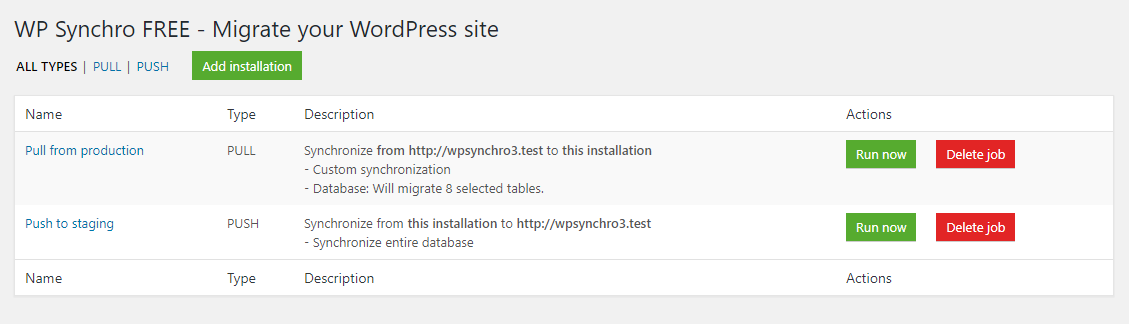

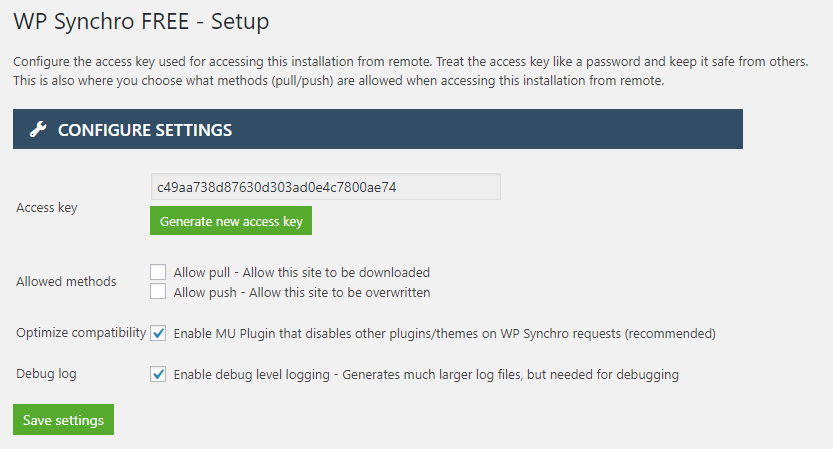

WP Synchro is the ultimate WordPress migration plugin for professionals and agencies.
Easily migrate, clone, backup, and synchronize your WordPress site, including database, media, plugins, themes, and custom files. WP Synchro is designed for fast, secure, and customizable migrations between local, staging, and production environments.
Key Features (Free):
* One-click WordPress database migration (pull/push)
* Search/replace in database data (supports serialized data)
* Handles migration of database table prefixes between sites
* Database backup before migration
* Select specific database tables or migrate all
* Automatic cache clearing after migration for popular cache plugins
* Secure, encrypted data transfer – no third-party servers
* Set up once, run multiple times – perfect for development, staging, and production
PRO Features:
* File migration: media, plugins, themes, custom files/folders
* Only migrate changed files for faster sync
* User confirmation before making file changes
* Customize migrations down to a single file or folder
* Support for basic authentication (.htaccess)
* Email notifications on migration success or failure
* WP CLI command for scheduled migrations (cron)
* 14-day free trial for PRO features
Typical Use Cases:
* Move or clone WordPress sites between servers or hosts
* Push local development or staging sites to production
* Pull a copy of a live site for debugging or development
* Keep staging and production in sync
* Back up your WordPress site
Quick Start
- Install WP Synchro on both source and destination WordPress sites.
- Activate the plugin via the Plugins menu.
- Create a new migration job in WP Synchro.
- Select what to migrate: database, files, or both.
- Run the migration and watch your site move!
- Rerun the same migration anytime with one click.
Support & Documentation
For detailed documentation and support, visit WP Synchro Documentation.