

WPFrom Email
v1.9.7Manny Rodrigues · 2019年7月25日 上架
Replaces default WordPress sender FROM Name and Email Address. NEW admin email options.
- 正在使用
- 600+
- 评分
- 5.0 / 5
- 累计下载
- 1.7 万
- 最近更新
- 2026年1月5日
 WP Gear Pro
 Manny Rodrigues
截图
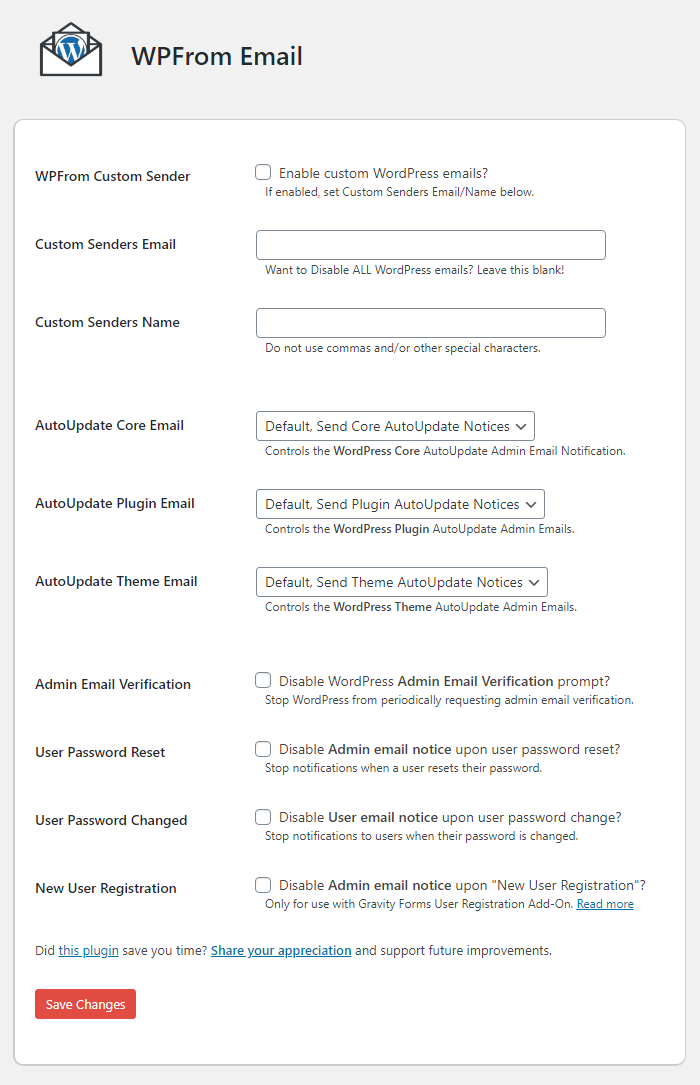
Introducing WPFrom Email, a free WordPress Plugin aimed at helping you quickly and easily update the default WordPress sender FROM Name and Email Address.
To increase brand authenticity and create name recognition among your visitors it is recommended update how WordPress sends out emails to your subscribers. Leaving the WordPress email sending settings in their default state may even result in email delivery issues. This is because the default wordpress@ emails usually trigger Internet Service Providers and end user email spam filters.
Using this plugin you can also disable the admin email notification upon New User Registration (only tested against Gravity Forms User Registration Addon). This disables two email notifications. First the user notification email which the user receives upon registration with a link to set their password. Secondly, the admin notification email which the site admin receives upon new user registration: “New User Registration”. You won’t be able to use the option to email the new user their auto-generated password since that email is now disabled. Rather, you will have to create a Gravity Forms notification within your form to send the user the password setup email.
Toggle WordPress AutoUpdate Email Notifications for the WordPress Core, Plugins or Themes. Or choose to have email notifications sent only if there was an error.
Did this plugin save you time? Share your appreciation and support future improvements.
Features
- Toggle to replace the default WordPress FROM Name and Email Address.
- Disable Admin email notices of WordPress Core Autoupdates or Send Only on Error.
- Disable Admin email notices of Autoupdated Plugins or Send Only on Error.
- Disable Admin email notices of Autoupdated Themes or Send Only on Error.
- Disable Admin email verification prompt.
- Disable Admin email notification upon user password reset.
- Disable User email notification upon user password change.
- Disable Admin email notification upon New User Registration (Gravity Forms only).
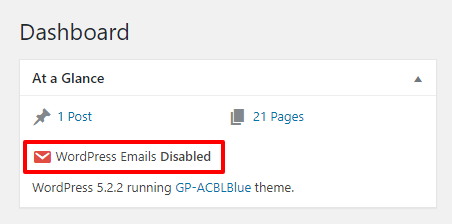
- Disable ALL WordPress emails by leaving the Senders Email field blank.
- Notice of Disabled WordPress emails within Dashboard At A Glance metabox.
- Upon deactivation, all associated database values are removed.