

WP Widget Clipboard – Duplicate widgets intuitively
v1.2.15owlwpplugins · 2018年9月28日 上架
Duplicate multiple widgets by drag & drop.
- 正在使用
- 700+
- 评分
- 5.0 / 5
- 累计下载
- 1 万
- 最近更新
- 2019年11月28日
5 条评价需要 WordPress 3.3+已测试到 5.3.28
贡献者
 owlwpplugins
截图

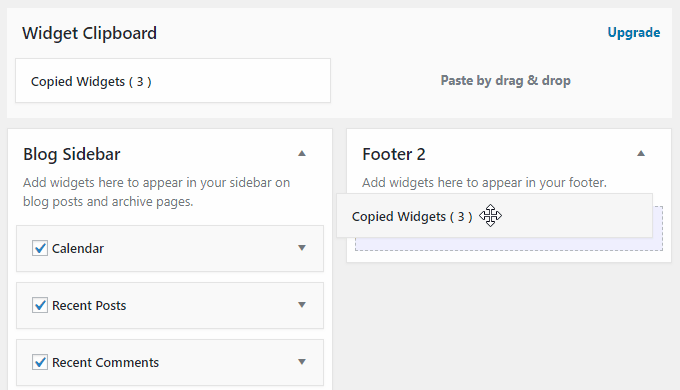
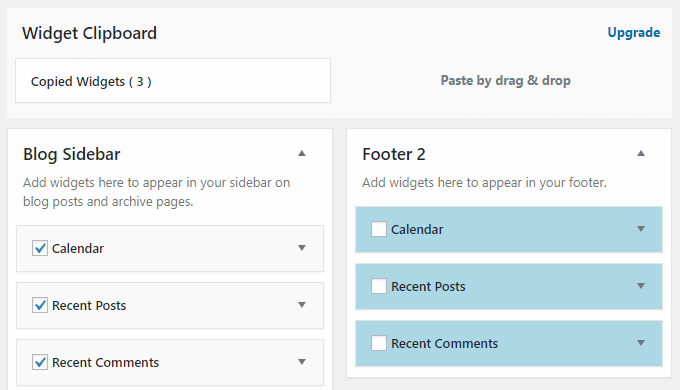
Duplicate multiple widgets by drag & drop. so you can intuitively copy and paste widgets.
It is hard to copy widgets one by one manually. Using this plugin makes duplicating widgets very easy.
Widgets duplication procedure is the following :
- Select multiple widgets you want to copy.
- Then drag and drop “Coied Widget” which in clipboard to any position.
- Selected widgets is duplicated at that location.
Or, you can duplicate widgets individually.
For more detailed usage, install this plugin and read usage manual by opening “Settings” -> “WP Widget Clipboard” from the menu.