

WPSponsorship
v1.0.1xbenx · 2015年7月27日 上架
This is the core of the "Sponsorship" software. This allows blog users to send E-mails to a list of contacts of their choice.
- 正在使用
- 10+
- 评分
- 5.0 / 5
- 累计下载
- 2,229
- 最近更新
- 2015年8月2日
 thomasB5
 Boluge
 xbenx
截图
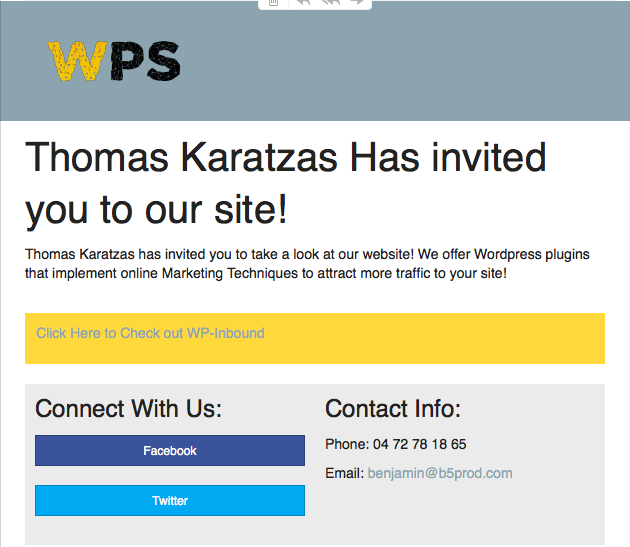
This is the core of the “Sponsorship” software. This allows blog users to send E-mails to a list of contacts of their choice.
The content of the E-mails are controlled by the admin. They can contain links, html, photos etc. For example, by adding a link to an article in the E-mail body you can create a powerful article sharing page where a visitor can share the link with his E-mail contacts. Another example could be to create a small invitations page where the visitor lists the people to invite and the admin customizes the content.
This is meant to be a base to build on! So be creative!
The content in the E-mail follows a pre-built template (Photo in Screenshots tab). The admin has control over the colors, links and text.
If you are interested, we have some extensions we built ourselves at http://www.wp-inbound.com/wpsponsorship/.
Before you get started, you will need an SMTP server. Alternatively, you can use your Gmail account as an SMTP server if you wish. For more information check out this link: https://www.digitalocean.com/community/tutorials/how-to-use-google-s-smtp-server.
Other great SMTP hosts are turboSMTP (http://www.serversmtp.com/) and MANDRILL (https://www.mandrill.com/). Set up is quick, easy and free.