

WP Social Avatar
v1.5Maruti Mohanty · 2014年2月26日 上架
This plugin gives the users the option to use their social profile picture as the WordPress Avatar
- 正在使用
- 200+
- 评分
- 4.3 / 5
- 累计下载
- 1.9 万
- 最近更新
- 2016年6月22日
贡献者
 Maruti Mohanty
截图

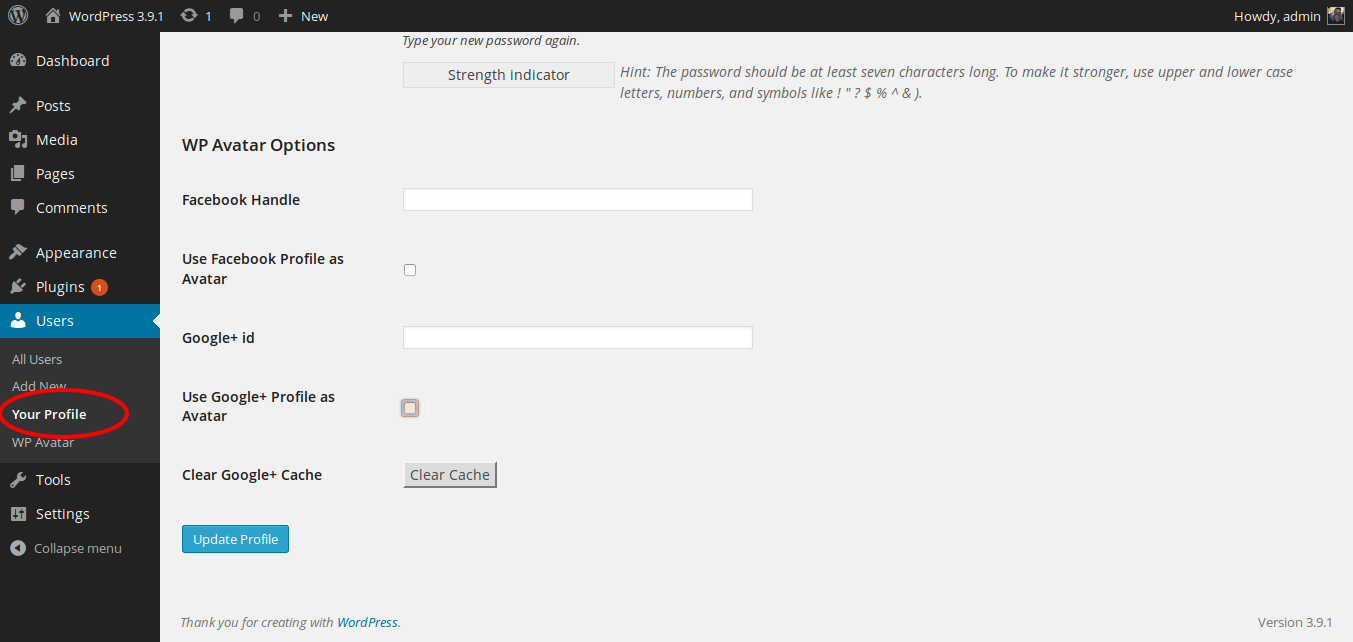
As the name suggests, this plugin allows you to use the social profile picture as your WordPress Avatar.
You can see more, on how to install and use the plugin here in this blog WP Social Avatar
Why this plugin?
If you are me, who gets bore of using the same gravatar for few days or months then this plugin is totally for you.
This plugin provides option to the user to use Social media like Facebook and Google plus profile pictures as the gravatar instead of the one from en.gravatar.com.
WP Social Avatar Settings:
After activating the plugin admin will see WP Avatar, under Users menu. Here the admin can set the minimum role/capabilities required to avail this feature.
The allowed users will see the available options in their Your Profile sub menu under Users menu.
For the first version I only have two social options available, Facebook and Google plus. You need to add either the Facebook user ID(numeric) or Google plus id in the corresponding fields. You can find your facebook user id here
Once done with the above, check the social profile picture you want to use as the gravatar and click Update Profile and you are done.
After saving the profile you can see all the gravatars in the site has been replaced by the respective social media profile picture.
With this you will get rid of the boredom of looking at the same gravatar all the time. With the change in the respective social media profile picture, the gravatar of your site will also change.
With Version 1.4 Cache functionality is implemented for Google Plus avatar, this optimizes the functionality. I have added a clear cache button for Google plus, anytime you upload a new profile picture in your Google Plus account click the “clear cache” button and you will get the latest image else the code will make a request and pull the latest image after every 48 hours. This has been done to make the Google Plus functionality faster.