
WP Rollback – Rollback Plugins and Themes
v3.4.0Devin Walker · 2015年5月12日 上架
Roll back (or forward) any WordPress.org plugin, theme, or block like a boss.
- 正在使用
- 20 万+
- 评分
- 4.9 / 5
- 累计下载
- 523 万
- 最近更新
- 2026年11月11日
 Devin Walker
 Brandon Lavigne
 Matt Cromwell
截图
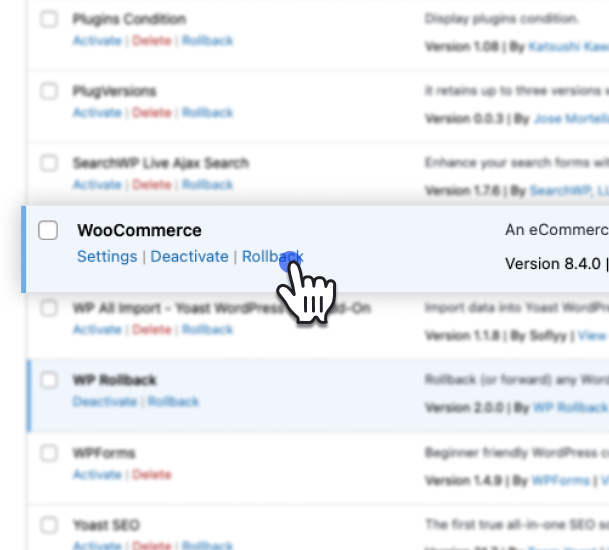
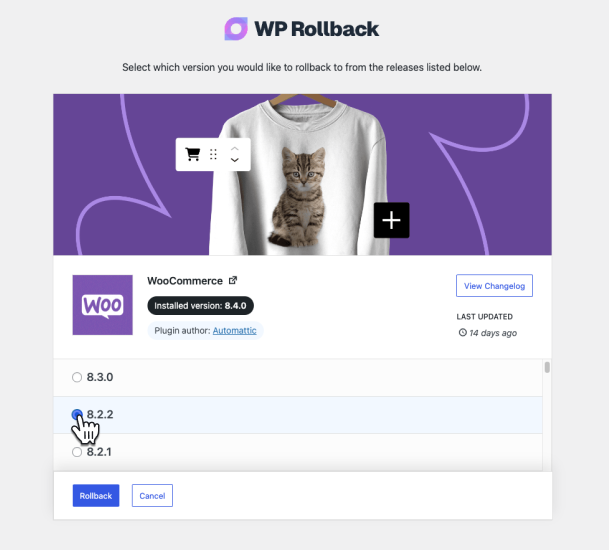
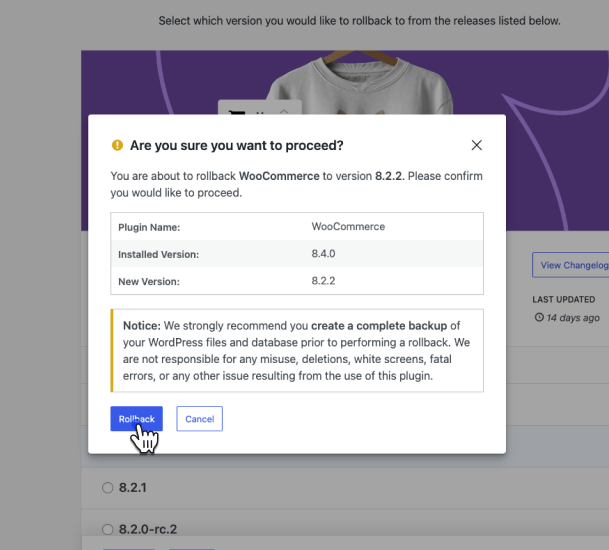
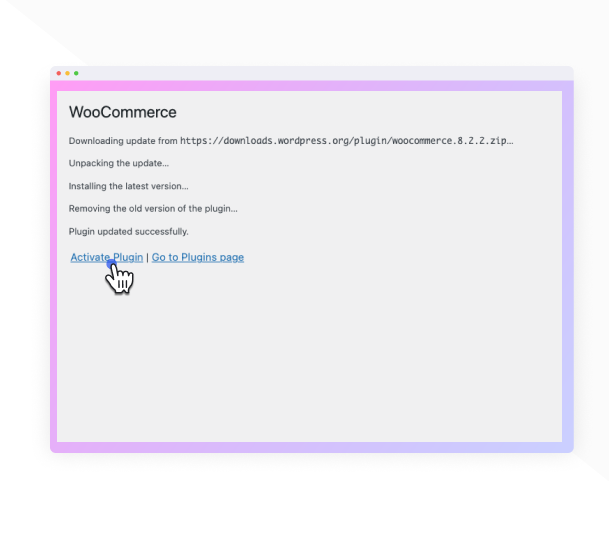
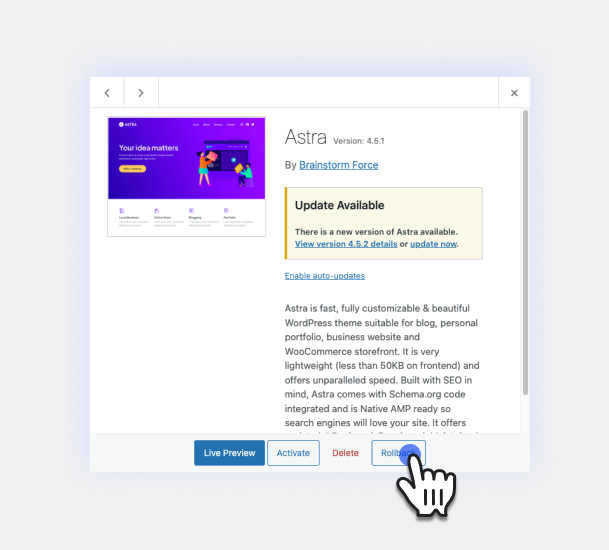
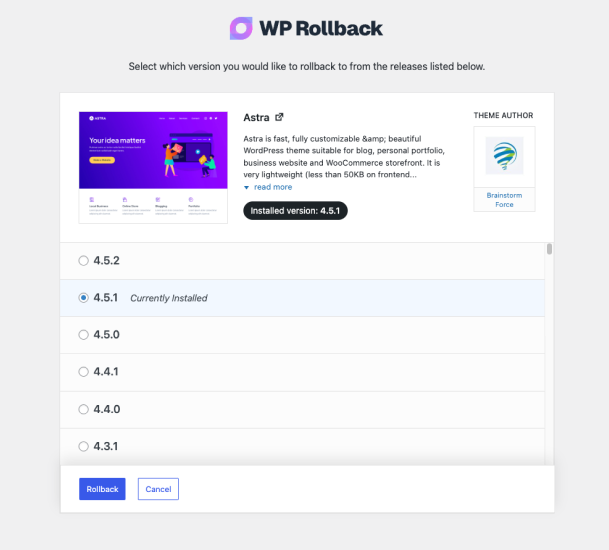
Quickly and easily roll back any theme or plugin from WordPress.org to any previous (or newer) version without any of the manual fuss. Works just like the plugin updater, except you’re rolling back (or forward) to a specific version. No need for manually downloading and FTPing the files or learning Subversion. This plugin takes care of the trouble for you.
🔙 Roll Back WordPress.org Plugins and Themes
While it’s considered best practice to always keep your WordPress plugins and themes updated, we understand there are times you may need to quickly revert to a previous version. This plugin makes that process as easy as a few mouse clicks. Simply select the version of the plugin or theme that you’d like to roll back to, confirm, and in a few moments you’ll be using the version requested. No more fumbling to find the version, downloading, unzipping, FTPing, learning Subversion or hair pulling.
For advanced features including rollback support for premium plugins and themes you already have licensed and installed (Elementor Pro, Gravity Forms, WooCommerce extensions, Kadence Pro, Astra Pro, GeneratePress Premium, Divi, Envato/ThemeForest products, and more), comprehensive activity logging, multisite network management, and priority support, consider upgrading to WP Rollback Pro.
Muy Importante (Very Important): Always Test and Backup
Important Disclaimer: This plugin is not intended to be used without first taking the proper precautions to ensure zero data loss or site downtime. Always be sure you have first tested the rollback on a staging or development site prior to using WP Rollback on a live site.
We provide no (zero) assurances, guarantees, or warranties that the plugin, theme, or WordPress version you are downgrading to will work as you expect. Use this plugin at your own risk.
Translation Ready
Do you speak another language? Want to contribute in a meaningful way to WP Rollback? There’s no better way than to help us translate the plugin. This plugin is translation ready. Simply header over to the WP Rollback translation project that’s powered by WordPress.org volunteer translators. There you can contribute to the translation of the plugin into your language.
Support and Documentation
We answer all free user support requests on the WordPress.org support forum. For pro users, please submit your questions to WP Rollback Pro support.
WP Rollback was created to be as intuitive to the natural WordPress experience as possible. We believe that once you activate WP Rollback, you’ll quickly discover exactly how it works without question.
BUT!!
We do have documentation on our website. See WP Rollback Documentation.
External services
Besides WordPress.org, where it finds plugin and theme versions, WP Rollback connects to two services, and only when you ask it to.
WP Rollback newsletter (wprollback.com)
After a rollback, at the end of the 1-minute tour, and on the WP Rollback dashboard, you can subscribe to the WP Rollback newsletter: tips for safer WordPress updates, WP Rollback news, and the occasional deal. Nothing is sent unless you click Subscribe. When you do, your site sends the email address you entered and where the form was (for example, “free-plugin-rollback-complete”) to https://wprollback.com/wp-json/wp-rollback/v1/subscribe, which also sees your server’s IP address. You’ll get an email asking you to confirm, and every email has a link to unsubscribe.
Click “No thanks” to hide the form. To hide it for every user, return false from the wpr_newsletter_signup_enabled filter.
- Terms of service: https://wprollback.com/terms-of-service/
- Privacy policy: https://wprollback.com/privacy-policy/
WP Rollback’s Plugin Vault (hosted on Supabase)
When you open the rollback screen for a premium plugin or theme (one that isn’t on WordPress.org), WP Rollback asks Plugin Vault whether it has any versions of it, so the screen can tell you what WP Rollback Pro could restore. Your site sends only the plugin or theme’s folder name and whether it’s a plugin or a theme to https://vkdqaijmfyemronywzkv.supabase.co/functions/v1/vault-coverage, which also sees your server’s IP address. The request identifies WP Rollback and its version, not your site. The answer is a yes or no, cached for up to 12 hours. Nothing is sent for WordPress.org plugins and themes, on the Plugins screen, or in the background. If WordPress.org can’t be reached to confirm it doesn’t have the item, nothing is sent either.
To turn the check off, return ‘unknown’ from the wp_rollback_pre_vault_coverage filter.
- Terms of service: https://wprollback.com/terms-of-service/
- Privacy policy: https://wprollback.com/privacy-policy/