
WP Recent Tags
v0.1.1AndrewZhang · 2008年9月30日 上架
Provide a widget to show the hot tags of your recent posts.
- 正在使用
- 10+
- 评分
- 暂无
- 累计下载
- 3,513
- 最近更新
- 2008年10月12日
贡献者
 AndrewZhang
截图
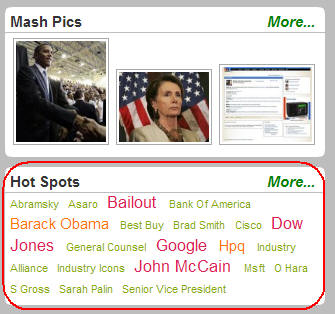


Provide a widget to show the hot tags of your recent posts.
What’s Tag?
Tag is simply a word you can use to describe something, with WordPress, ‘something’ will be your posts or pages. It’s very easy to use, think this way, if you want to google your post, what keywords should you use, that’s it.
Why ‘Recent Tags’?
Giving an example:
Olympics were very hot about a month ago, and we might write many posts about this topic, then ‘Olympics’ was a very hot tag. But Olympics would not always the hot spot, right? It’s gone, and we might talk Elections now, so how to let the visitors get this, get what you’re talking about now?
Recent Tags! That’s the simplest way.
How to define ‘Recent’ and something you should know?
‘Recent’ is a problem? Yep, actually it is. Recent tags might be tags used in some recent posts, or it might be the tags used in some recent days, strictly speaking, they’re different, but most of the time, the difference can be very small. The point is when you see the tags, you do tell it is the ‘recent’ ones.
For performance considerations, this plugin will log your tags by days, that means it can tell you what and how many times a tag be used for a specific day, and what the hot tags in some recent days.
But for most of us, we don’t write posts very day, right? So there’s a problem here, if you ask hot tags in recent 2 days, you might get a empty box, as you didn’t publish anything. To solve this problem, this plugin will still ask to show the hot tags in some recent posts, but the calculation method will be:
Giving an example, to show the hot tags in recent 20 posts, it will get the date of the 20th post first, and calculate the hot tags since that day.
Worry about performance?
It’s possible to calculate the tag stat directly through wordpress tables, but the server usage will be extremely high, so this plugin creates a table in your database to track your tags by day. You can treat these data as some pre-calculation, if you’re not publishing posts every minute and every post gets lots of tags, I don’t think you should worry about this table.
Also, I think you may use the WP Widget Cache to cache the widget output