

Mihdan: Ajax Edit Comments
v6.1mihdan · 2007年5月20日 上架
Allow users to edit comments for a limited time, while admins can edit all comments.
- 正在使用
- 300+
- 评分
- 4.4 / 5
- 累计下载
- 33 万
- 最近更新
- 2020年1月13日
18 条评价需要 WordPress 3.1+已测试到 5.3.28
 Ajay
 Ronald Huereca
 joshben
 Glenn Ansley
 mihdan
 jtbfocus
截图
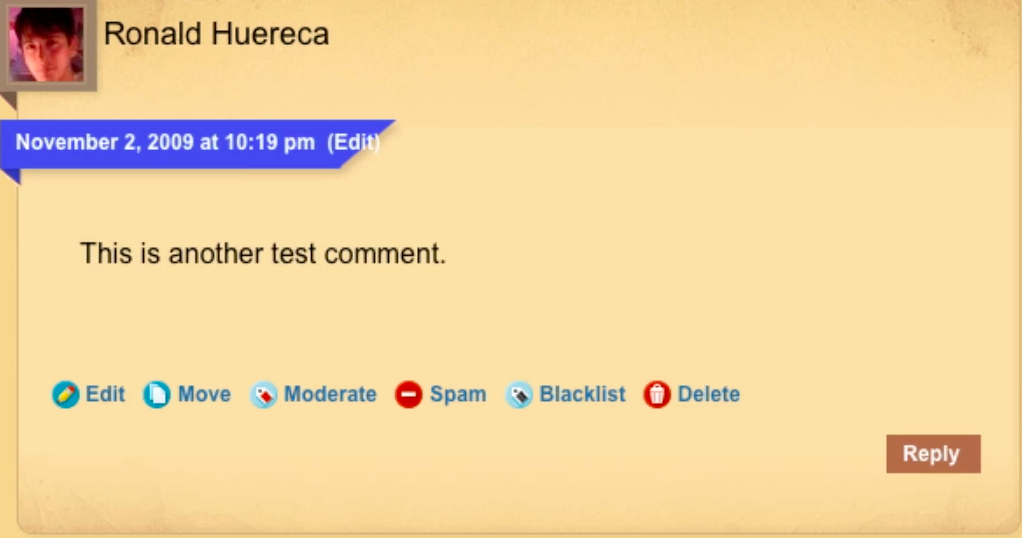


Ajax Edit Comments allows users to edit their own comments for a limited time. Administrators can edit all comments on the front-end.
Looking for Just Comment Editing?
Check out a “lite” version of this plugin called Simple Comment Editing. Check out the WPTavern review for more information.
Features
Admin Features
Please watch this video demonstrating the new admin features. Alternatively, read about the features on Github.
- Can edit all comments.
- Can move comments.
- Can blacklist comments.
- Can approve, mark for moderation, mark as spam, and delete all comments from a post or the admin panel.
- Undo functionality for most editing options.
- Can choose different icon sets for use on your blog.
- Dropdown menu to de-clutter the interface.
- Various admin-panel options including
- Can edit comment time.
- Can specify anonymous user options.
- Can specify logged-in user options.
- Can choose between Akismet and Defensio for spam protection.
- Can disable timer.
- And much, much more…
Anonymous User Features
Please watch this video demonstrating the anonymous features.
- Can edit comments for a limited time.
- Can request deletion of own comments.
Logged-in User Features
- Potential indefinite comment editing.
- Can edit comments for a limited time.
Plugin Features
- New pop-up box called Colorbox used.
- Timer on both the post and in the comment-editing interface.
- Improved usability and look-and-feel.
- Better error and status messages.