
Word Counter Plus – Word Count Filter & Post Views
v1.4.1Mofizul Islam · 2024年7月25日 上架
Sortable Word Count and Views columns for the Posts screen, plus a filter to find posts by word count range.
- 正在使用
- 70+
- 评分
- 5.0 / 5
- 累计下载
- 2,542
- 最近更新
- 2026年11月15日
贡献者
 Mofizul Islam
截图
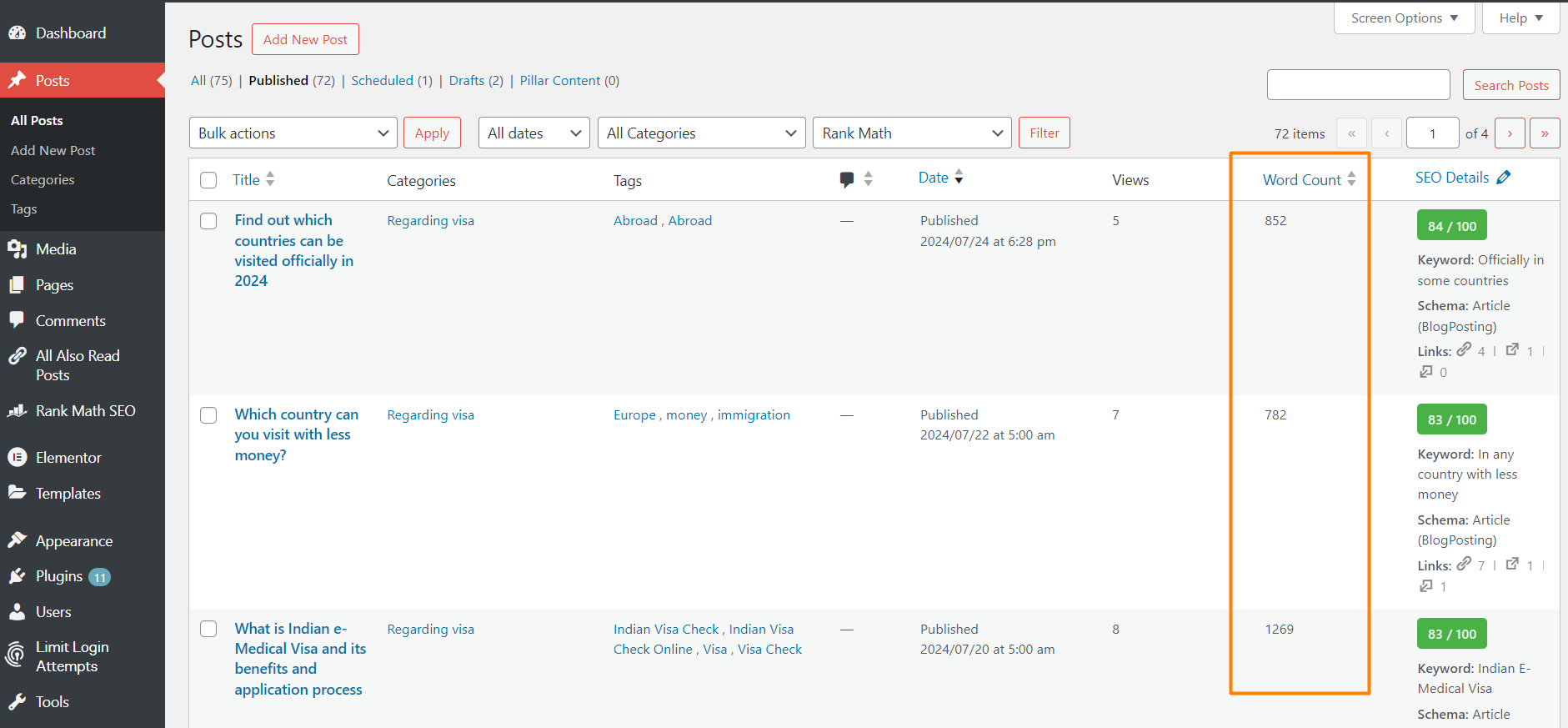


Word Counter Plus shows how long each post is and how many people read it, right in your admin Posts list. No settings page and no extra screens.
It is built for bloggers, editors, and content teams who want to find thin content, spot their most-read posts, and plan updates without leaving the dashboard.
Word Count column
Every post gets a Word Count column that you can sort. Words are counted when you save a post. Posts that existed before you installed the plugin are counted automatically in the background.
Word Count filter
A word count dropdown next to the date and category filters lets you show only posts within a range:
- 0–600 words
- 601–1000 words
- 1001–2000 words
- 2001–3000 words
- 3001–4000 words
- 4001+ words
Combine it with the category filter, search, or sorting. For example, find short posts in one category that need expanding.
Post Views column
A sortable Views column counts how many times each post is opened on your site. To keep the numbers honest it skips:
- Search engine bots and other crawlers
- Browser prefetch and prerender requests (such as WordPress speculative loading)
- Post previews
- Logged-in users who can edit the post, such as the author or an admin
Sort by Views to see your most popular posts, or combine it with the word count filter to compare long and short posts.
Show views to your visitors
Under Settings Word Counter Plus you can show the view count (for example “1,204 views”) to your visitors on single posts, on post archives (the blog page, categories, tags, authors and search results), or both. It is off by default.
Choose where it appears:
- After the title, next to the author, date and categories (default). For example, “Written by Admin in News · 1,204 views”.
- Before the content
- After the content
Works with block themes such as Twenty Twenty-Five, and with classic themes.
Lightweight
- Word counts are calculated only when a post is saved.
- A view is a single post meta update. No extra database tables, external services, or tracking scripts.
- Each column can be hidden from Screen Options.