
BLAZING Email Transfer Payment Gateway
v2.6.2Massoud Shakeri · 2015年6月17日 上架
Many customers in Canada prefer to pay for the merchandise they buy, by e-Transfer (formerly Email Money Transfer).
- 正在使用
- 2,000+
- 评分
- 5.0 / 5
- 累计下载
- 6 万
- 最近更新
- 2025年1月20日
贡献者
 Massoud Shakeri
截图

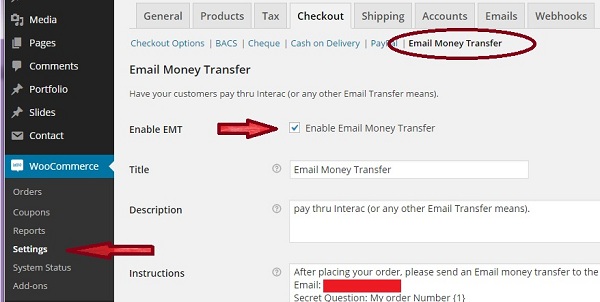

Many customers in Canada prefer to pay for the merchandise they buy, by e-Transfer (formerly Email Money Transfer).
What does this plugin do?
If customers choose the secret question and answer by themselves, they have to call to inform you what the Q&A are. Or they have the option to send them by Email. The other option is you give everybody a static question and answer.
In both cases, if a third party, or a hacker, gain access to the username & password of your Email, he/she can deposit the funds to any account he wants, and there is no way to cancel the transaction.
So, this plugin creates a random word which can be used as an answer to the quetion. In this case, whoever has the access to your Email box, is not going to figure out what the answer to the question is. Unless he/she hacks the backend of the website as well as your Email box.
How To use this plugin:
In the ‘Email Transfer payment gateway’ in the WooCommerce Settings, there is a field named ‘Instructions’. Whatever you enter in that field will be shown to the user in the ‘Thank You’ page after placing an order, and also in the Email.
You must provide an Email for customers, so you can receive the instructions to retrieve the funds they send.
Also you should keep two placeholders which are {1} and {2}.
{1} will be replaced by Order Number. Customers should be encouraged to mention their order number in the secret question they send
{2} will be replaced by a randomly generated 6-character long word. Customers are encouraged to use that word as the answer to the secret question.
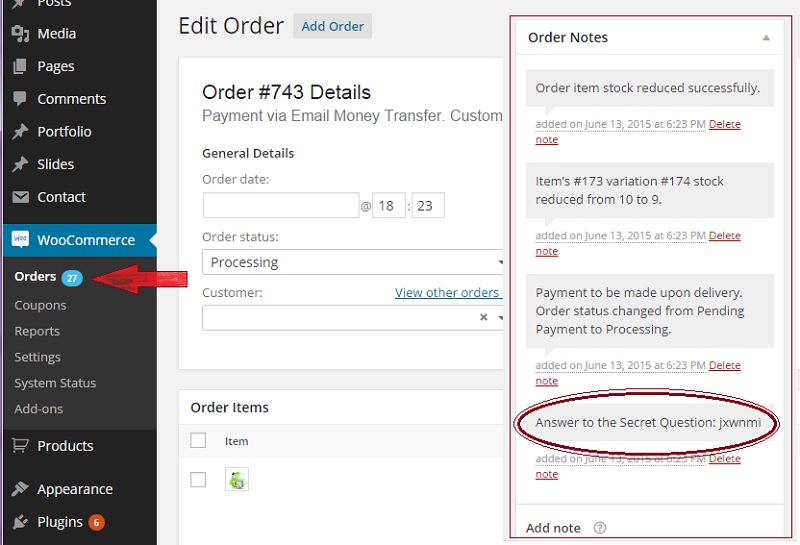
An ‘Order note’ will be added to the order, containing this randow word, so upon retrieving the funds, you will know what the answer to the secret question of each order is.
An Instruction can be something like this:
After placing your order, please send an Email money transfer to the following:
Email: xxx@yyy.com
Secret Question: Your Order Number {1}
Secret Answer: {2} (MAKE SURE YOU DO NOT REMOVE THESE TWO {1} and {2})
Thanks for choosing us! We appreciate your business.
Thanks
Translators who did a great job converting the text of the plugin to their native language. Thank you!