

Widgetize Pages Light
v3.0OTWthemes · 2012年8月20日 上架
Drop widgets in page or post content area. Widgetized pages. Build your custom Responsive page layout in no time. No coding, easy and fun!
- 正在使用
- 2,000+
- 评分
- 4.2 / 5
- 累计下载
- 26 万
- 最近更新
- 2022年5月7日
贡献者
 OTWthemes
截图

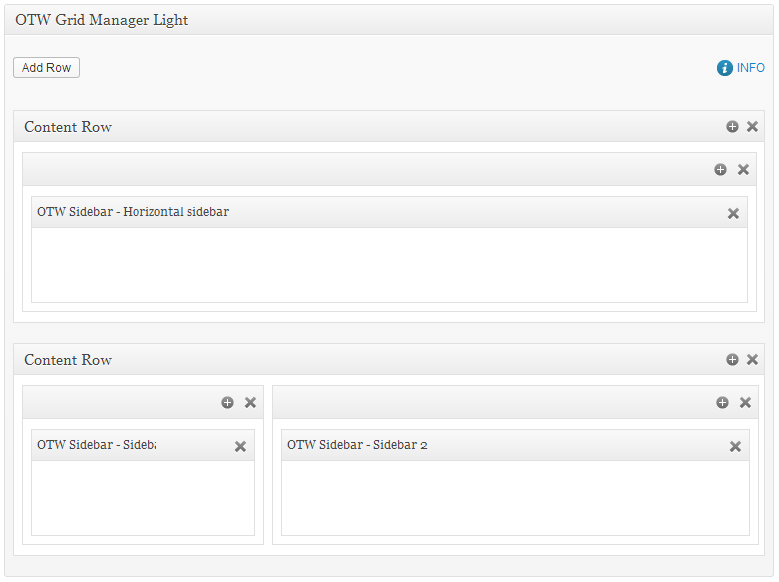

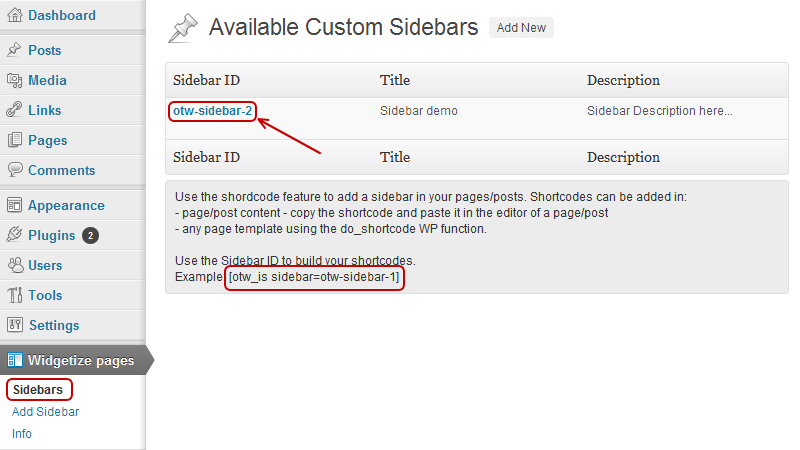


Widgetized pages in WordPress are very powerful tool. Have you ever wanted to drag and drop a widget in a page content area, but the only widgetized sections of your theme are usually sidebars and footers?
Check on the Widgetize Pages Light: Demo site | Documentation page
You can now easily widgetize a page and drop widgets in page or post content area or any template file. Adding widgets on pages is a very flexible way to build your own unique page layout. This is very easy and fun to do and requires no coding knowledge at all.
Use the new OTW Grid Manager Light component to build your custom Responsive layout in no time. It is all done in a nice and easy interface. Add some rows and columns in the rows. Insert the sidebars in the columns.
You can use as many widget areas (sidebars) in as many pages/posts as you need. Creating sidebars(widget areas) is unlimited.
The plugin has very easy and intuitive administration area designed to fit into the core WordPress design. Check out the screenshots section or just download it and try it out.
Upgrade to the full version of Sidebar and Widget Manager |
Demo site | Create responsive layouts in minutes, drag & drop interface, feature rich
How Widgetize Pages Light works:
- Create a custom sidebar(widget area)
- Insert the sidebar shortcode in the page editor wherever in the content you need it – either use the Insert Sidebar Shortcode button in the editor or copy/paste the sidebar shortcode.
- Go to your widgets section (Appearance -> Widgets) and drop some widgets in your new sidebar.
Advanced users:
- Add any sidebar created with this plugin in any part of your wordpress site. To do that use the shortcode of the sidebar you want to add and the do_shortcode WordPress function in any of the template files of your theme.