

Widget Display Options
v1.0.0Dojo Digital · 2013年4月16日 上架
Adds a section to all widgets allowing control over when each widget is displayed and the ability to add custom classes to each widget wrapper.
- 正在使用
- 40+
- 评分
- 4.3 / 5
- 累计下载
- 4,973
- 最近更新
- 2013年4月16日
4 条评价需要 WordPress 3.0+已测试到 3.5.2
贡献者
 Dojo Digital
截图
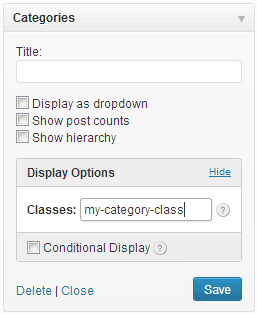

Widget Display Options adds fields to all registered widgets that allow you to contextually hide or show any widget based on a set of chosen conditions. Many of the conditions accept parameters so you could, for example, only show a widget on the single view of a given page or post, or hide it on the archive pages of a given post type or category, etc.
Additionally this plugin provides an input field to add custom classes to the widget wrappers.
Available Conditions:
Items marked with an * accept parameters.
- Front Page
- Blog Index
- Page*
- Single*
- Single Post Type*
- Post Type*
- Search Results
- Page Template*
- Sticky Post*
- Attachment
- 404
- Archive (common)
- Date Archive
- Tag Archive*
- Category Archive*
- Taxonomy Archive*
- Post Type Archive*
- Author Archive*
For a complete description visit the online usage manual.