

Hide Posts
v2.1.3MartinCV · 2017年10月11日 上架
Hide posts or WooCommerce products from the homepage, archives, search, RSS, REST API, sitemaps and SEO tools — per-post control in any editor.
- 正在使用
- 2 万+
- 评分
- 4.7 / 5
- 累计下载
- 29 万
- 最近更新
- 2026年11月4日
22 条评价需要 WordPress 5.0+已测试到 7.1.5PHP 7.3+
贡献者
 MartinCV
截图
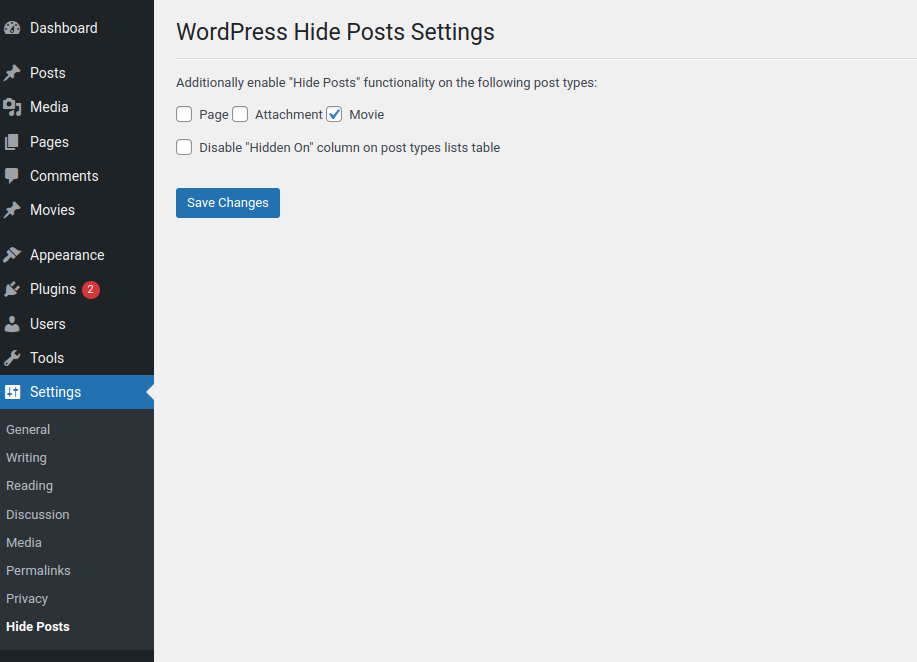
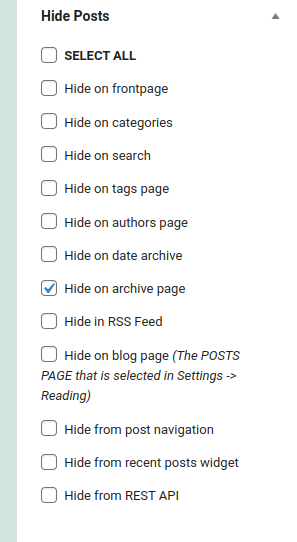

Publish it — without putting it everywhere. Hide Posts gives you a simple checklist on every post, page, or product that controls exactly where it appears: keep a post out of the homepage and archives, off the search results, out of your RSS feed and REST API, or invisible to XML sitemaps and Yoast SEO — while it stays perfectly reachable at its own URL.
Perfect for syndication-only articles, landing pages, evergreen content you don’t want cluttering the blog roll, or products that should only be found via direct link.
Choose exactly where a post is hidden:
- Site pages — homepage, blog page, category, tag, author, and date archives, search results, post navigation (previous/next), and the Recent Posts widget
- Feeds & APIs — RSS feed and the REST API
- Sitemaps & SEO — WordPress core XML sitemaps, Yoast SEO sitemap, Yoast breadcrumbs, and Yoast internal link suggestions
- WooCommerce — hide products from the shop page, product category pages, and the store REST API
Built for real editorial workflows:
- Full Block Editor support — a native sidebar panel with all hide options, plus the classic metabox
- Works with the Query Loop block and custom queries
- Enable hiding for any Custom Post Type from the settings page
- Bulk Edit and Quick Edit support for managing many posts at once
- “Hidden On” column in the posts list so you always see what’s hidden where
- Custom database table and layered caching — no postmeta bloat, no slow queries on busy sites