
WebMCP Bridge
v1.10.1Mescio · 2026年3月23日 上架
Make your WordPress site natively AI-agent friendly via WebMCP, REST/OpenAPI, a remote MCP server, and optional Poppy 0.4 guest carts.
- 正在使用
- 700+
- 评分
- 暂无
- 累计下载
- 6,019
- 最近更新
- 2026年11月17日
贡献者
 Mescio
截图
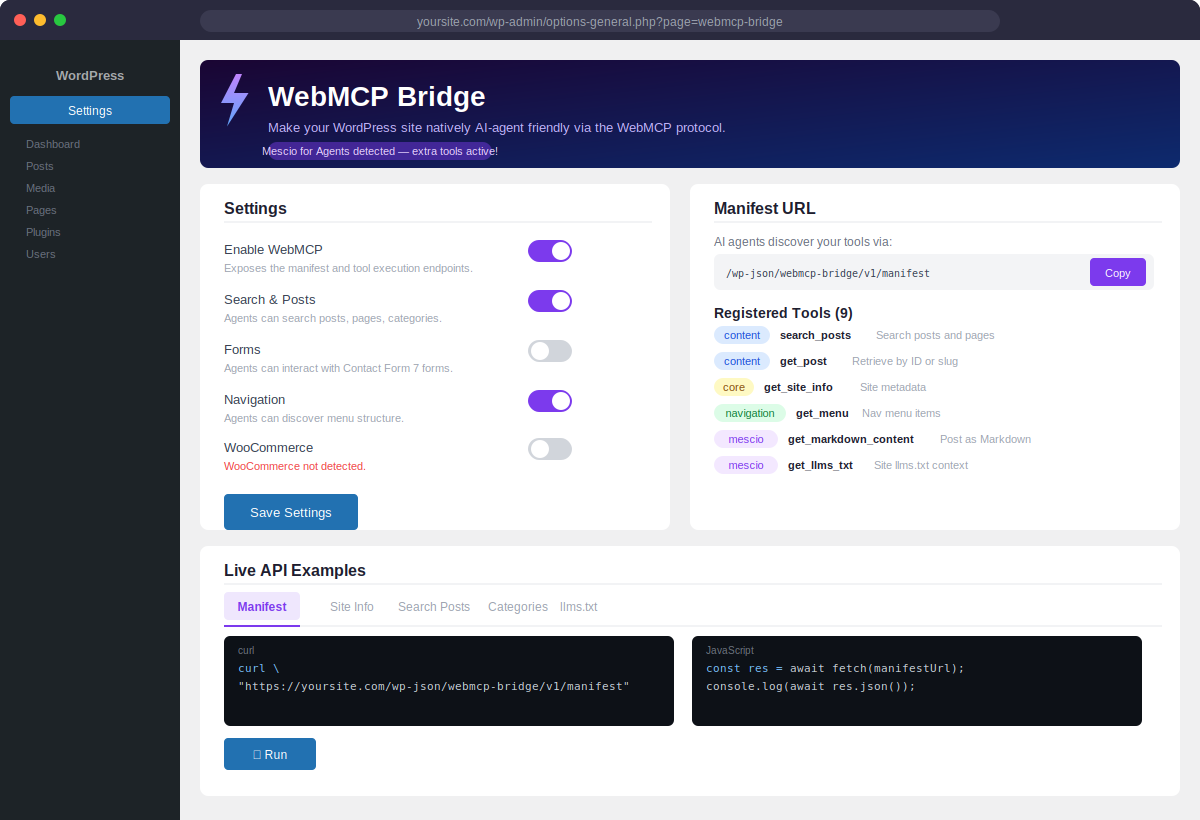
WebMCP Bridge exposes your WordPress (and WooCommerce) functionality as WebMCP tools that AI agents can discover and invoke directly in the browser.
Once installed, your site automatically becomes “agent-friendly”:
- AI agents can search posts, pages, and custom post types
- With Mescio for Agents, the site becomes a live RAG source (
retrieveMarkdown) - AI agents can browse products, manage the cart, apply coupons (WooCommerce)
- With Personal Agent Protocol (Poppy) 0.4, a verified session can share one anonymous WooCommerce guest cart between MCP calls and the agent’s browser
- AI agents can read navigation menus and site metadata
- Developers can register custom tools in minutes via a simple PHP API
What is WebMCP?
WebMCP is a new browser-native protocol (currently in Chrome Early Preview) that lets web apps expose their functionality as structured “tools” that AI agents can invoke — without needing to screenshot or parse HTML. Think of your website as an MCP server running entirely client-side.
How it works
- Install and activate the plugin
- Enable the features you want from Settings WebMCP Bridge
- Your tool manifest is immediately available at
/wp-json/webmcp-bridge/v1/manifest - Custom GPT Actions can import
/wp-json/webmcp-bridge/v1/openapi - Claude (and other MCP clients) can use
/wp-json/webmcp-bridge/v1/mcpas a remote Streamable HTTP MCP server (protocol 2025-06-18, still compatible with 2025-03-26) - Optional: enable Poppy 0.4 guest cart so Personal Agents can search, fill a guest cart, and send the shopper to normal WooCommerce guest checkout
- AI agents (or any JavaScript code) can call your tools via REST API or the native browser WebMCP API
Included tools
Core:
search_posts— Search posts, pages, or custom post typesget_post— Retrieve a single post by ID or slugget_menu— Return navigation menu itemsget_categories— List taxonomy termsget_site_info— Site name, description, URL, languagesubmit_contact_form— Contact Form 7 integration
WooCommerce (requires WooCommerce plugin):
woo_search_products— Search by keyword, category, price rangewoo_get_product— Full product details including attributeswoo_add_to_cart— Add a product to the cartwoo_get_cart— Current cart contents and totalswoo_remove_from_cart— Remove an item by cart keywoo_apply_coupon— Apply a coupon codewoo_get_checkout_fields— Return checkout field schemawoo_get_product_categories— List all product categories
Even more powerful with Mescio for Agents
WebMCP Bridge integrates automatically with the Mescio for Agents plugin. When both plugins are active, three additional tools are unlocked:
retrieve— RAG retrieve: ranked hits with snippets, Markdown URLs and token estimates. This is the search step of a live RAG loop over the site, without a separate vector database.get_markdown_content— Returns any post or page as clean Markdown, the format AI models consume most efficiently. Instead of raw HTML, agents receive structured, token-optimized content ready for reasoning and summarization.get_llms_txt— Exposes the site-widellms.txtcontext document (index or full variant), giving agents an instant, structured overview of what the site is about, who it is for, and what content is available — before they even start searching.
Together, the two plugins turn your WordPress site into a live knowledge base: Mescio for Agents is the content layer (Markdown, llms.txt), WebMCP Bridge is the tool layer (retrieve, act, checkout). From Mescio 1.8 / WebMCP 1.10.1, Agent activity in Mescio settings also logs MCP and REST tool calls — the observability slice: what this site served, not a ChatGPT citation score. The RAG loop is get_llms_txt retrieve get_markdown_content.
Privacy
This plugin does not collect, store, or transmit cart or customer data to third-party analytics. Tool execution happens in your WordPress install. No telemetry. If Poppy 0.4 guest cart is enabled, the plugin fetches the Personal Agent’s agent.json and JWKS over HTTPS only to verify Poppy-Session signatures.