

Webmastery Site Toolkit for MCP
v3.2.0Daniel Boring · 2026年7月10日 上架
70+ permission-aware WordPress abilities for AI agents: content, media, SEO, audits, users, health, and security via the official MCP Adapter.
- 正在使用
- 40+
- 评分
- 暂无
- 累计下载
- 1,726
- 最近更新
- 2026年11月24日
贡献者
 Daniel Boring
截图
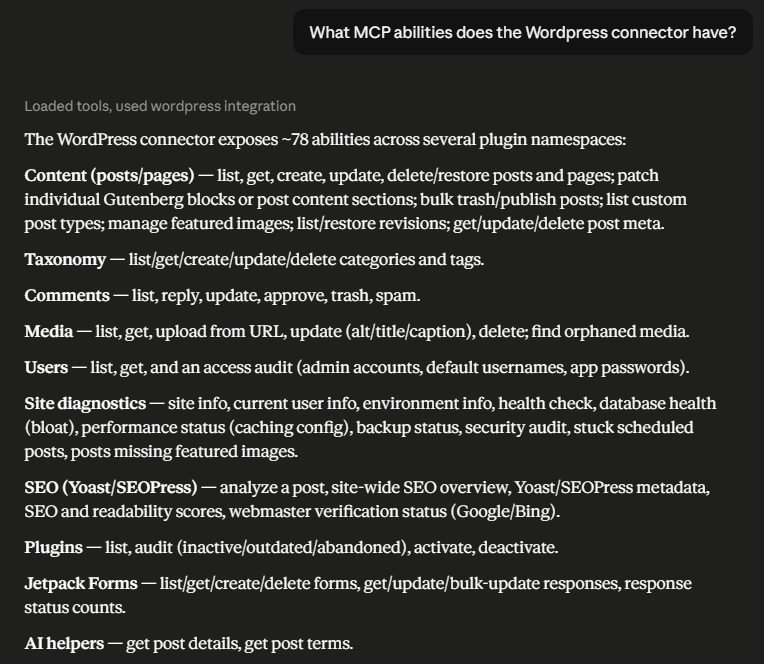
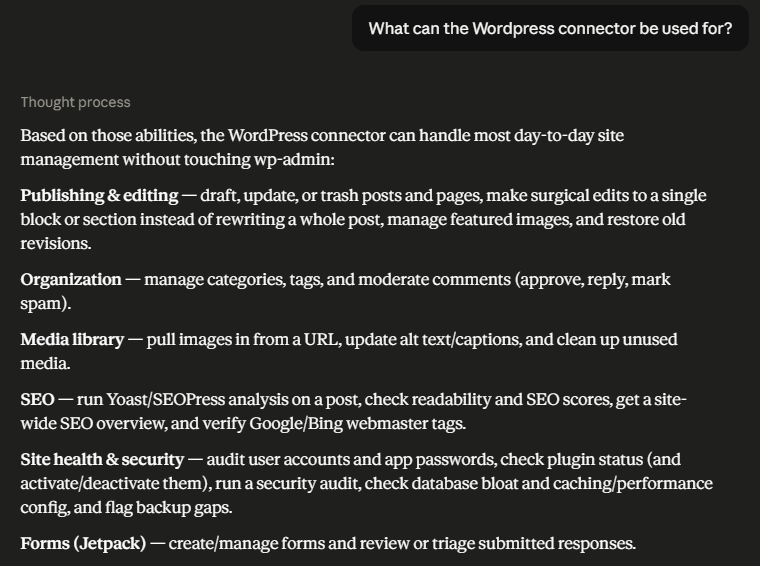
Webmastery Site Toolkit for MCP adds 70+ permission-aware abilities across 16 areas that AI agents and MCP clients can call through the official MCP Adapter plugin. It works with popular MCP clients including Claude, ChatGPT, GitHub Copilot, and Gemini.
The MCP Adapter provides the transport layer. This plugin provides the site-management vocabulary: posts, pages, media, comments, taxonomy, custom post types, post meta, content hygiene, SEO checks, broken link scans, public webmaster verification, Google Site Kit diagnostics, site info, health, security, users, plugins, themes, classic navigation menus, available updates, WP-Cron status, database, performance, and backup status.
Core editorial workflows work well with a dedicated Editor service account. Sensitive workflows such as plugin management, theme inventory, navigation menus, update overview, WP-Cron status, external link checks, user auditing, site health, database health, backup status, performance status, and security audits require a separate Administrator service account.
Highlights:
- Create, update, list, restore, trash, bulk publish, and bulk trash posts and pages.
- Inspect Gutenberg blocks and patch one targeted block or content section in posts, pages, and eligible custom post types instead of rewriting the full content.
- Manage categories, tags, comments, media metadata, featured images, and public image URL uploads.
- Discover eligible public custom post types and use generated CRUD abilities for each one.
- Read, update, and delete safe post meta, including supported Yoast SEO and SEOPress metadata fields.
- Inspect Rank Math and All in One SEO metadata for a post or page (read-only, allowlisted fields).
- Run content hygiene checks for orphaned media, missing featured images, and stuck scheduled posts.
- Inspect safe site and current-user context, with runtime environment details reserved for Administrator accounts.
- List and inspect classic navigation menus and update a single menu item’s label, link, target, classes, position or parent (custom-link URLs limited to http, https, mailto, tel and relative links; block-theme Navigation blocks are not covered).
- Audit plugins, installed themes (active, parent and cached update status), available core, plugin and theme updates from cached data, WP-Cron schedule health (overdue events and cron configuration, never event arguments), administrator accounts, backups, performance settings, database bloat, site health, and security posture.
- Analyze SEO metadata and public Google/Bing webmaster verification proof.
- Scan one post or page for broken links: internal links are resolved offline (published, not published, trashed or deleted, or unresolved), and an Administrator can also check external links with bounded, SSRF-protected HEAD requests from the server.
- Inspect Google Site Kit setup, modules, current-user permissions, and same-site PageSpeed summaries without exposing OAuth credentials or changing Site Kit settings.
All abilities enforce WordPress capability checks. If the connected account cannot perform the equivalent WordPress action, the ability fails instead of bypassing WordPress permissions. List abilities for posts, pages, custom post types, media, and SEO scores also filter each returned object before exposing full details, so private, trashed, draft, pending, and scheduled content follows WordPress object/status permissions.
3.0.0 is a breaking upgrade from 2.6.0. Update clients for bounded pagination, summary defaults, strict inputs, separate metadata writes, destructive confirmation/previews, canonical errors and database identifier privacy before upgrading. Affected successful records add untrusted_fields markers without rewriting stored values, HTML or block markup. These hints are not prompt-injection prevention; see the migration and agent-safety FAQ below.
For full setup instructions, ability tables, and the deeper security model, visit:
https://www.virtuallyboring.com/webmastery-site-toolkit-for-mcp/
External services
This plugin does not send any data to the plugin author or to a service run by the plugin author.
It contacts third-party sites only when an MCP client explicitly asks for it:
- Image URL uploads (Upload Image from URL, requires upload_files) download the image URL the caller supplies.
- Broken link scans with check_external set to true (requires permission to edit the post plus manage_options, normally Administrator) send an HTTP HEAD request, or a GET limited to the first 1 KB when a server refuses HEAD, from your server to each external URL found in the selected post or page, and to at most 3 redirect targets per link. The request carries only the URL, a fixed User-Agent naming this plugin (WebmasterySiteToolkitForMCP-LinkCheck/1.0) and, for the GET, a Range header asking for the first 1 KB; it carries no cookies, credentials, referer or site URL. The remote site sees your server’s IP address and can log the request under its own privacy policy and terms. At most 10 requests are sent per call, never to private, reserved or local network addresses, and results are not stored. Without check_external, or for links to your own site, no request is made.
Google Site Kit diagnostics use Site Kit’s own connection to Google; see “Do I need Google Site Kit?” below.