

Web Directory plugin Free – Booking
v2.5.0Shamalli · 2018年5月23日 上架
A WordPress directory plugin for business listings with bookings: categories, locations, fields, maps, free-time search and AI writing.
- 正在使用
- 300+
- 评分
- 4.1 / 5
- 累计下载
- 6.2 万
- 最近更新
- 2026年11月25日
贡献者
 Shamalli
截图
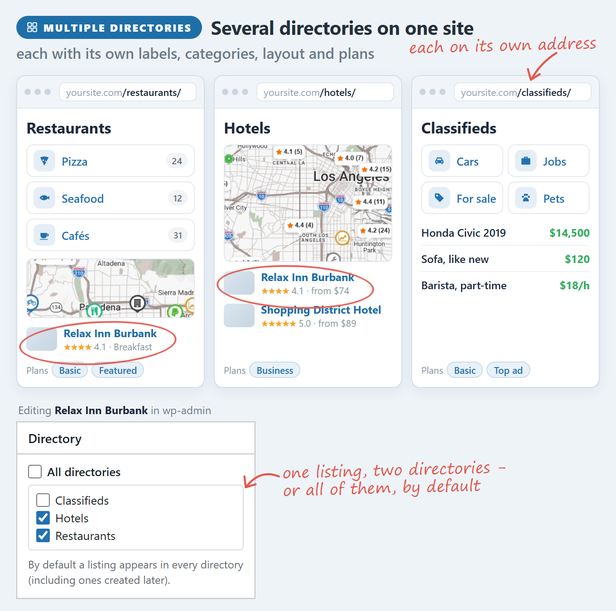


Web Directory plugin Free is a WordPress directory plugin that turns your site into a searchable business directory. Sort listings into categories and locations, build your own listing form, drop the directory onto any page with a shortcode, and let visitors search and browse – as a list, as cards, or on an interactive map.
See Demo | Docs and Features | Get Support
Key Features
- Launch in minutes – a setup wizard, or a ready-made directory in one click.
- Your own listing form – drag-and-drop fields: address, photos and videos, prices, opening hours, files.
- Maps – Google Maps, Mapbox or MapLibre, with markers, clusters and popups.
- Search – any field can be a filter; search within a radius of an address.
- Bookings – time slots, time ranges or nights, free times on the cards, a bookings calendar.
- Categories and locations – nested as deep as you like, each with its own page, icon and marker.
- Plans – how long a listing stays, reminders before it expires, pause, renewal and ownership claims.
- On any page – the built-in page builder, blocks, Elementor and other builders, or shortcodes.
- SEO and speed – titles, share images and structured data on every page; a search index for tens of thousands of listings.
- CSV import and export – listings with their images and categories.
What you can build
A local business directory, a member or staff directory, a property or vehicle catalogue, a venue or event guide, a service-provider index, a classifieds board. Anything that is a list of places or things with fields, categories and a map.
Organise your listings
- Categories and locations are hierarchical, so Country, Region, City nests the way you expect, and each level gets its own page.
- Each category can carry its own marker icon and colour, so the map reads at a glance.
- Every category and location page is a real URL with its own listings, search and map.
Build the listing form yourself
The form builder is drag and drop: arrange fields in rows and columns, and add your own on top of the built-in ones. Field types included:
- Title, Content, Excerpt
- Categories
- Address and Map
- Images & Videos – photos plus YouTube or Vimeo links, shown in one gallery with a lightbox
- Contact info, Phone, Email, Website URL
- Text/string, Number, Price
- List – as a dropdown, radio buttons or checkboxes
- Date-Time
- Opening hours
- File upload
Every field can be placed independently on the listing card, the listing page, the search form and the map popup, so a field can be searchable without cluttering the card.
Put the directory anywhere
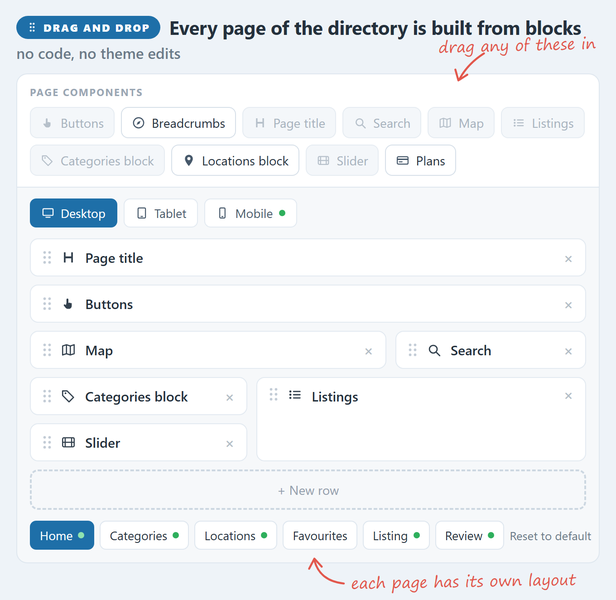
Each directory has a page builder: choose which elements appear on the home, category, location and listing pages, and in what order – search form, map, categories block, listings grid, slider, breadcrumbs, page title, buttons.
If you would rather place things by hand, every element is also a block in the block editor, a widget in Elementor, an element in WPBakery and a shortcode: [webdirectory], [webdirectory-search], [webdirectory-map], [webdirectory-listings], [webdirectory-categories], [webdirectory-locations], [webdirectory-slider], [webdirectory-breadcrumbs], [webdirectory-listing-page] and more. A listing page can be laid out the same way, from the listing’s own elements: its fields, gallery, map, rating, reviews and the contact, claim and report forms.
Bookings
Switch on Settings > Bookings and your listings take reservations.
- Three ways to book – fixed time slots (a haircut, a lesson), a start and end time the customer picks (a court, a studio), or nights and days (a room, a cabin). With services, guests or places, breaks between bookings and a minimum notice.
- Booking forms – built like listing forms, with a live calendar and live slots as you edit. A directory picks its form; a listing can have its own.
- Confirmation your way – instant, manual or on request. Every booking holds its time, so nobody books it twice.
- Bookings calendar – month and week views, special hours and closed days, new bookings and blocked time; confirm, move or decline.
- Free times everywhere – the next free times show on cards, map popups and the listing page, and visitors search by free dates or a free time.
- Emails – booking emails with a calendar file, a link to cancel, and reminders.
Bookings in this edition are free of charge. Prices and online payment through WooCommerce are in the full version.
AI that writes listings and reads search
Add a free Groq key and a Write button drafts the listing description from its name, categories and location. Facts such as prices, phone numbers and opening hours are never invented, and nothing leaves the site until you add a key.
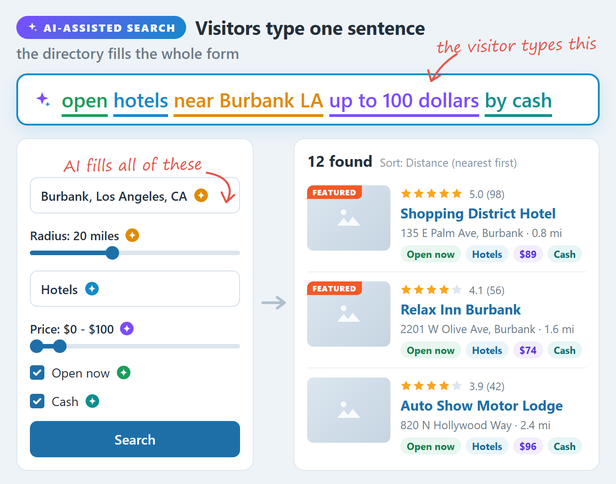
The separate AI Assistant Add-on adds OpenAI, DeepSeek, Mistral, OpenRouter and Gemini, and a Write button on every field. It also brings search by sentence. A visitor writes what they are after as a sentence, “a cheap place open on Sunday that takes cards”, and it is read into the search form’s own filters rather than into the keyword box: the category, the location and the distance, the sliders and the dropdowns your form carries.
Maps
- Three engines: Google Maps, Mapbox and MapLibre with MapTiler tiles. Pick per site.
- Marker clustering, so thousands of listings stay usable.
- Per-category and per-listing marker icons.
- Rich popups built from the fields you chose, with the listing photo.
- A map sidebar that lists what is currently in view, and follows as the visitor pans.
- Radius search from an address, in miles or kilometres.
- Several layouts, including a full-width hero map and a sticky map beside the listings.
Search and filters
The search form is built the same way as the listing form: drag in the elements you want.
- Keyword, categories, locations, address plus radius, rating.
- Any custom field you added becomes a filter – a price range, a number range, a date, a dropdown.
- A “More filters” separator to keep the visible form short.
- Sorting by newest, oldest, title, rating, random, or any numeric or date field you defined.
- Grid and list views, with the visitor’s choice remembered.
- With the AI Assistant Add-on, a whole sentence instead of a form: the filters above set themselves from it, and the visitor can drop any of them.
Ratings
Built in, no add-on: visitors rate a listing, the average shows on the card, the listing page and the map popup, and rating becomes a search filter and a sort option. Ratings can be switched off entirely.
Bulk work
- CSV import and export for listings, including categories, locations, custom fields, images and video links. Import creates or updates; export round-trips.
- Demo content: 5 ready-made directories with their maps and pages, and a listing form template, imported in one click.
- A thumbnail regeneration tool for when you change image sizes.
Plans and listing lifetime
- Plans decide what a listing gets: how many categories, locations, images and videos, which fields, a logo, the map, ratings, and a sticky badge that keeps it first in the lists you choose.
- An active period per plan – days, weeks, months or years – or none at all. A listing whose period ends leaves the site on its own.
- Reminder emails before a listing expires, once or several times (for example 7, 2 and 1 day before), and an email when it expires.
- After expiration, a plan can hand the listing to another plan instead of taking it down: a featured period that falls back to a basic listing.
- Pause takes a listing off the site without spending its period. Renew an expired listing, or give any listing a date of its own, from its edit screen.
Looks and setup
- An install wizard that creates the pages and the first directory for you.
- Colour palette controls so the directory matches your theme, with several presets.
- Translation ready: ships a POT file for any standard gettext or PO editor.
Emails and spam protection
- Email notifications with editable subjects and texts, each one switchable.
- Google reCAPTCHA (v2 or v3) on the listing contact form.
Ready for large directories
- A dedicated search index and sort index keep tens of thousands of listings responsive, and both rebuild in the background.
- A diagnostics page that checks the directory is wired up correctly and tells you what to fix if it is not.
This plugin uses external services: the map provider you choose, Groq for AI writing once you add a key, Google reCAPTCHA if you turn it on, and salephpscripts.com for the AI Assistant Add-on and the demo data. See the External Services section below.
What is not in the free edition
Front-end submission and payments. In the free edition listings are created and edited in the WordPress admin; visitors browse and search. The paid version adds front-end submission with a member dashboard, where members pick a plan, pause and renew their own listings, and WooCommerce checkout for paid listings, renewals, raise-ups and plan upgrades.
Get the full version: Web 2.0 Directory on CodeCanyon
External Services
Web Directory plugin Free uses the following third-party services. Nothing is sent until you use the matching feature:
- Map providers (Google Maps, Mapbox, MapTiler / MapLibre) – when a map loads or an address is geocoded, the request (coordinates, the address being searched, and your API key/token) is sent to the provider you chose. See that provider’s terms and privacy policy.
- Google reCAPTCHA – when you turn it on for the contact form, the visitor’s interaction is checked with Google. See Google’s terms and privacy policy.
- Groq (AI writing) – only when you have entered a Groq API key and pressed a Write button. What is sent is the text the draft is built from: the entry name, its categories, its location and the fields already filled in. Nothing is sent without a key, and no key ships with the plugin. See Groq’s terms (https://groq.com/terms-of-use/) and privacy policy (https://groq.com/privacy-policy/).
- salephpscripts.com (the plugin author) – when you open the AI tab of the settings, the plugin asks salephpscripts.com for the latest version of the AI Assistant Add-on, at most once an hour; only the add-on’s name is sent. When you press the button that installs the add-on or the one that downloads the demo data, the file comes from salephpscripts.com, and your site’s domain and the plugin version are sent with that request.
Updates come through WordPress.org. The free edition does no license or “phone-home” checks.