

Smart COD for WooCommerce
v1.9.12FullStack-ing · 2017年6月27日 上架
Retiring during December. Existing features keep working in Classic Checkout and Cart & Checkout Blocks. Explore Smart COD PRO.
- 正在使用
- 3 万+
- 评分
- 4.6 / 5
- 累计下载
- 40 万
- 最近更新
- 2026年11月24日
贡献者
 FullStack-ing
截图
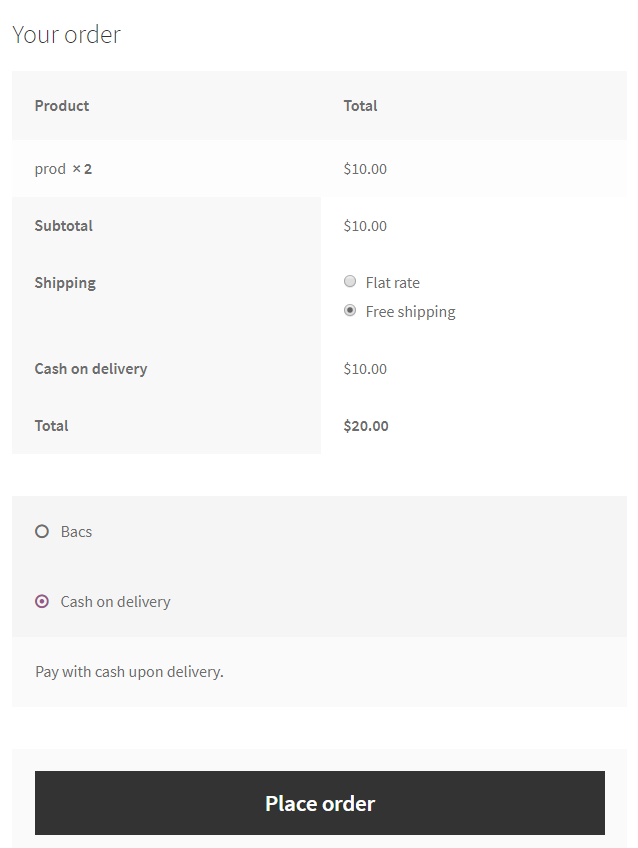
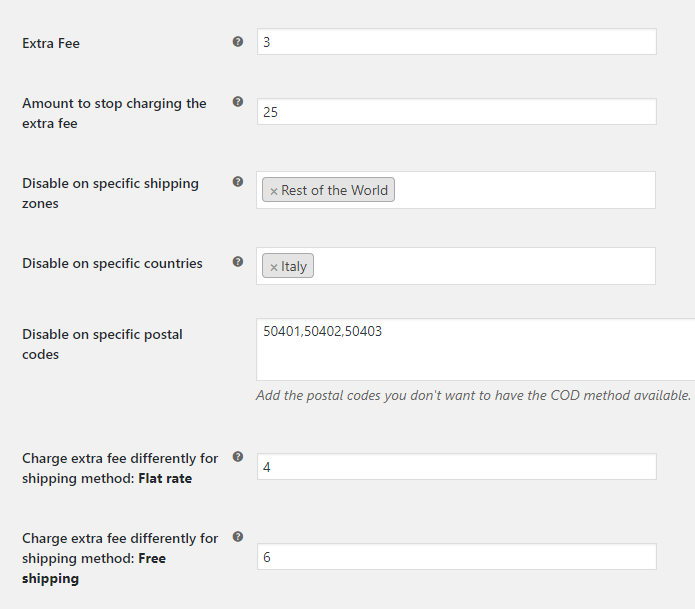
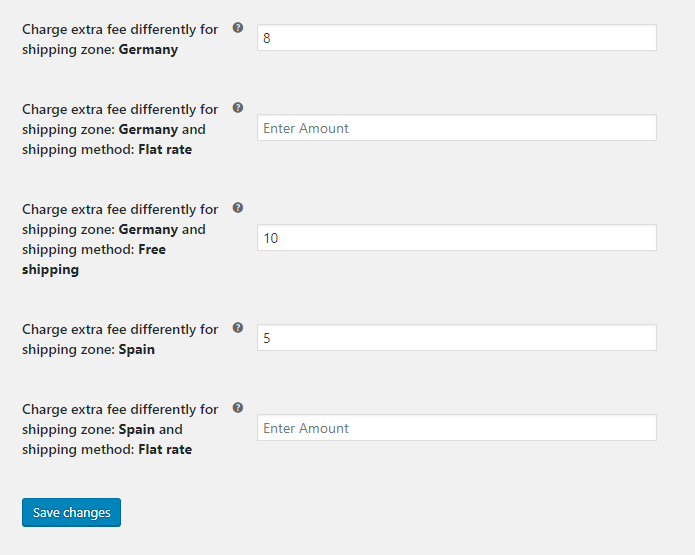
Smart COD for WooCommerce extends the WooCommerce Cash on Delivery (COD) Gateway with an optional extra fee and restrictions based on customer conditions such as location and selected shipping method.
Supports both Classic Checkout and WooCommerce Cart & Checkout Blocks (WooCommerce 9.9+ for Blocks). The same COD restrictions and extra fees apply to both checkout types.
Retirement of the free edition
Thank you for using Smart COD for WooCommerce in your store. The free edition will be retired during December. We’re focusing on Smart COD PRO to bring you more COD features and better support.
Your installed version will continue working with its current features and settings, but will no longer receive updates, including compatibility updates for WordPress and WooCommerce. Once the directory entry closes, new installations through WordPress.org will no longer be available. You do not need to buy PRO to keep using the version you already have installed.
See what changes, compare your current plugin with PRO and automatically import your settings.
Take full control of COD with Smart COD PRO
Create multiple rules for when COD appears, when a fee applies and how much to charge. Protect your store from non-collection using delivery history from your own store and other participating stores in your country.
- Different COD fees for different orders: combine cart value, products, customer details and shipping conditions to build the pricing that fits your store.
- More control before accepting COD: hide COD or request email verification when your checkout conditions match.
- Delivery history beyond your own store: use history from participating stores in your country alongside your own, with clear reasons for each decision.
- Partial COD with an upfront deposit: collect a fixed amount or percentage online and leave the balance payable on delivery.
Already using Free? Keep your setup. PRO automatically detects your saved Free settings for review and import, so you do not have to rebuild your rules. Premium ticket support is there when you need help.
The free edition described below retains its existing features on installed stores. Future development and new features will focus on Smart COD PRO.
Restrictions
Each restriction can be easily toggled between Enable and Disable. When set to Enable, the restriction will allow the Cash on Delivery (COD) payment option only for the specified selections. On the other hand, when set to Disable, the restriction will disable the COD option for the specified selections, making it unavailable for them.
- Shipping Zone
- Shipping Method inside Shipping Zone
- Country
- State
- Postal Code (Supports Ranges)
- City
- User Role
- Products in cart (Supports Variations)
- Categories of the products in cart
- Shipping Class
You can define an informational message to display before the payment methods, when the COD method is not available for a customer.
You can define different messages per restrict reason.
Extra Fees
You can configure a standard extra fee and a separate fee for local pickup.
You can use a fixed price or a percentage of the customer’s cart amount.
You also have a nice rounding option.
You can enable tax for this fee. Set a custom label for the fee in COD settings. The label appears in both Classic Checkout and Checkout Blocks.
Settings Backup
Export your Free settings as a JSON file and restore them on the same store from WooCommerce > Smart COD: Settings backup. Review the current and saved values before confirming. No paid account is required.
Backups include COD availability, fees, restriction selections and messages. Sharing consent, credentials and order/customer data are excluded and remain unchanged during restoration. Files from another store are not accepted because product, shipping and category identifiers are store-specific. A preview expires after ten minutes; changing settings after preview requires a new preview.
Developer-Friendly
The plugin integrates seamlessly with WooCommerce and uses a clean, object-oriented codebase. It also provides the following filters for easy customization:
wc_smart_cod_fee: Alter the extra fee.wc_smart_cod_available: Alter the current COD restriction.wc_smart_cod_fee_title: Change the COD fee title.
Since the plugin extends the existing WooCommerce Cash on Delivery Gateway, there’s no need to enable or disable gateways manually.
External services
COD Protection and data sharing are optional and off by default. If enabled in the Cash on Delivery settings, the plugin registers with api.woosmartcod.com using an installation ID, shop domain, country and public signing key. The existing choice carries forward after updates without a separate activation or upgrade notice. Switching it off stops future collection, transmission and checkout lookups.
The plugin sends new physical COD orders and their outcomes in signed batches. It sends eligible past cancellations and a capped prior-completion count for the shopper at the same store. Events include pseudonymized contact and postcode tokens, an order reference, timestamps, totals and currency, shipping method, item count, guest status and tracking details where available. The plugin never sends raw customer names, email addresses or phone numbers. The service uses these data for same-store COD Protection and may use eligible events to train cross-store models. Free checkout uses only same-store history.
Checkout sends hashed contact tokens, the installation ID and country. The service returns an allow or disable decision with a reference and policy details, not customer-history counts. It keeps aggregate decision statistics and pseudonymized evidence for denials. If the service is unavailable, COD stays available.
Service information: cancelled COD service privacy details, Terms and Conditions and Privacy Policy.
Promotional links
The retirement notice, settings card and Installed Plugins information link directly to woosmartcod.com without campaign tags, store identifiers or customer identifiers. The plugin does not send promotional requests or track notice impressions or clicks.
COD Protection, successful history and order lifecycle
Classic shortcode checkout remains supported. Cart and Checkout Blocks are also supported on WooCommerce 9.9 or newer through the native Store API and Blocks extension APIs. The same COD rules, fees and optional order-lifecycle collection apply to both checkouts. Third-party gateways and checkout fields require their own Blocks support.
With sharing enabled, new physical COD orders and their outcomes can be recorded immediately. For a cancellation to affect COD availability, it must meet fulfilment checks. An untracked fallback applies after at least 24 hours where there is no recognized tracking integration and any supplied source status indicates fulfilment.
The successful-history allowance uses matching email or phone history from the same store. The minimum success rate is configurable from 50% to 100% and defaults to 100%. For example, nine completed orders and one qualifying cancellation meet a 90% threshold. Pending orders are excluded.