
VybeDraft Product Uploader for WooCommerce
v1.1.1infinitistudios · 2026年8月5日 上架
Save hours on store management. Generate complete WooCommerce product listings with commercial studio imagery—all from a single photo.
- 正在使用
- 10 以下
- 评分
- 暂无
- 累计下载
- 632
- 最近更新
- 2026年11月22日
贡献者
 infinitistudios
截图
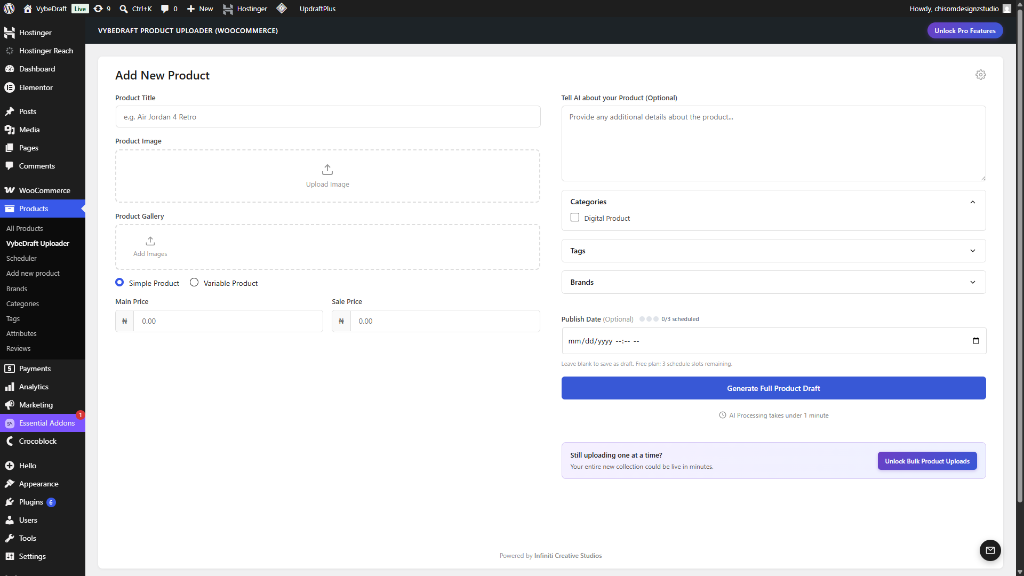
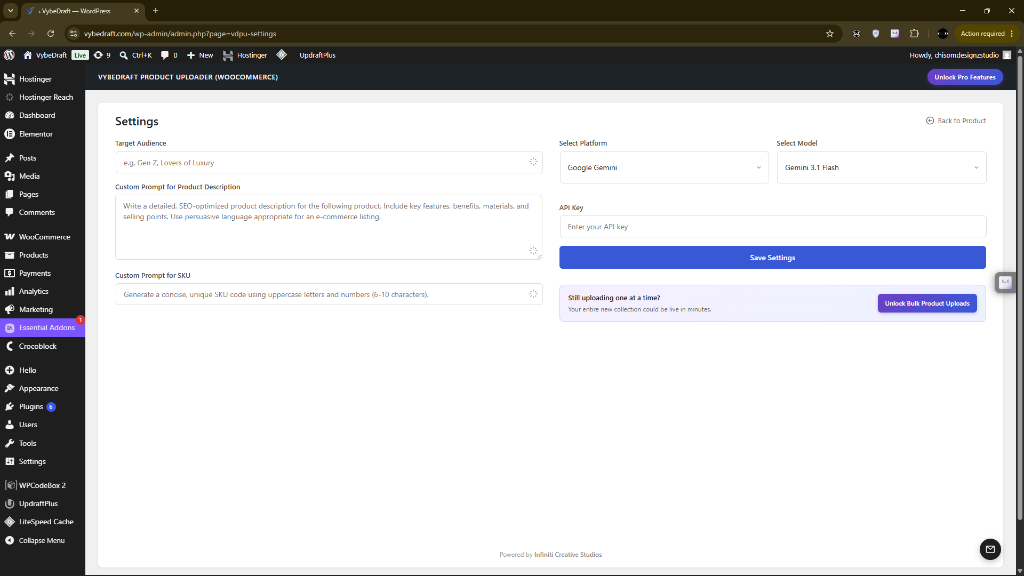
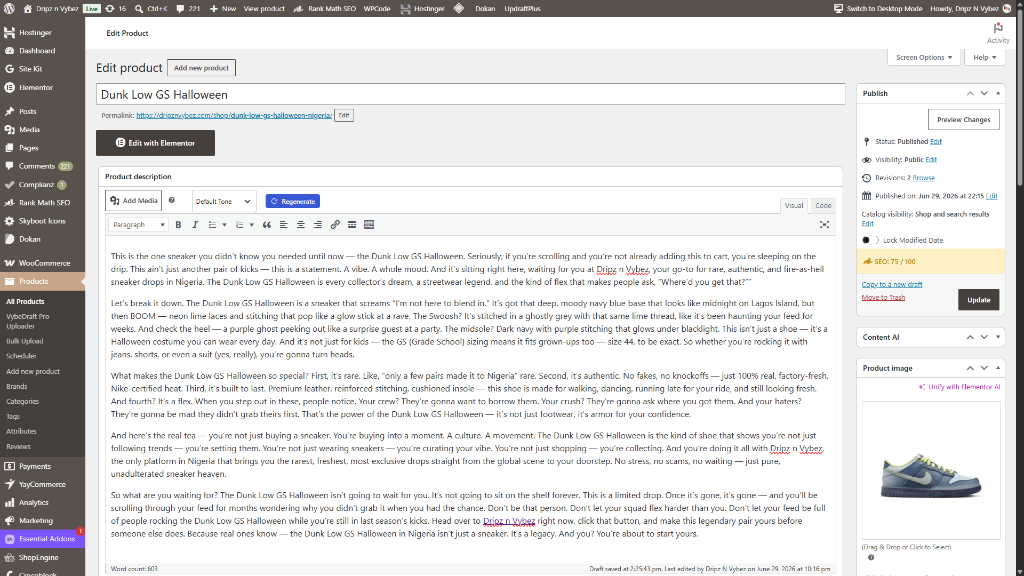
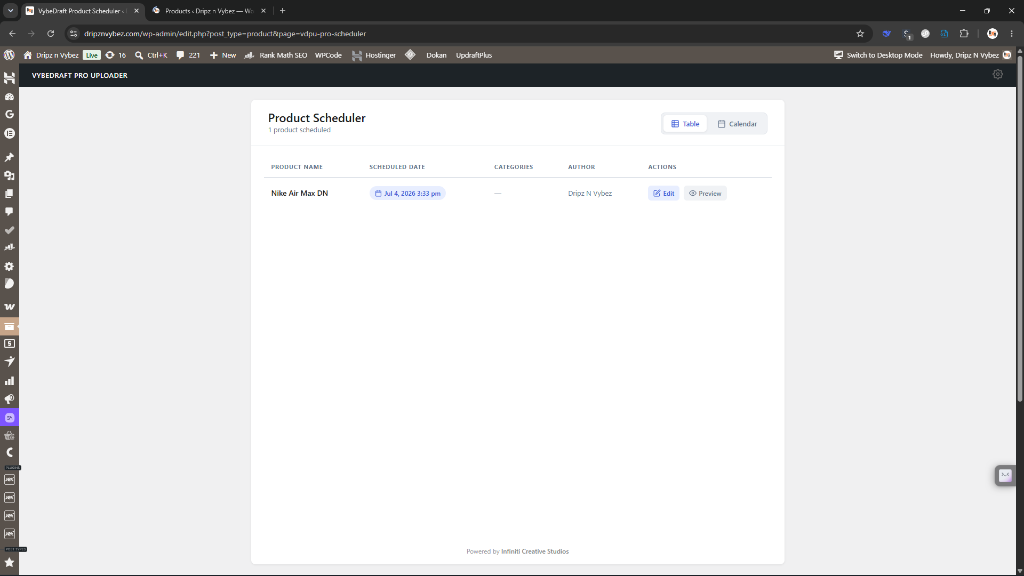
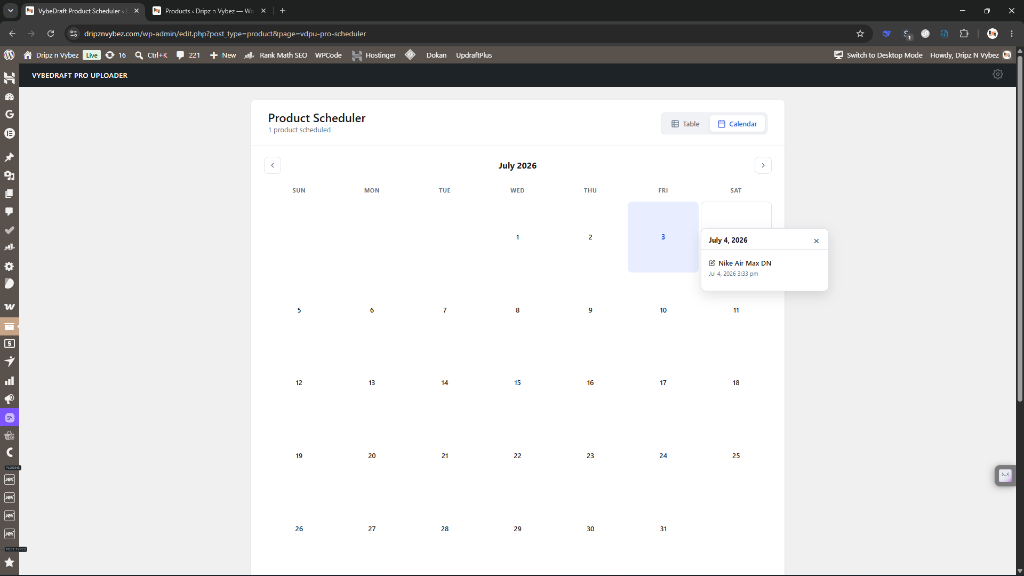
Stop spending hours manually writing product listings for your WooCommerce store. VybeDraft Product Uploader uses state-of-the-art AI Vision models to instantly generate complete, SEO-optimized product drafts from just a product image and a generic title.
Simply upload a photo of your product (such as a shoe, shirt, or gadget), add a simple title, and watch as advanced AI writes high-converting product descriptions, concise short descriptions, generates unique SKUs, assigns categories, and suggests tags—all in a matter of seconds.
Equipped with a powerful Product Scheduler, you can schedule product releases and manage your pipeline with a clean Table and interactive Calendar view. WordPress crons can be unreliable, but VybeDraft includes a built-in recovery mechanism to ensure missed scheduled products publish automatically.
📸 AI Product Studio (NEW)
Turn raw phone photos into crisp, studio-lit e-commerce product imagery right inside WordPress! Upload a raw photo, pick a curated Studio Preset (Pure White E-Com, Minimalist Podium, Warm Lifestyle, or Custom Prompt), and transform your image using Nano Banana 2.1, Nano Banana Pro, or GPT-Image-2.5 Sunburst (via Direct API or OpenRouter). Inspect results with an interactive Before / After Split Slider, download HD studio images directly to your device, or send them straight to the AI Listing Generator in one click.
How to Use the AI Product Studio:
1. Navigate to AI Product Studio: Go to Products AI Product Studio in your WordPress dashboard.
2. Upload Your Raw Photo: Drag and drop or upload a plain product photo taken from your phone.
3. Choose a Studio Preset: Select a commercial backdrop (Pure White E-Com, Marble Podium, Clean Sunlight) or create a custom scene by describing it or uploading a background reference.
4. Select Aspect Ratio & Click Generate: Choose your ratio (1:1, 3:4, or 4:3) and hit Generate Studio Image.
5. Inspect & Refine: Use the interactive Before/After slider to review the transformation, or use the Quick Refine bar for adjustments.
6. Download or Launch Listing: Click Download HD Image to save the commercial photo to your computer, or click Use as Featured Image & Create Listing to hand it straight to the AI listing generator.
🔌 Connect Directly to Your Favorite AI Platforms (BYOK)
We believe in absolute privacy and cost control. VybeDraft runs on a Bring Your Own Key (BYOK) model, connecting your store directly to the world’s leading AI APIs. You pay only the raw cost per generation directly to the providers—often fractions of a penny per product—with no middleman markups!
Supported platforms include:
* OpenAI: Leverage the gold standard of AI reasoning with GPT-6.2 (Astra, Sol), GPT-6 (Astra, Sol, Terra, Luna), and the GPT-5.6 series.
* Anthropic: Utilize Claude Fable 5.2, Claude Fable 5.1, Claude Opus 5.5, Claude Sonnet 5.5, Claude Haiku 5.5, and the Claude 5 series for natural, copywriter-grade writing styles.
* Google Gemini: Generate listings quickly and cost-effectively using Gemini 4 (Carbon, Argon, Neon, Hydrogen), Gemini 3.8 Flash, and Gemini 3.5 Flash Lite.
* OpenRouter: Tap into a massive catalog including Free Vision Models (Auto Free Router, NVIDIA Nemotron 3.5 Super VL, NVIDIA Nemotron 3 Nano Omni, Particle 1, Dots3-Note Preview), plus GPT-6.2/GPT-6, Gemini 4, Claude 5.5/Fable 5.2, Meta Muse Spark 1.3 & 1.3 Contributor, Kimi K3.1 Pro & K3, Qwen 4 Max & 3.8 Flash, and DeepSeek V4.1 Flash.
✨ Key Features
- AI Product Studio: Transform raw smartphone photos into professional studio product shots with Product Fidelity Guardrails, Before/After slider, and 1-click HD image downloads.
- Affiliate / External Product Auto-Extraction: Automatically pulls featured product image, product gallery photos, regular & sale prices, and product context from external product links.
- Variable & Simple Product Inventory Controls: Global attribute sync, inline attribute/term creation, per-variation stock management, and Simple product stock quantity controls.
- AI-Powered Content Generation: Automatically writes long descriptions, short descriptions, and tags.
- Visual Product Analysis: AI analyzes images to detect colors, materials, patterns, and features.
- Smart SKU Generation: Automatically creates unique, clean SKUs for your product drafts.
- Product Scheduler: Schedule posts and view them in custom Table or Calendar dashboard views.
- Missed Schedule Recovery: Built-in safeguards that catch and auto-publish missed scheduled products.
- Custom Brand Prompts: Tailor the AI’s writing style, tone, language, and SKU structure to match your brand identity.
- WordPress Native UI: A sleek dashboard built to feel like an organic part of WooCommerce.
- Strict Security & Compliance: Developed with clean, fully sanitized, and escaped code adhering to WP.org repository guidelines.
External Services
This plugin connects directly to third-party AI services to generate WooCommerce product content (descriptions, short descriptions, and SKUs) from your uploaded product image. No requests are made until you click the generation or bulk processing button on the dashboard. Your API key and the product image are sent directly to your chosen provider at that point.
1. OpenAI
Used to connect to OpenAI’s models (e.g., GPT-4o) via their official API.
* Service URL: https://api.openai.com
* Terms of Service: https://openai.com/policies/terms-of-use
* Privacy Policy: https://openai.com/policies/privacy-policy
2. Anthropic
Used to connect to Anthropic’s Claude models via their official API.
* Service URL: https://api.anthropic.com
* Terms of Service: https://www.anthropic.com/legal/consumer-terms
* Privacy Policy: https://www.anthropic.com/legal/privacy
3. Google Gemini (Google AI Studio)
Used to connect to Gemini models via the Google Gemini API.
* Service URL: https://generativelanguage.googleapis.com
* Terms of Service: https://ai.google.dev/gemini-api/terms
* Privacy Policy: https://policies.google.com/privacy
4. OpenRouter
OpenRouter is an AI model aggregation service that routes requests to various AI providers.
* Service URL: https://openrouter.ai
* Terms of Service: https://openrouter.ai/terms
* Privacy Policy: https://openrouter.ai/privacy
What data is sent: The product image you upload (as base64-encoded data) and a text prompt containing your product title and any optional context you provide. No personal user data or customer data is transmitted.
When it is sent: Only when you click the “Generate Full Product Draft” button. Nothing is sent automatically.
External services
This plugin connects to external artificial intelligence APIs to generate product listings from images and titles.
When a user explicitly clicks the “Generate Product” button, the product image and title are sent to the selected AI provider to generate the product description and SKU. The APIs supported are OpenAI, Anthropic (Claude), Google Gemini, OpenRouter, and GitHub Models.
No data is sent automatically or in the background. Data is only transmitted when the user explicitly requests generation and provides their own API key.
- OpenAI: Terms of Service, Privacy Policy.
- Anthropic: Terms of Service, Privacy Policy.
- Google Gemini: Terms of Service, Privacy Policy.
- OpenRouter: Terms of Service, Privacy Policy.
- GitHub Models: Terms of Service, Privacy Policy.