
Vinvin AI Visibility Tools
v1.0.0vinvin27 · 2026年11月3日 上架
See what AI assistants can read on your site, and decide which AI crawlers may use it: a readiness checklist and purpose-based crawler controls.
- 正在使用
- 10 以下
- 评分
- 暂无
- 累计下载
- 417
- 最近更新
- 2026年11月4日
贡献者
 vinvin27
截图



People now ask AI assistants what to buy, who to call and which company to trust. Vinvin AI Visibility Tools shows you what those assistants can read on your WordPress site, and lets you decide which AI crawlers may use it. It does nothing at all until you switch something on.
1. A checklist of what your site shows to AI assistants
One click reads your own home page, robots.txt, llms.txt and sitemap, and gives a score out of 100 with a plain-language list of what to fix:
- are AI search and answer crawlers allowed in, or blocked by mistake?
- can your home page be indexed (“Discourage search engines” and noindex)?
- does your home page say who you are in structured data?
- title, meta description and one clear H1;
- is there real text in the HTML, for crawlers that do not run JavaScript?
- do your images have descriptions;
- are an XML sitemap and an llms.txt published?
The check runs on your own server and reads only your own site. Nothing is sent anywhere.
2. AI crawler controls grouped by purpose
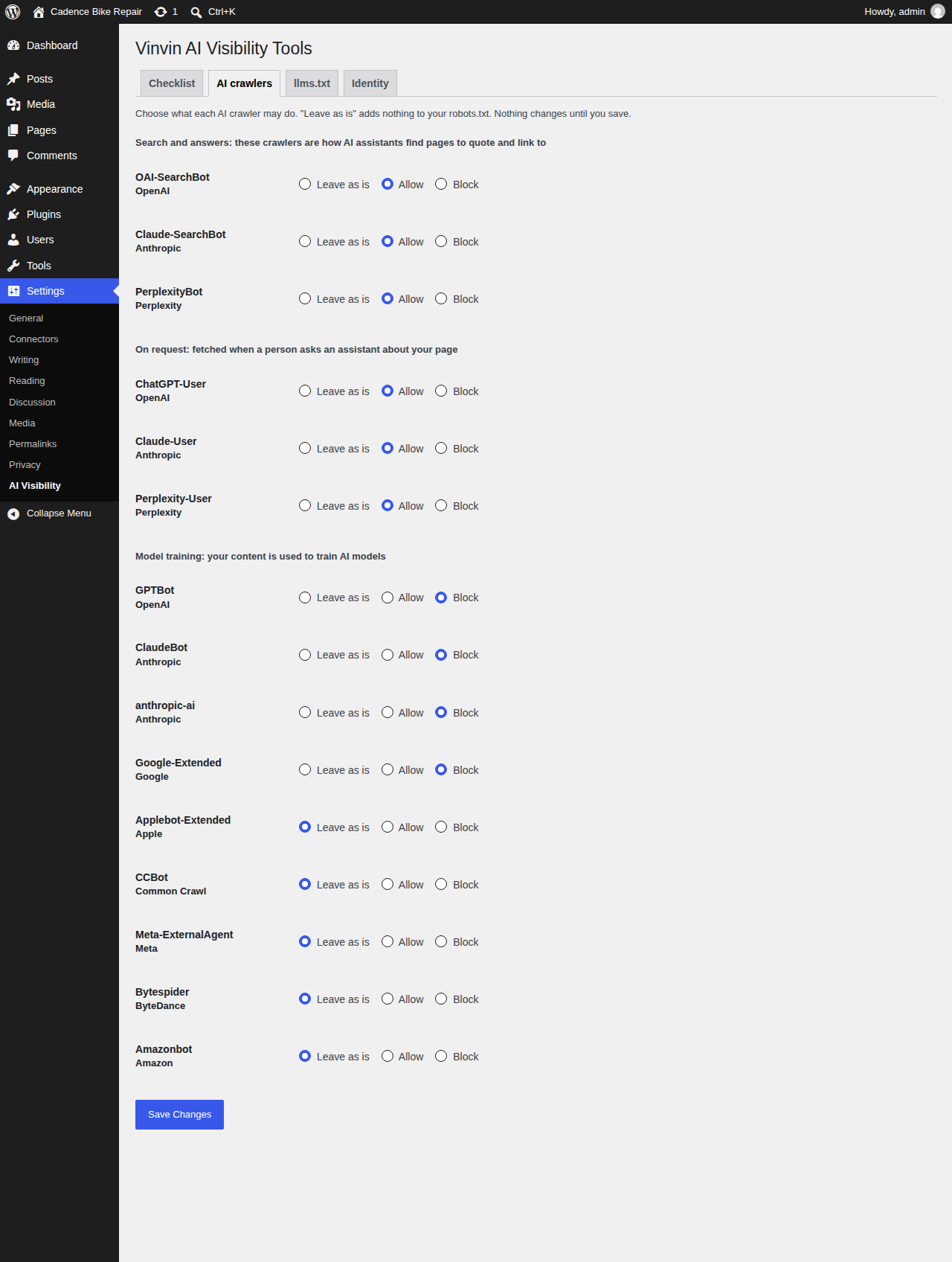
For each known AI crawler, choose “Leave as is”, “Allow” or “Block”. Crawlers are grouped by what they do, so you can make a different choice for each group: search and answers (OAI-SearchBot, Claude-SearchBot, PerplexityBot), fetches made when a person asks an assistant about your page (ChatGPT-User, Claude-User, Perplexity-User) and model training (GPTBot, ClaudeBot, anthropic-ai, Google-Extended, Applebot-Extended, CCBot, Meta-ExternalAgent, Bytespider, Amazonbot). You can, for example, stay visible in AI answers while refusing model training. The plugin warns you when a physical robots.txt file or the “Discourage search engines” setting would make your choices ineffective.
3. Optional extras
- llms.txt: a short Markdown page at
/llms.txtwith your summary, key pages and latest posts, with a preview. Off by default. - Organization data: a small schema.org block on your home page, if your SEO plugin does not already add one. Off by default.
What this plugin does not do
- It does not promise that any assistant will mention you. llms.txt is a community proposal and no assistant is guaranteed to read it; crawler rules are requests that well-behaved crawlers follow.
- It cannot change a robots.txt or llms.txt file that physically exists in your site folder: your web server serves those directly. The plugin tells you when it finds one.
- It does not measure whether assistants name your business. For that, the author runs a free live audit on his own website, linked from the checklist.
Privacy
Vinvin AI Visibility Tools does not contact any other server, sets no cookies and collects no data. The checklist makes requests to your own site only.
More details in the plugin presentation (in French).
Developed by a WordPress developer in Montreal.