

Uploads Unleashed – Resumable Large File Uploads
v1.2.0Konstantin Obenland · 2026年2月9日 上架
Upload large files past PHP and host limits in chunks. Resume after a dropped connection or reload. Media Library and block editor. No settings.
- 正在使用
- 30+
- 评分
- 5.0 / 5
- 累计下载
- 1,275
- 最近更新
- 2026年11月7日
 Konstantin Obenland
截图
“This file exceeds the maximum upload size for this site.” “The uploaded file exceeds the upload_max_filesize directive in php.ini.” “413 Request Entity Too Large.” If you’ve tried to upload a video, a podcast episode or a large PDF to WordPress, you’ve probably seen one of these. Or you watched an upload crawl to 90%, lost your connection, and had to start over.
Uploads Unleashed sends each file in small chunks, using the open TUS resumable upload protocol. Every chunk is far below your server’s limit, and the server puts the file back together when the last one arrives.
- Get past upload size limits. Upload files larger than PHP’s
upload_max_filesizeandpost_max_size, without editingphp.inior asking your host. On a single site, the maximum upload size WordPress shows becomes the free disk space in your uploads folder. - Don’t start over. If a chunk fails, for example because of a network hiccup or a server timeout, it’s retried a few times on its own. If that isn’t enough, you go offline, or you reload or close the tab, select the same file again within 24 hours and the upload continues from the last chunk the server received.
- Nothing to set up. Activate it and upload the way you always do. There’s no settings page.
Where it works
- Media Library (Media Library, grid view)
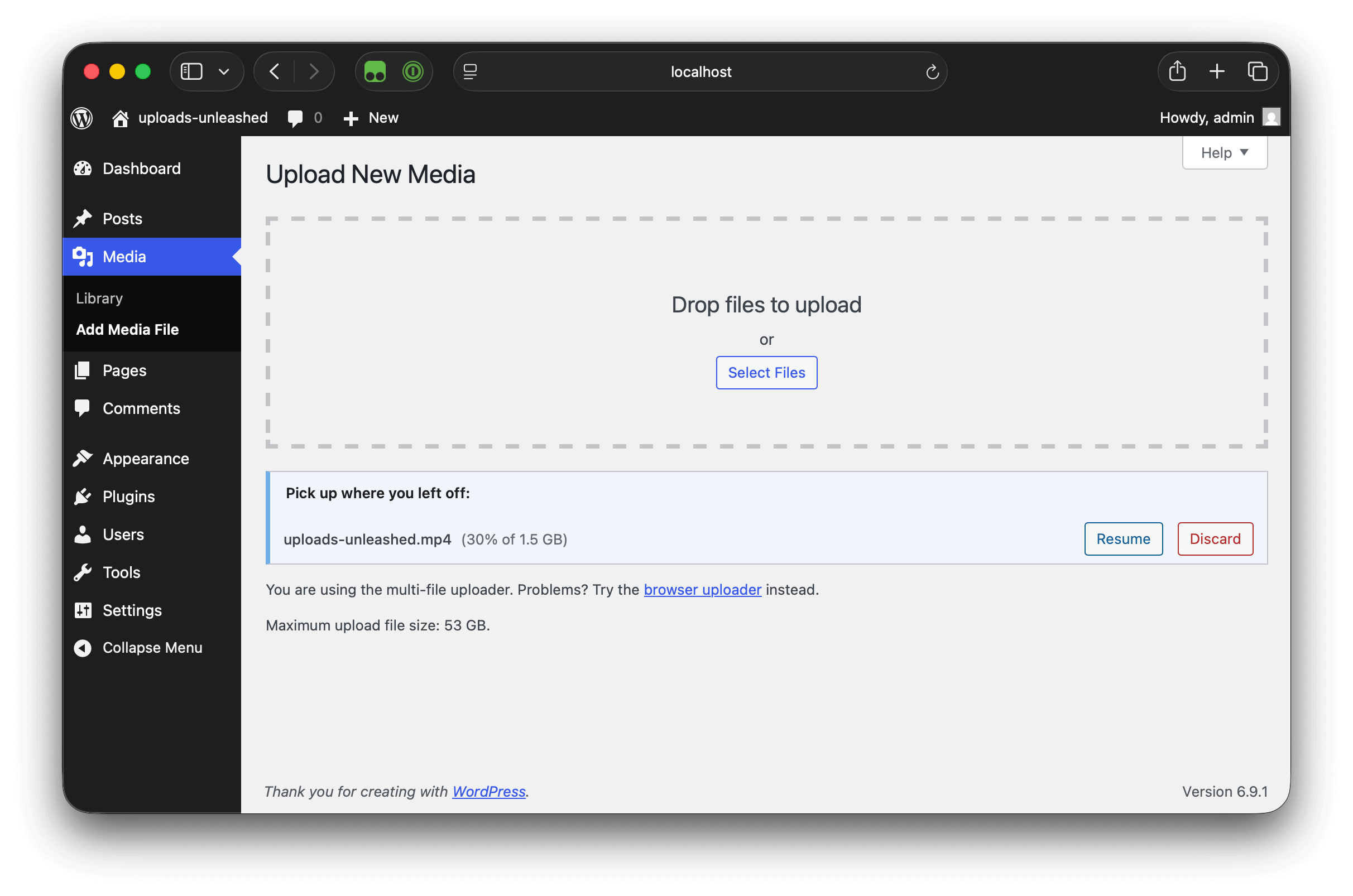
- Add New Media (Media Add Media File), which also lists interrupted uploads with Resume and Discard buttons
- Block editor: files you drop or upload into blocks such as Image, Video, Audio and File
- Media modal: the “Upload files” tab of the media picker, used by the block editor’s “Media Library” button, the classic editor’s “Add Media” button and other screens that open it
The Media Library, Add New Media and media modal show progress as the upload runs. When you open the block editor or the Media Library with unfinished uploads, a notice links you to Add New Media to resume them.
If a resumable upload fails in the block editor, you’ll see a notice and the plugin hands the file to WordPress’s regular upload, which has the usual size limits.
Why it’s different
Plugins that only raise the upload limit can’t go past what PHP and your host allow. Some split files into chunks too, but start over when the connection drops, or only work in the Media Library.
- Resumable: interrupted uploads continue where they stopped, even after a reload.
- Works in the block editor, not only in the Media Library.
- No settings, no upsell, no account. Everything the plugin does is free.
- Built on an open standard: the upload endpoint speaks TUS 1.0, so it works with standard TUS clients, too.
For developers
- TUS 1.0 endpoint.
POST /wp-json/wp/v2/mediawith anUpload-Lengthheader creates an upload, and/wp-json/wp/v2/media/<uuid>takesHEAD,PATCHandDELETE. Supported extensions: creation, expiration, termination and checksum (SHA-256, SHA-1, MD5). Clients that can’t sendPATCH,HEADorDELETEcan send aPOSTwithX-HTTP-Method-Override. Requests authenticate like any other REST API request. - Hooks. PHP filters and actions let you change the maximum upload and chunk sizes, validate or replace finalization, and react to each step of an upload. The JavaScript filter
uploadsUnleashed.shouldUseTusdecides per file whether to use resumable uploads, anduploadsUnleashed.allowFallbackcontrols the block editor fallback. See the hooks reference. - WP-CLI.
wp tus listshows uploads in progress,wp tus cancel <upload-id>cancels one, andwp tus cleanupremoves expired ones. - Source and issues on GitHub.