

Upgravo – PHP Compatibility Checker & Scanner
v0.1.12Nicolás Alejandro Salinas · 2026年10月31日 上架
Check if your plugins and theme will break on PHP 8.2, 8.3, 8.4 or 8.5 before you upgrade. Free, on your own server, no account.
- 正在使用
- 10 以下
- 评分
- 暂无
- 累计下载
- 676
- 最近更新
- 2026年11月25日
 Nicolás Alejandro Salinas
截图
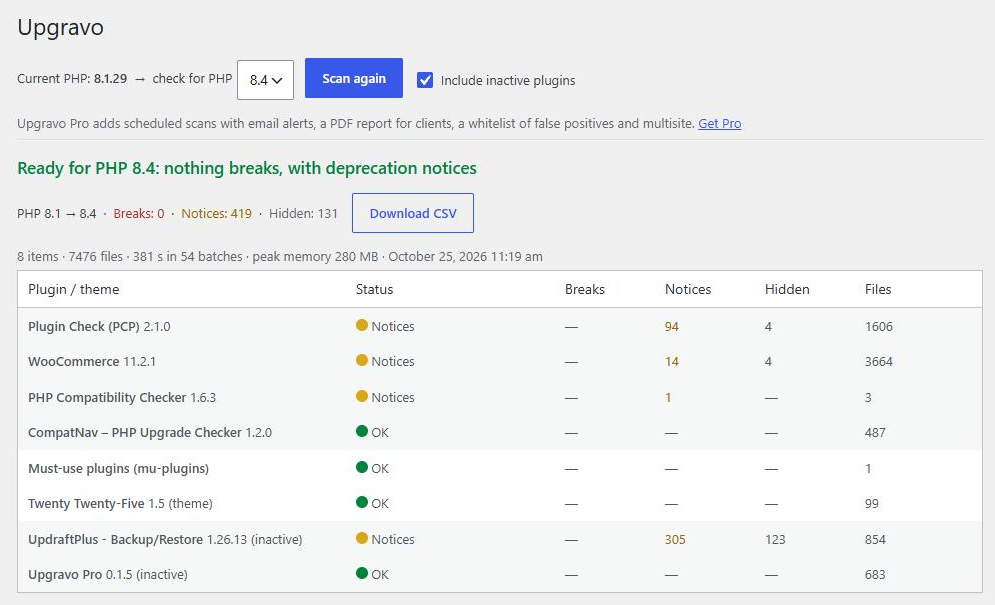



PHP 8.2 stops getting security fixes on 31 December 2026. PHP 8.1 and older already get none, and hosts are moving sites to PHP 8.3, 8.4 and 8.5. Before you change the PHP version, you want to know one thing: will my site break?
Upgravo reads the code of every plugin and your theme, on your own server, and gives you a straight answer:
- Ready for PHP 8.4: nothing breaks — or Not yet: something active breaks, with the exact plugin, file and line.
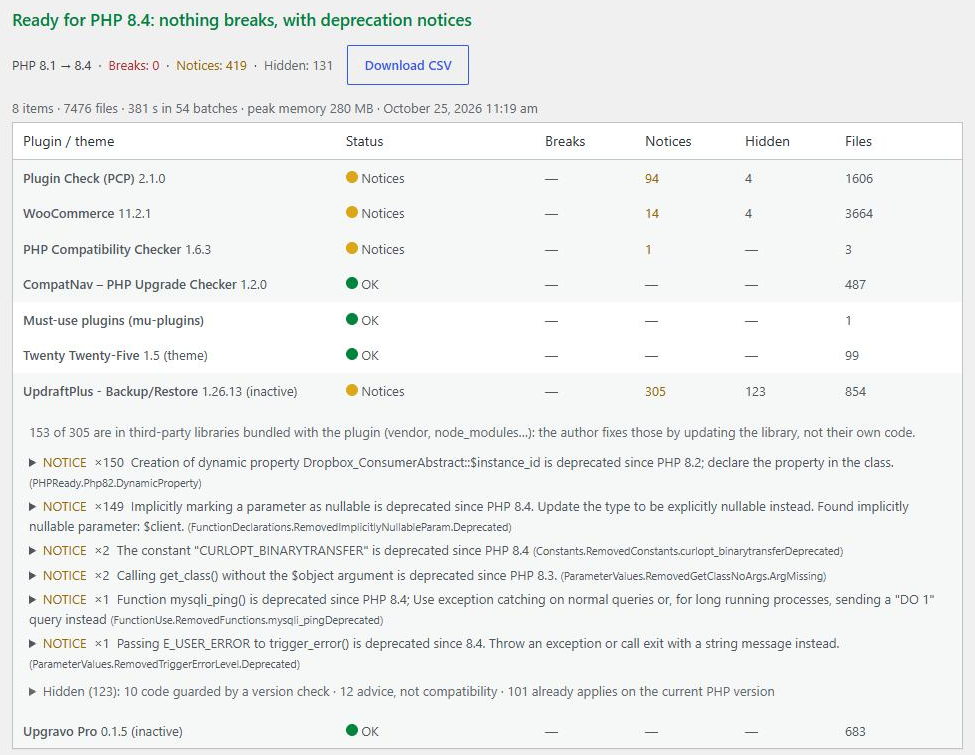
- Breaks vs deprecation notices: a removed function stops the site with a fatal error; a deprecation only writes a line in the error log. Upgravo keeps the two apart so you know what is urgent.
- What to do first: if the plugin that breaks has an update available, it says so. If it is inactive, it says it does not matter until you activate it.
- The verdict on the Plugins screen: after a scan, every plugin row shows “PHP 8.4: OK”, “PHP 8.4: works, 12 notices” or “PHP 8.4: 3 breaks”, with a link to the details. If a plugin was updated after the scan, it tells you which version was checked.
- Abandoned plugins: plugins not tested with the last three WordPress versions are flagged, using the data WordPress already downloads for updates. Optionally, Upgravo also asks WordPress.org whether each plugin was closed (for example for a security issue) or has not been updated in two years.
- How to fix, with code: for the most common problems (implicitly nullable parameters, removed extensions,
each(),create_function(),${var}in strings, dynamic properties, the PHP 8.5 casts…) each finding explains what changed in PHP and shows the code before and after, so you can fix your own code or send it to the plugin author. - Copy summary: one click copies a plain-text report (verdict, what breaks, what to do first) to paste in an email to your client or in a ticket to your host.
Fewer false alarms
A raw PHPCompatibility scan of the 20 most installed WordPress.org plugins (20,100 PHP files) reports 165 “errors” for PHP 8.4. Every one of them is code that never runs on PHP 8: old fallbacks behind function_exists(), extension_loaded() or a PHP version check. A checker that shows them all tells you that your site is broken when it is not.
Upgravo recognises those guards, but only when the guard names the exact function, constant or class it protects: function_exists( 'a' ) around a call to b() does not hide b(), and a call inside if ( ! function_exists( 'x' ) ) is still reported. Findings that only apply to the PHP version you already run are hidden too, because your site already lives with them. Nothing is thrown away: every hidden finding can be expanded, with the reason it was hidden.
Designed for any hosting
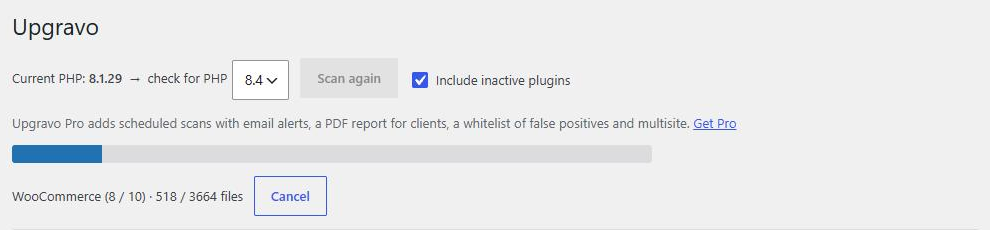
- Runs on shared hosting. The scan runs in short batches with a progress bar, so it never hits the 30-60 second request limit of shared hosts. Close the tab and come back: it resumes where it stopped.
- No
exec(), no shell, no external server. Your code never leaves your site. Nothing to sign up for, no license key to see results. - Covers the whole site: must-use plugins, drop-ins (
advanced-cache.php,object-cache.php,db.php…), the parent theme, and every class of WordPress core itself, so a plugin that extendsWP_WidgetorWC_Payment_Gatewayis checked properly instead of ignored. - Any upgrade path from PHP 7.4 to 8.1, 8.2, 8.3, 8.4 or 8.5: removed functions and extensions (
mysql_*,mcrypt,each(),create_function(),imap_*andpspell_*in PHP 8.4…), PHP 8.0 fatal errors, PHP 8.1–8.5 deprecations including dynamic properties (PHP 8.2), implicitly nullable parameters (PHP 8.4),'self::method'callables and the PHP 8.5 changes ((boolean)/(integer)casts, backticks,curl_close()…). - Site Health integration: the verdict shows up in Tools Site Health.
- WP-CLI:
wp upgravo scan --target=8.4 --format=jsonreturns exit code 1 if anything active breaks, so agencies can check 50 sites from a script. - CSV export of every finding, including the hidden ones and why they were hidden.
For freelancers and agencies
Hosts send the same email to all your clients: “your PHP version is going away”. Install Upgravo on each site, scan, and use Copy summary to answer the client with a list of what breaks and what to do first. The free plugin has no site limit.
Upgravo Pro adds what you need when you maintain many sites: scheduled scans with an email when a plugin update introduces an incompatibility, a PDF report with your name for the client, a whitelist of reviewed findings per plugin, and multisite (one scan for the whole network).
Built on PHPCompatibility
The analysis engine is PHPCompatibility (176 rules maintained by the PHP community since 2012) running on PHP_CodeSniffer, bundled inside the plugin, plus Upgravo’s own detectors for PHP 8.2 dynamic properties and relative callables. It reads code; it does not run it. A static scan cannot see problems that only appear at runtime, so treat “nothing breaks” as “nothing we can see breaks”, and keep a backup before any upgrade.
External services
By default Upgravo makes no external requests. It only uses the plugin data that WordPress itself already downloaded from WordPress.org when it checked for updates.
If you tick “Also check on WordPress.org whether each plugin is still maintained” on the Upgravo screen, Upgravo sends the folder name (slug) of each scanned plugin to the WordPress.org Plugin API (https://api.wordpress.org/plugins/info/1.2/) after a scan, to read whether the plugin was closed and when it was last updated. Nothing else about your site is sent. Answers are cached for 24 hours. The service is provided by WordPress.org, under its privacy policy. Untick the box to stop it.
Third-party libraries included
- PHP_CodeSniffer — BSD-3-Clause
- PHPCompatibility — LGPL-3.0-or-later
- PHPCSUtils — LGPL-3.0-or-later
Source code
The free plugin is developed in the open: https://github.com/nis-prog/upgravo (support stays in the WordPress.org forum).