
Translate This
v9.03.12andrea.olivato · 2009年3月9日 上架
Translate This is a Wordpress plugins that allows users to translate their posts and pages directly from the input form.
- 正在使用
- 10+
- 评分
- 暂无
- 累计下载
- 6,865
- 最近更新
- 2009年3月12日
贡献者
 andrea.olivato
截图
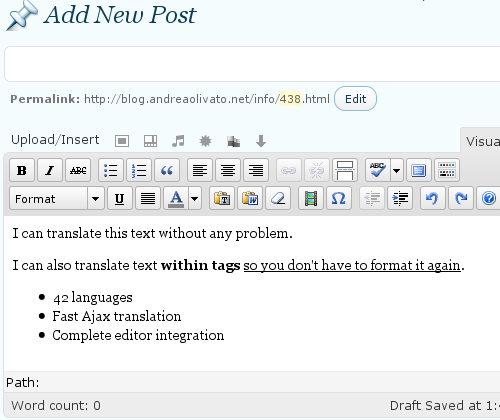


Translate This is a WordPress plugins that allows users to translate their posts and pages directly from the input form.
[updated] You can watch a preview of what this plugin can do on youtube:
Watch the screencast
After installing it you will be able to open the translation menu from both the edit and the add new pages for posts and pages. Inside the translation menu you will have the possibility to choose in which language you want to translate (42 languages availables) your text and a short preview of what you will obtain.
The language you’re writing on is automatically detected, so you don’t have to specify it and obviously HTML tags are preserved by the system.
After choosing the language the preview will update automatically in a few seconds, depending on your connection speed. After you read the preview and agreed it is a good result you can confirm the translation tool to substitute your text with the translated one. If you’re not satisfied you can just undo your latest action ( CTRL+Z on the text area ) and you will came back to your original post.
CHANGELOG
-
9.03.12
- Fixed bug wordpress installations which are not located in the root folder of the domain.
- More details – Many thanks to Marco Battistoni for this fix
-
9.03.11
- Added flags to language selection
- Graphics improvement on popup
- When selecting HTML editor mode plugin will hide itself
-
9.03.09-1
- Fixed compatibility issues with contact_forms_iii
-
9.03.09
- Fixed paths problem with image and iframe
-
9.03.08
- Initial Release
CREDITS
Language icons have been realized by Icon Drawer
Usage
For more usage information please read the USAGE INSTRUCTIONS
Using is even simplier then installing it. Just start a new article clicking on New Post ( top-left of the administration area), write something on your native language in the text area and then look for the flag icon located in the Upload/Insert row right before the text editor where you typed.
After clicking the flag a popup will appear, containing a simple select with all the languages supported by Google language tools. After the select you can see a preview of your text translated on the default language ( English ). If you want to translate your native post into any language just choose it from the select and allow some seconds to the script to update the preview.
After the script made its job, if you are satisfied on what it translated just press Send & Close which will translate the text into your editor and close the popup. If instead you want to close the window without making any change to your text just close the popup clicking on the big grey X at the top left of it.
Video Preview
You can watch a preview of what this plugin can do on youtube updated