

Total Cost Input for WooCommerce
v2.3.0ethereumicoio · 2022年6月30日 上架
Let customers enter the amount of money they want to spend and buy the matching product quantity.
- 正在使用
- 10 以下
- 评分
- 5.0 / 5
- 累计下载
- 3,226
- 最近更新
- 2026年11月24日
贡献者
 ethereumicoio
截图


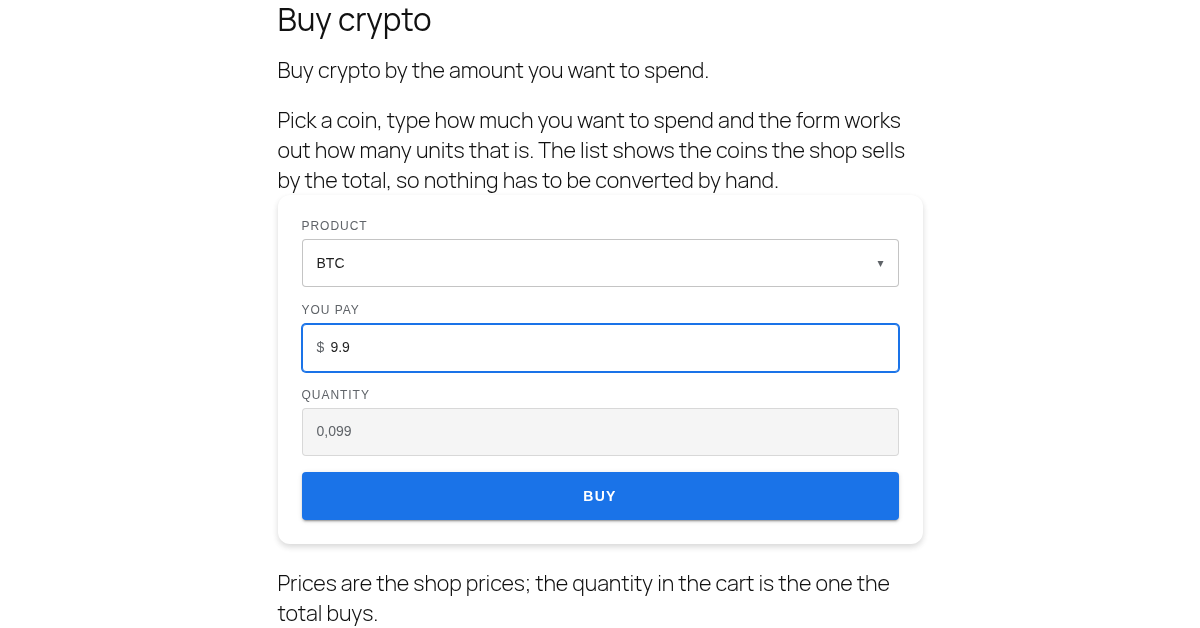


Total Cost Input for WooCommerce plugin lets customers enter the amount of money they want to spend. The matching product quantity is calculated for them and shown right next to the sum (and, in the PRO version, the customer can also type the quantity and the two numbers stay in sync).
This plugin is ideal to sell products that can not be counted in portions, like liquids, powders, gas, cryptocurrencies, etc.
With this plugin used, your customer can just enter a sum, like $100 for example, and buy some amount of product you are selling, in grams, litres, bitcoins, etc.
It can be a valuable addition to your crypto selling store with the Cryptocurrency WordPress Plugin for WooCommerce!
Features
- Your customer types the sum, not the quantity: on a product that sells by the total, entering $9.9 at a $100 unit price shows 0.099 units next to the amount, and that is the quantity that goes into the cart.
- The sum field is switched on per product: one checkbox on the product’s General tab makes that product, and only that product, ask for a total instead of a quantity.
- One settings screen controls the sale: the quantity step (0.001, 0.1, …), the order of the widget fields, each field’s width out of twelve columns, the button text and the widget style.
- Sell by the sum from any page: the
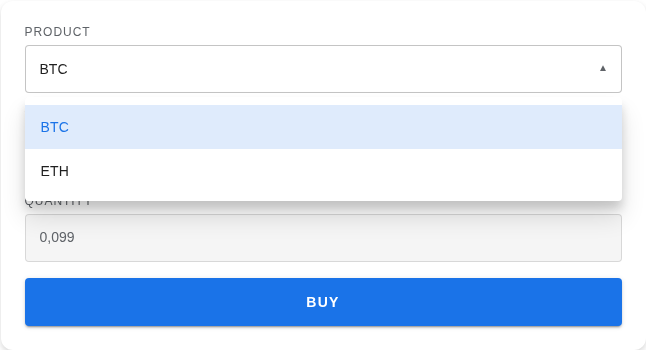
[total_cost_input_widget]shortcode, or theTotal Cost Inputblock in the editor, shows the product, the sum and the resulting quantity in a finished Material card. - The widget’s dropdown lists the products by name only, with no prices in the list, so the buyer picks the coin rather than comparing numbers.
- The field order is yours: the sum can come first and the product after the quantity, set per shortcode, per block or once for the whole site.
- The card is arranged in the block editor, not in code: the inspector reorders the four fields, sets each field’s width out of twelve columns, and the Professional version adds a Style panel with the style mode, colours, font, size and corner radii.
- All four fields – the sum, the quantity, the product and
Buy– sit side by side on one line: each field takes a span of 1 to 12 columns, and 4 + 4 + 1 + 3 fills a row of twelve exactly, with no separate layout switch.
PRO Features
- On the product page the two fields stay in sync in either direction: type 0.05 units and the sum becomes $5.00.
- The widget’s quantity field is editable too, so the buyer types the units instead of only reading the number the sum produced.
- A custom style paints the widget: the card and button colours, the text colour, the font family and size, and the corner radii of the card and of the button.
- The custom style works in a one-row layout as well: the same colours, font and radii with the fields sharing the line.
Works with
- Classic WooCommerce product, cart and checkout templates, on WooCommerce 5.5 and newer.
- In the Professional version the widget can offer the products of the current vendor only, on a WC Vendors, Dokan or WCFM page. No screenshot confirms this one: it is a per-page restriction with no screen of its own.
- In the Professional version the widget’s product list can be restricted to the products you choose. No screenshot confirms this one either, for the same reason.
- The widget’s product list holds the shop’s sellable set only: published products, in stock or on backorder, and simple enough to price per unit. No screenshot confirms this one either: the list shows two names and carries no stock or visibility marker.
- In the Professional version the buy button carries your text instead of
Buy, and the widget can take the look of the site theme; both are rows on the settings screen shown above.
Not supported yet
Block-based product surfaces are not supported yet. The Total Cost Input field works on the classic single-product template and on the classic cart and checkout. The block versions of those pages (the Single Product block, the Cart and Checkout blocks) render the quantity field on the client side and therefore ignore the plugin’s field:
- Single Product block – no
Total Cost Inputfield; - Cart and Checkout blocks – no money/quantity synchronisation.
Use the classic templates (or the [total_cost_input_widget] shortcode / block, which is unaffected) until a future release adds the block support.
l10n
This plugin is localization ready.
Languages this plugin is available now:
- English
- Arabic (عرب)
- Czech (čeština)
- Danish (Dansk)
- German (Deutsche)
- Greek (Ελληνικά)
- Spanish (Español)
- Persian (فارسی)
- French (Français)
- Hebrew (עִברִית)
- Hindi (हिन्दी)
- Indonesian (Bahasa Indonesia)
- Italian (Italiano)
- Japanese (日本)
- Korean (한국인)
- Malay (Melayu)
- Norwegian (Norsk)
- Netherlandish (Nederlands)
- Polish (Polski)
- Portuguese (Português)
- Russian (Русский)
- Slovak (Slovenský)
- Finnish (Suomalainen)
- Swedish (Svenska)
- Thai (ไทย)
- Philippine (Pilipinas)
- Turkish (Türk)
- Vietnamese (Tiếng Việt)
- Chinese (中国人)
Feel free to translate this plugin to your language.