

Slider Addons for The Events Calendar
v2.4.2mywptrek · 2022年2月15日 上架
Slider Blocks to showcase your events.
- 正在使用
- 300+
- 评分
- 4.7 / 5
- 累计下载
- 7,363
- 最近更新
- 2025年1月27日
 mywptrek
 Freemius
截图
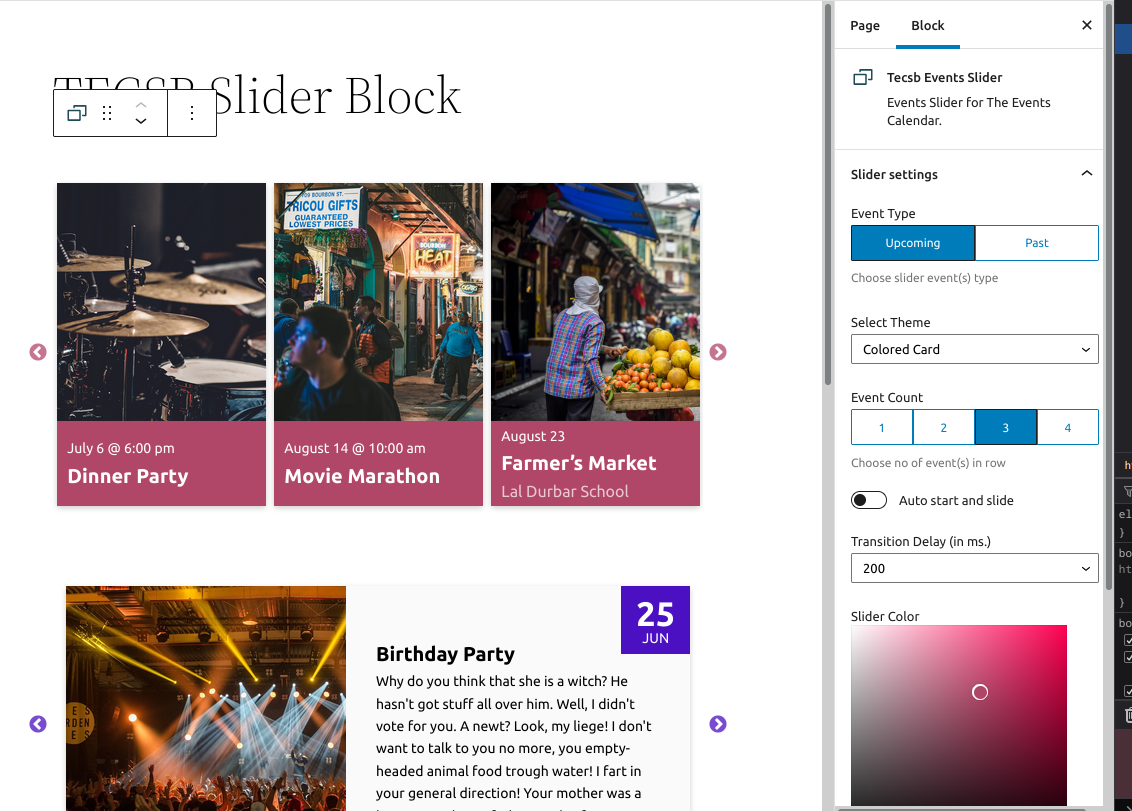


Slider Addons for The Events Calendar is the perfect solution to beautifully showcase your upcoming or past events in a customizable, responsive slider. Whether you’re using the Gutenberg Block, Elementor widget, or shortcode, this plugin provides you with flexible options to create eye-catching event sliders with ease.
Features
Multiple Display Options
– Showcase upcoming or past events.
– Works seamlessly with Gutenberg Block, Elementor Widget, or Shortcode.
Customization Options
– Adjust the number of events displayed in rows and slides.
– Set autoplay and transition delay for sliders.
– Customize color schemes with a color picker.
– Option to open events in a new tab on click.
– Adjust slider height and image height.
Theme Selection
– Choose from three pre-designed themes: DateTop, ColoredCard, SingleEvent.
Shortcode Usage
Example Shortcode:
[add_mwt_tec_slider slidertheme="datetop" slidertype="upcoming" eventinrow="3" eventinslide="2" autoplay=true transitiondelay="100" colorscheme="#215455" newtab=true category="party"]
Shortcode Attributes:
- slidertheme: Choose between ‘datetop’, ‘coloredcard’, or ‘singleevent’.
- slidertype: Define the type of event to display (‘upcoming’ or ‘past’).
- eventinrow: Number of events displayed per row.
- eventsinslide: Number of events displayed per slide.
- autoplay: Set autoplay to true or false (Default: true).
- transitiondelay: Adjust the transition delay (in milliseconds, Default: 200).
- colorscheme: Hex code for the color scheme (Default: #5a30f3).
- newtab: Open events in a new tab (Default: true).
- category: Filter events by category using category slug.
- slideheight: Adjust slider height (Default: 300).
- imageheight: Adjust image height (Default: 200).
- displayTime: Display time just below date (datetop only) (true or false).
Want More Features?
Upgrade to the premium version for additional themes, more customization options, and priority support. Learn More