

Sun Form Builder
v1.1.1suformdev · 2026年6月29日 上架
Powerful Gutenberg form builder with two notification emails, reusable templates, Mailchimp, and GetResponse.
- 正在使用
- 10 以下
- 评分
- 暂无
- 累计下载
- 544
- 最近更新
- 2026年11月10日
贡献者
 suformdev
截图
Sun Form Builder is a modern, lightweight form builder for WordPress that lives natively inside the Gutenberg block editor. Drop the Sun Form block into any post, page or template and build the form visually using a rich set of field controls — no coding required.
Each form is stored as its own post (sun_forms), so you can manage all of your forms from a single dashboard, embed them anywhere with a shortcode, and customize per-form styles that are automatically compiled into a dedicated CSS file.
Highlights
- Build forms visually inside the Gutenberg block editor using the
Sun Formblock. - Reusable Email Templates powered by Twig, edited with the WordPress CodeMirror editor.
- Send a second notification after submit with Email 2, using its own recipients, subject, template, and metadata.
- Shortcode embedding from any builder or classic editor:
[sun_form id="123"]. - Dedicated Sun Forms admin menu with form list, email templates and settings.
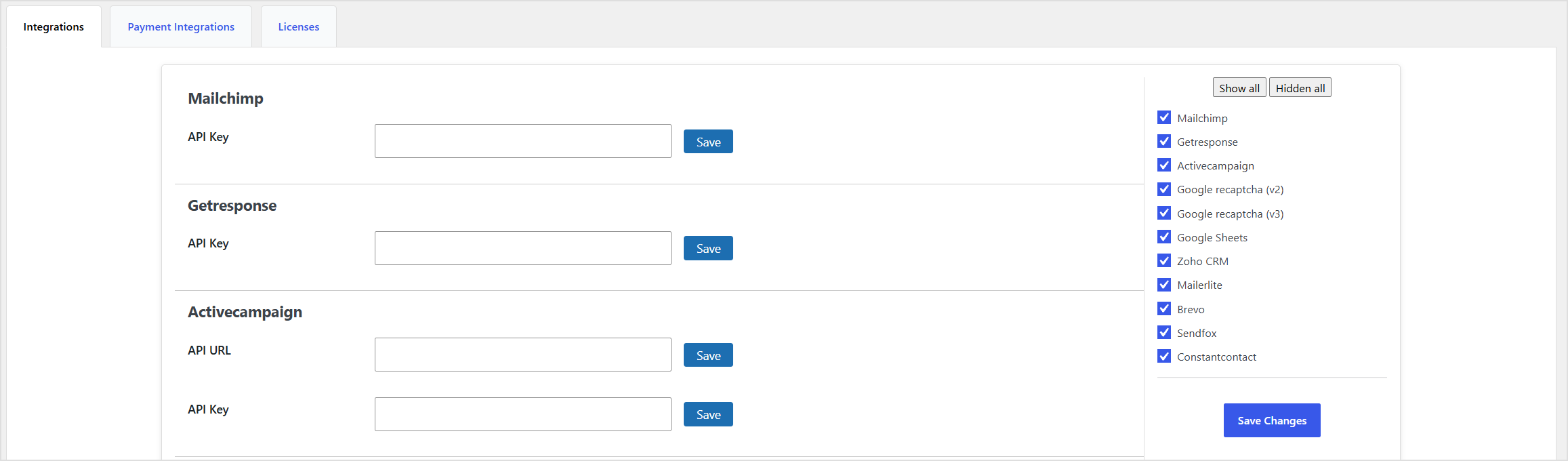
- Mailchimp and GetResponse integrations out of the box (additional integrations available in the Pro version).
- Per-form generated CSS stored under
wp-content/uploads/sun-form-builder/css/for fast frontend rendering. - SVG upload support enabled for icon/branding usage inside forms.
- Conditional asset loading — submission script and styles are only enqueued on pages that actually use a form.
- Developer-friendly: clean hooks, custom post types and filters (
block_categories_all,upload_mimes, etc.).
Field & Form Features
- Multiple field types: text, email, textarea, select, checkbox, radio, and more.
- Customizable labels, placeholders, validation and required state per field.
- Email notifications rendered through a Twig-based template (
{% for key, item in data %}etc.). - Email 2 action after submit, with its own To, Subject, template, From, Reply-To, Cc, Bcc, and meta data.
- Default email templates auto-created on first run, including a separate template for Email 2, so the plugin works immediately after activation.
- Admin column showing the shortcode for every form for quick copy & paste.
Integrations
Free version:
- Mailchimp — connect with your Mailchimp API key under Sun Forms Settings Integrations.
- GetResponse — connect with your GetResponse API key under Sun Forms Settings Integrations, then add the Getresponse action after submit.
Available in the Pro version (Sun Form Builder Pro):
- ActiveCampaign, MailerLite, Sendinblue, SendFox, Constant Contact
- Google reCAPTCHA
- Google Sheets
- Zoho CRM
- Stripe payments
External services
This plugin connects to the Mailchimp API to add form subscribers to a Mailchimp audience you have configured. Mailchimp is a third-party service provided by The Rocket Science Group LLC d/b/a Mailchimp.
When data is sent to Mailchimp
Requests are sent to the Mailchimp REST API at https://<dc>.api.mailchimp.com/3.0/ (where <dc> is the data center derived from your API key, e.g. us1.api.mailchimp.com, us21.api.mailchimp.com, etc.) only in the following cases:
- A site administrator saves or updates a Mailchimp API key on Sun Forms Settings Integrations (the key is sent once to authenticate with Mailchimp and verify the connection).
- A site administrator configures the Mailchimp integration on a form inside the block editor — the plugin requests the available audiences, interest groups and merge fields from Mailchimp so they can be selected in the editor UI.
- A visitor submits a form that has the Mailchimp integration enabled by the site administrator.
No data is sent to Mailchimp on any frontend page view, nor when the Mailchimp integration is not enabled for a form.
What data is sent to Mailchimp
When a visitor submits a form configured to use the Mailchimp integration, the following data is sent:
- The Mailchimp API key stored on the settings page (used for authentication only, sent as an HTTP
Authorization: Basicheader). - The audience / list ID that the site administrator has selected for the form.
- The visitor’s email address from the form.
- Any additional merge fields that the site administrator has mapped between the form fields and the Mailchimp audience (e.g. first name, last name, address, phone number).
No personal data is sent to Mailchimp unless you (the site administrator) explicitly map a Mailchimp integration to one of your forms.
Mailchimp legal documents
- Terms of Use: https://mailchimp.com/legal/terms/
- Privacy Policy: https://mailchimp.com/legal/privacy/
By enabling the Mailchimp integration in this plugin, you acknowledge that the data described above will be transmitted to and processed by Mailchimp in accordance with their Terms of Use and Privacy Policy.
This plugin also connects to the GetResponse API to add form contacts to a GetResponse campaign you have configured. GetResponse is a third-party service.
When data is sent to GetResponse
Requests are sent to https://api.getresponse.com/v3/ only in the following cases:
- A site administrator configures the GetResponse integration on a form inside the block editor — the plugin requests campaigns and custom fields so they can be selected in the editor.
- A visitor submits a form that has the GetResponse action enabled by the site administrator.
No data is sent to GetResponse on a frontend page view, nor when the GetResponse action is not enabled for a form.
What data is sent to GetResponse
- The GetResponse API key (sent as an
X-Auth-Tokenheader). - The campaign ID selected for the form.
- The visitor’s email address, name, and any custom fields the administrator has mapped.
- The visitor’s IP address.
GetResponse legal documents
- Terms of Service: https://www.getresponse.com/legal/terms-us
- Privacy Policy: https://www.getresponse.com/legal/privacy
By enabling the GetResponse integration in this plugin, you acknowledge that the data described above will be transmitted to and processed by GetResponse in accordance with their Terms of Service and Privacy Policy.
Credits
Built with love on top of the WordPress block editor. Email templates are powered by Twig.