

Subscribers & Members Based Pricing
v1.0.1meowcrew · 2024年2月12日 上架
Create discounts for subscribers or members in your shop. Set product prices dynamically based on a user's previous product purchases or the stat …
- 正在使用
- 10+
- 评分
- 5.0 / 5
- 累计下载
- 2,673
- 最近更新
- 2024年11月1日
 meowcrew
 Freemius
截图


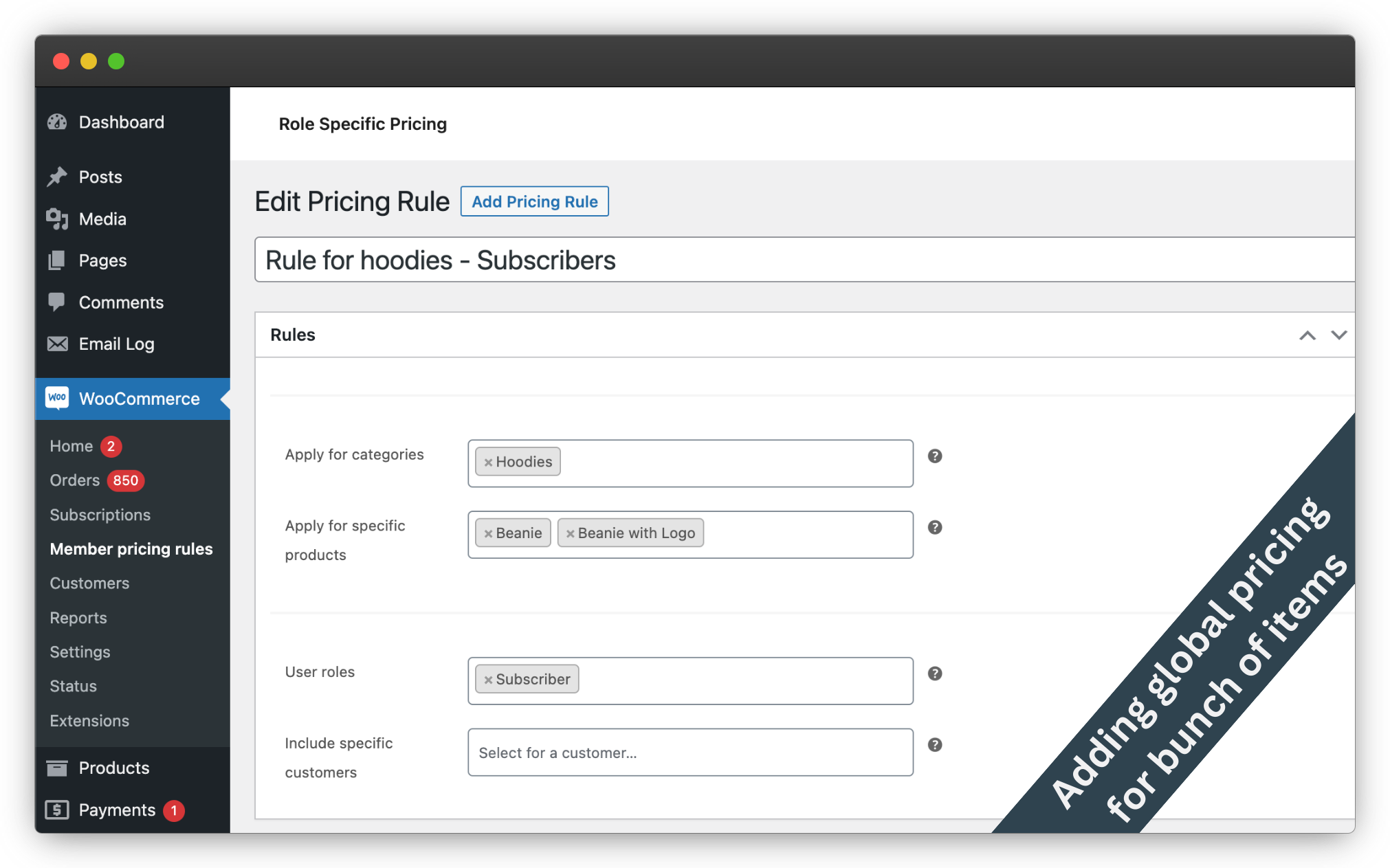

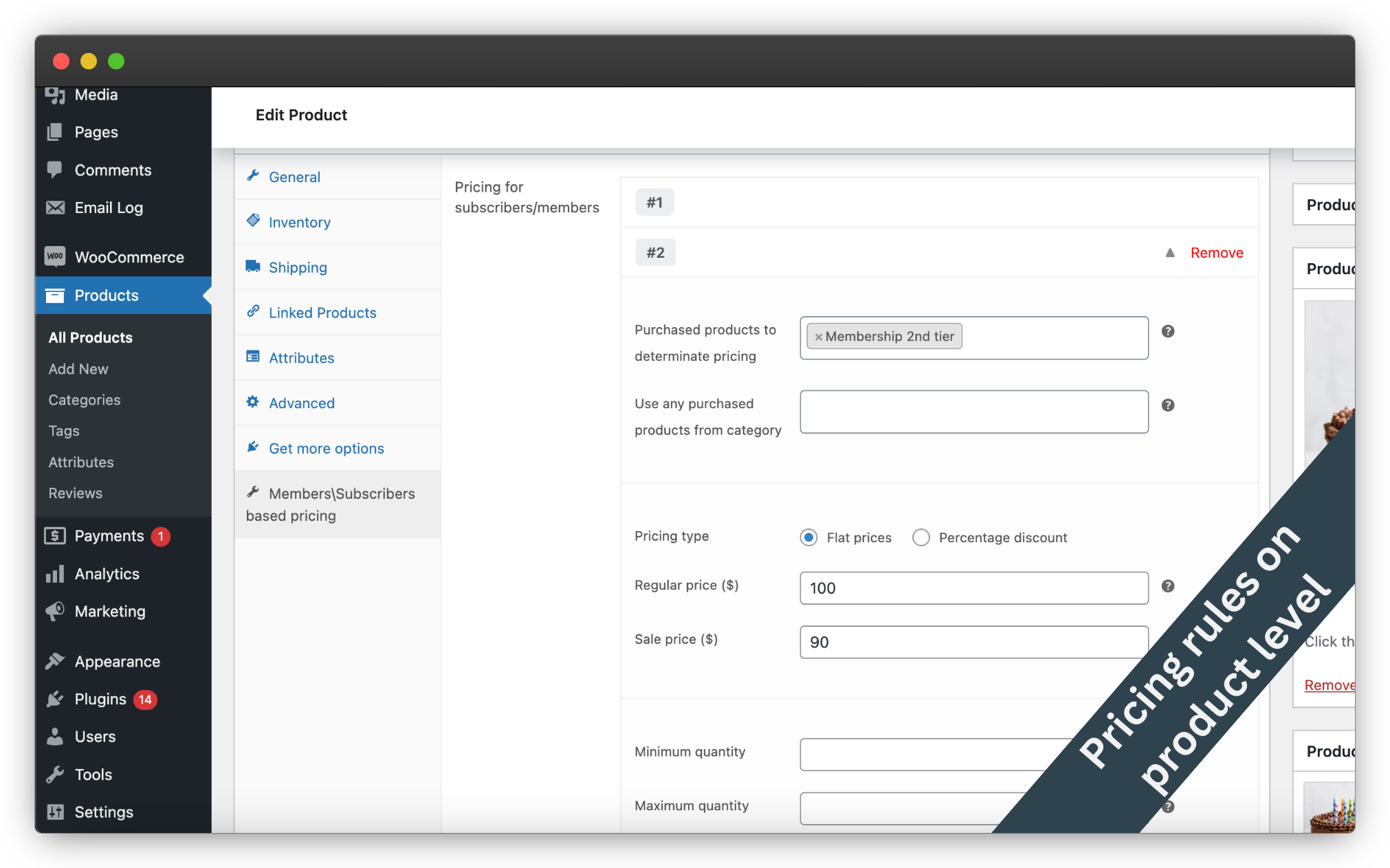


The Subscribers & Members Based Pricing plugin allows WooCommerce store owners to offer special pricing based on user membership or subscription status. It integrates with WooCommerce Subscriptions, giving you the chance to apply discounts or special pricing rules for active subscribers. Membership can be defined by any product in your store (if a user purchases a particular product, then they are considered members).
Establish a Rewarding Membership System
- Offer special discounts and prices to members: Give your customers exclusive discounts and prices when they become members.
- Make premium products exclusive to members: Turn chosen products into special items only for members, giving them membership when bought.
- Work smoothly with WooCommerce Subscriptions: Provide special prices to current subscribers through the WooCommerce Subscriptions plugin.
- Customize pricing strategies: Adjust prices throughout your store, in certain categories, or for specific products, allowing full flexibility.
Features
- Pricing Based on Recent Purchase: Offer tailored prices for customers based on their previous purchases, like memberships.
- Exclusive Subscriber Discounts: Provide special discounts to active subscribers, like a 20% reduction on selected categories for all who have active subscription.
- Pricing Types:
- Flat Price: Users can set a regular and sale price that becomes active when inventory reaches specified levels.
- Percentage Discount: Automatically applies a percentage discount to the current product price based on inventory changes [premium version].
- Members price as Sale price: Can show the price set by pricing rules as a sale price to draw attention and promote sales [premium version].
- Activation Settings: Specify the status required for subscriptions or orders (active, on hold, canceled, etc.) to trigger the rules [premium version].
- Global pricing rules: Easily create bulk pricing rules applicable to entire categories, several categories, or a group of products.
- User role conditions: Implement additional conditions for pricing based on predefined user roles.
- Scenarios for non-logged-in users: When the user’s status (membership or subscription) isn’t defined because they aren’t logged in, you can disable purchases or hide pricing.
- Quantity limitations: Define minimum and maximum purchase quantities and set quantity increments specifically for members and subscribers.
How to use
- Select Activation Settings – configure special pricing rules in the Settings, selecting desired order statuses or subscription states. E.g. only users with Active subscription or with Processed Order will be granted special pricing.
- Create Global Pricing Rule – set universal, category-based, or pricing rules for a bunch of products for members or subscribers. Select what product is counted as subscription or membership and what discounts members and subscribers will be granted.
- Create Product-Specific Rule – define unique pricing conditions for each product, based on membership or subscription criteria. This can be used together with Global Rules or you can only use Product-Specific Rules.
3.1. Define Membership Qualifications – specify products or categories that grant membership status, along with their special pricing and quantity guidelines.
3.2. Define Pricing – set flat (regular + sale price) or percentage-based discounts for users who purchased a membership or have active subscription.
3.3. Add Extra Conditions – add user role as an additional condition for users to be qualified as members or subscribers.
3.4. Add Q-ty Limitations – set minimum and maximum quantities that may be purchased in one order, as well as quantity step.
Subscribers & Members Based Pricing offers dynamic pricing adjustments without complicated user-role settings or separate membership areas. It focuses on straightforward and effective pricing changes, avoiding the complexities of standard membership tools. If you want a simple, customer-focused pricing solution for your Woo store, without the need for complex membership systems, Special Pricing for Subscribers & Members is the ideal choice.