

Sticky Header by ThematoSoup
v1.2.2Slobodan Manić · 2013年10月19日 上架
Sticky Header by ThematoSoup allows you to add sticky header to any WordPress theme.
- 正在使用
- 1,000+
- 评分
- 4.5 / 5
- 累计下载
- 8.4 万
- 最近更新
- 2017年11月29日
 Slobodan Manić
 Dragan Nikolic
截图
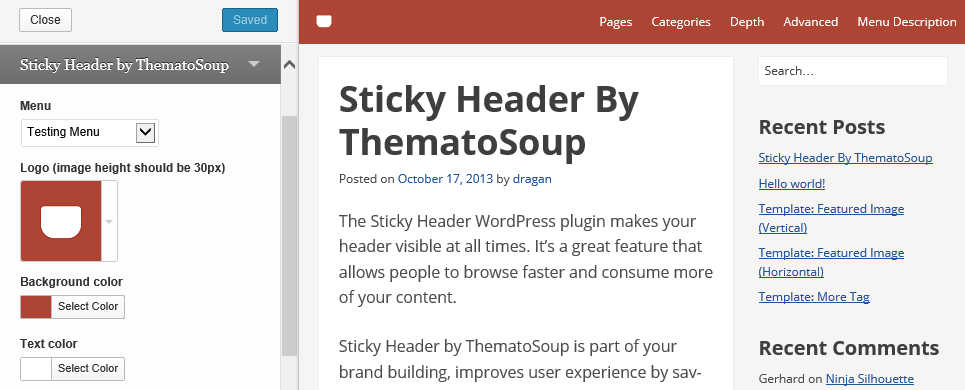

For support requests please use our dedicated support forums.
The Sticky Header WordPress plugin makes your header visible at all times. It’s a great feature that allows people to browse faster and consume more of your content.
Sticky Header by ThematoSoup is part of your brand building, improves user experience by saving people time and makes your WordPress website more aesthetically pleasing.
Your branding (logo) is something you want visitors to subconsciously keep in mind while browsing your website and navigation is one of the most important aspects of every website. Make them visible at all times.
Settings
Sticky Header by ThematoSoup has just few options, which you can find in your Theme Customizer. This makes it incredibly easy to configure and use.
- Menu – You need to create at least one navigation menu before you can add it to Sticky Header. The menu in Sticky Header shows only first level items, so no submenu items will be shown.
- Logo – You can upload your sticky header logo by clicking on “Upload new” > “Select a file”. Ideally, this logo should be 30px tall or it will be resized. If a logo image is not uploaded, site title will be used.
- Background color – You can choose your custom sticky header background color.
- Text color – Choose your sticky header text color so it provides enough contrast with regards to the background color.
- Sticky Header max width – This option allows you to match interior Sticky Header width to your content area width.
- Make visible when scrolled to – This is the distance from the top of the page at which sticky header will show, in pixels.
- Hide if screen is narrower than – Sticky header will not be shown on screens narrower than this value, in pixels. When people use mobile devices, they’re used to vertical scrolling so it’s not necessary to have sticky headers.