

Stealth Update
v2.5Scott Reilly · 2010年9月8日 上架
Adds the ability to update a post without having WordPress automatically update the post's post_modified timestamp.
- 正在使用
- 100+
- 评分
- 5.0 / 5
- 累计下载
- 7,683
- 最近更新
- 2016年4月14日
贡献者
 Scott Reilly
截图

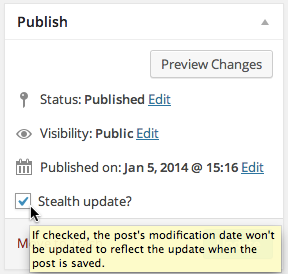


This plugin allows you to choose to update a post without having WordPress automatically update the post’s post_modified timestamp.
WordPress maintains a post field called post_modified which tracks the date the post was last edited. This value is used by feeds to indicate the latest update to each post or to report the latest updated post. Plugins and themes may also reference the post modification date to call attention to posts that have been updated. However, if an update is such that you don’t want it to be recorded in the post_modified date field (perhaps due to the update being a small formatting/editing change or fixing a typo, or if you just want to keep quiet about an update), then this plugin is for you.
This plugin adds a “Stealth update?” checkbox to the “Publish” box of any post’s or page’s “Edit Post” admin page.
Note: The plugin records when a post is stealth updated, so subsequent edits of the post will have the “Stealth update?” checkbox checked by default.
Links: Plugin Homepage | Plugin Directory Page | Author Homepage
Filters
The plugin is further customizable via two filters. Typically, these customizations would be put into your active theme’s functions.php file, or used by another plugin.
c2c_stealth_update_meta_key (filter)
The ‘c2c_stealth_update_meta_key’ filter allows you to override the name of the custom field key used by the plugin to store a post’s stealth update status. This isn’t a common need.
Arguments:
- $custom_field_key (string): The custom field key to be used by the plugin. By default this is ‘_stealth-update’.
Example:
/**
 * Defines a custom meta key to be used by Stealth Update.
 *
 * @param string $custom_field_key The default custom field key name.
 * @return string
 */
function override_stealth_update_key( $custom_field_key ) {
    return '_my_custom_stealth-update';
}
add_filter( 'c2c_stealth_update_meta_key', 'override_stealth_update_key' );
c2c_stealth_update_default (filter)
The ‘c2c_stealth_update_default’ filter allows you to override the default state of the ‘Stealth Update?’ checkbox.
Arguments:
- $state (boolean): The default state of the checkbox. By default this is false.
- $post (WP_Post): The post currently being created/edited.
Example:
// Have the Stealth Update? checkbox checked by default.
add_filter( 'c2c_stealth_update_default', '__return_true' );