

Stealth Publish
v2.6Scott Reilly · 2010年9月9日 上架
Prevent specified posts from being featured on the front page or in feeds, and from notifying external services of publication.
- 正在使用
- 900+
- 评分
- 5.0 / 5
- 累计下载
- 3.1 万
- 最近更新
- 2016年4月14日
贡献者
 Scott Reilly
截图
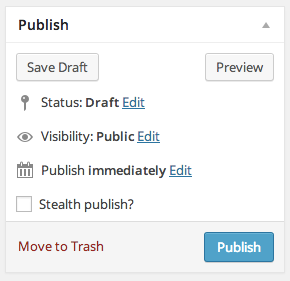


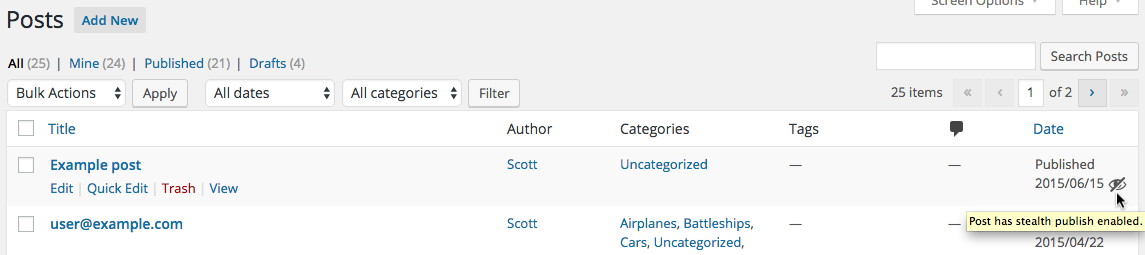
This plugin allows you to prevent specified posts from being featured on the front page or in feeds, and from notifying external services of publication. Beneficial in instances where you want to publish new content without any fanfare and just want the post added to archive and category pages and its own permalink page.
A “Stealth publish?” checkbox is added to the “Write Post” admin page. Posts which are saved with that checkbox checked will no longer be featured on the front page of the blog, nor will the post be included in any feeds.
A stealth published post will also not notify any external services about the publication. This includes not sending out pingbacks, trackbacks, and pings to update services such as pingomatic.com. This behavior can be overridden via the ‘c2c_stealth_publish_silent’ filter (see Filters section).
NOTES:
-
Use of other plugins making their own queries against the database to find posts will possibly allow a post to appear on the front page. But use of the standard WordPress functions for retrieving posts (as done for the main posts query and the recent posts widget) should not allow stealth published posts to appear on the home page.
-
If you use this plugin, you do not need to use my Silent Publish plugin as that functionality is incorporated into this plugin. Alternatively, if you like the silent publishing feature but want your new posts to appear on your blog’s front page and in feeds, then just use the “Silent Publish” plugin.
-
The plugin records when a post is stealth published, so subsequent edits of the post will have the “Stealth publish?” checkbox checked by default.
Links: Plugin Homepage | Plugin Directory Page | Author Homepage
Filters
The plugin is further customizable via three filters. Typically, these customizations would be put into your active theme’s functions.php file, or used by another plugin.
c2c_stealth_publish_meta_key (filter)
The ‘c2c_stealth_publish_meta_key’ filter allows you to override the name of the custom field key used by the plugin to store a post’s stealth publish status. This isn’t a common need.
Arguments:
- $custom_field_key (string): The custom field key to be used by the plugin. By default this is ‘_stealth-publish’.
Example:
/**
 * Defines a custom meta key to be used by Stealth Publish.
 *
 * @param string $custom_field_key The default custom field key name.
 * @return string
 */
function override_stealth_publish_key( $custom_field_key ) {
    return '_my_custom_stealth-publish';
}
add_filter( 'c2c_stealth_publish_meta_key', 'override_stealth_publish_key' );
c2c_stealth_publish_silent (filter)
The ‘c2c_stealth_publish_silent’ filter allows you to override whether the plugin also ensure the post gets published silently (i.e. without sending out pingbacks, tracbacks, and pings to update services).
Arguments:
- $publish_silently (bool): Should stealth published posts also be published silently? By default this is ‘true’.
- $post_id (int): The ID of the post being published.
Example:
/**
 * Disable silent publishing for stealth published posts.
 *
 * @param bool $publish_silently True if the post is to be published silently.
 * @param int  $post_id          The post ID.
 * @return Always false.
 */
function override_stealth_publish_silent( $publish_silently, $post_id ) {
    return false;
}
add_filter( 'c2c_stealth_publish_silent', 'override_stealth_publish_silent' );
c2c_stealth_publish_default (filter)
The ‘c2c_stealth_publish_default’ filter allows you to override the default state of the ‘Stealth Publish?’ checkbox.
Arguments:
- $state (boolean): The default state of the checkbox. By default this is false.
- $post (WP_Post): The post currently being created/edited.
Example:
// Have the Stealth Publish? checkbox checked by default.
add_filter( 'c2c_stealth_publish_default', '__return_true' );