

Sommelier Chatbox – Wine Recommendation Widget for WooCommerce
v1.1.0winechatbox · 2026年1月6日 上架
A floating WooCommerce chat widget that guides shoppers to 2-3 wines using your catalog data.
- 正在使用
- 10 以下
- 评分
- 暂无
- 累计下载
- 549
- 最近更新
- 2026年8月22日
贡献者
 winechatbox
截图
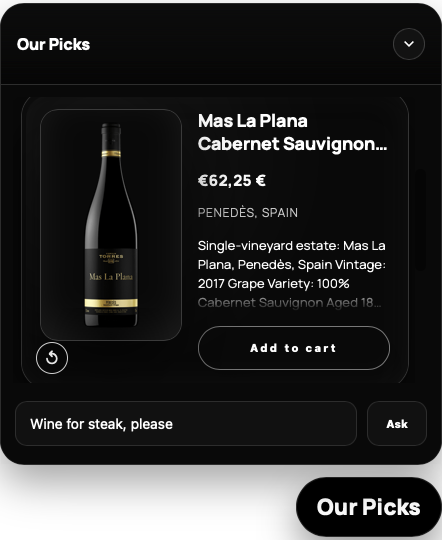
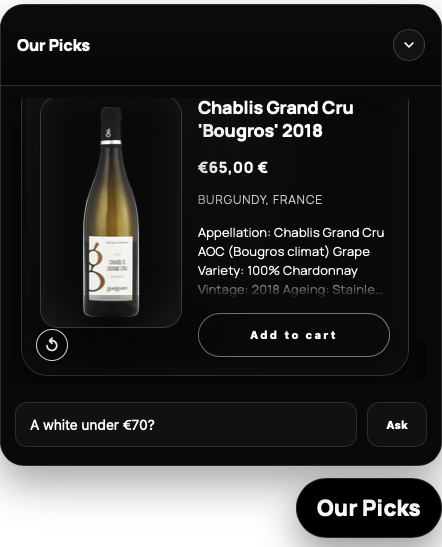
Sommelier Chatbox is a free WooCommerce widget designed to improve product discovery for wine stores.
The plugin adds a floating chat-style interface to your store that guides visitors through a short, simple conversation and returns a small, focused selection of wines from your existing WooCommerce catalog.
The goal is to reduce choice overload and help customers move faster from browsing to decision, without disrupting your store layout.
This FREE version works entirely inside WordPress and WooCommerce:
– No checkout integrations
– No tracking
All recommendations are generated using deterministic rules based on your existing WooCommerce data (categories, tags, attributes, descriptions, prices, stock).
Upgrade to PRO for advanced recommendations.
Learn more about Sommelier Chatbox PRO: https://www.sommelierchatbox.com
Features
- Floating, non-intrusive chat widget
- Guided conversational UX
- Deterministic product filtering using WooCommerce data
- Displays 2–3 relevant wines per interaction
- Uses existing product categories, tags, attributes, and prices
- No manual tagging required
- Fully functional as a standalone FREE plugin
Free vs Pro
Free:
– Deterministic recommendations using WooCommerce data
– 2-3 picks per request
– Runs entirely inside WordPress and stays lightweight for small to mid-size catalogs
Pro:
– AI-guided recommendations with natural replies
– Better handling of short or imperfect inputs
– Deeper catalog analysis for larger catalogs
Learn more about Sommelier Chatbox PRO: https://www.sommelierchatbox.com
How It Works
- The visitor opens the chat widget.
- The widget asks a few simple questions (occasion, taste, budget).
- The plugin matches keywords to WooCommerce categories, tags, attributes, and descriptions.
- A filtered query selects up to 3 suitable products.
- Results are displayed directly in the widget.
If no products match, a graceful fallback message is shown.
Usage
Once activated, the widget appears automatically on the front-end of your WooCommerce store.
No configuration is required for basic usage.
Optional settings can be configured in the WordPress admin panel to adjust the chat appearance.
Requirements
- WordPress
- WooCommerce