

SMTP Mailer
v1.1.28Noor Alam · 2015年12月20日 上架
Configure a SMTP server to send email from your WordPress site. Configure the wp_mail() function to use SMTP instead of the PHP mail() function.
- 正在使用
- 7 万+
- 评分
- 4.6 / 5
- 累计下载
- 154 万
- 最近更新
- 2026年9月7日
67 条评价需要 WordPress 7.1+已测试到 7.1.5
贡献者
 Noor Alam
截图
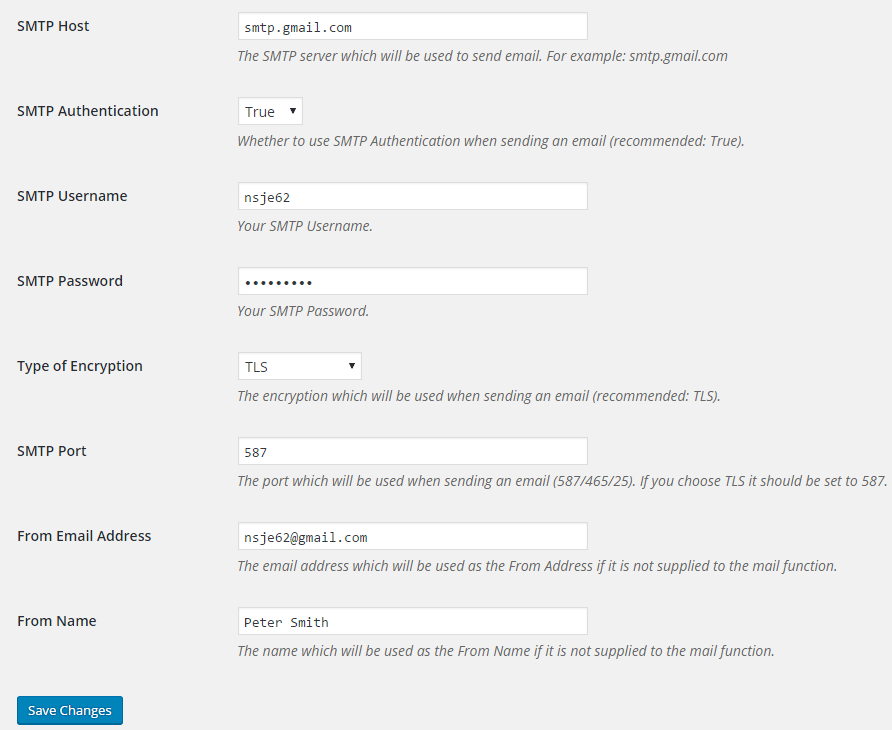
SMTP Mailer plugin allows you to configure a mail server which handles all outgoing email from your website. It takes control of the wp_mail function and use SMTP instead.
SMTP Mailer Add-ons
SMTP Mailer Settings
- SMTP Host: Your outgoing mail server (e.g. smtp.gmail.com).
- SMTP Authentication: Whether to use SMTP authentication when sending an email (True/False). If you choose to authenticate you will also need to provide your username and password.
- SMTP Username: The username to connect to your SMTP server.
- SMTP Password: The password to connect to your SMTP server.
- Type of Encryption: The encryption to be used when sending an email (TLS/SSL/No Encryption. TLS is recommended).
- SMTP Port: The port to be used when sending an email (587/465/25). If you choose TLS the port should be set to 587. For SSL use port 465 instead.
- From Email Address: The email address to be used as the From Email when sending a test email.
- From Name: The name to be used as the From Name when sending a test email.
- Force From Name: The From name in the settings is set for all outgoing email messages.
- Force From Email: The From email in the settings is set for all outgoing email messages.
- Force From Address: The From address in the settings is set for all outgoing email messages.
- Disable SSL Certificate Verification: As of PHP 5.6 a warning/error is shown if the SSL certificate on the server is not properly configured. This option lets you disable that behaviour.
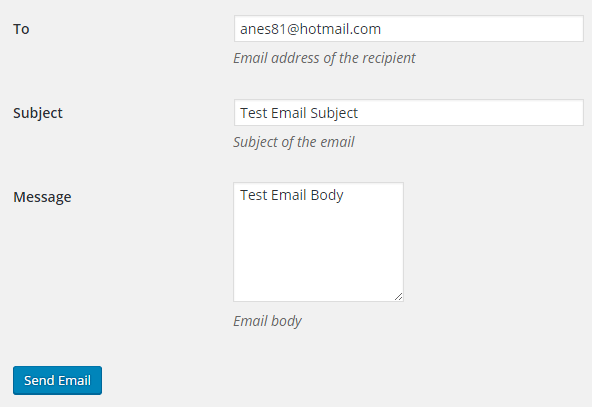
SMTP Mailer Test Email
Once you have configured the settings you can send a test email to check the functionality of the plugin.
- To: Email address of the recipient.
- Subject: Subject of the email.
- Message: Email body.
Known Compatibility
SMTP Mailer should work with any plugin that uses the WordPress Mail function. However, It has been tested with the following form and contact form plugins:
- Contact Form 7
- Jetpack Contact Form
- Visual Form Builder
- Fast Secure Contact Form
- Formidable Forms
- Contact Form by BestWebSoft
For detailed setup instructions please visit the SMTP Mailer plugin page.