

Smart Reviews Display – Show Customer Reviews and Ratings with Beautiful, Responsive Layouts
v1.0.6Seventh Sky · 2025年9月10日 上架
Display WordPress.org, Yelp, and Google reviews via shortcode or block with responsive layouts, avatars, ratings, and smart caching.
- 正在使用
- 10 以下
- 评分
- 暂无
- 累计下载
- 655
- 最近更新
- 2026年11月17日
 Seventh Sky
 Mishal Fatima
截图
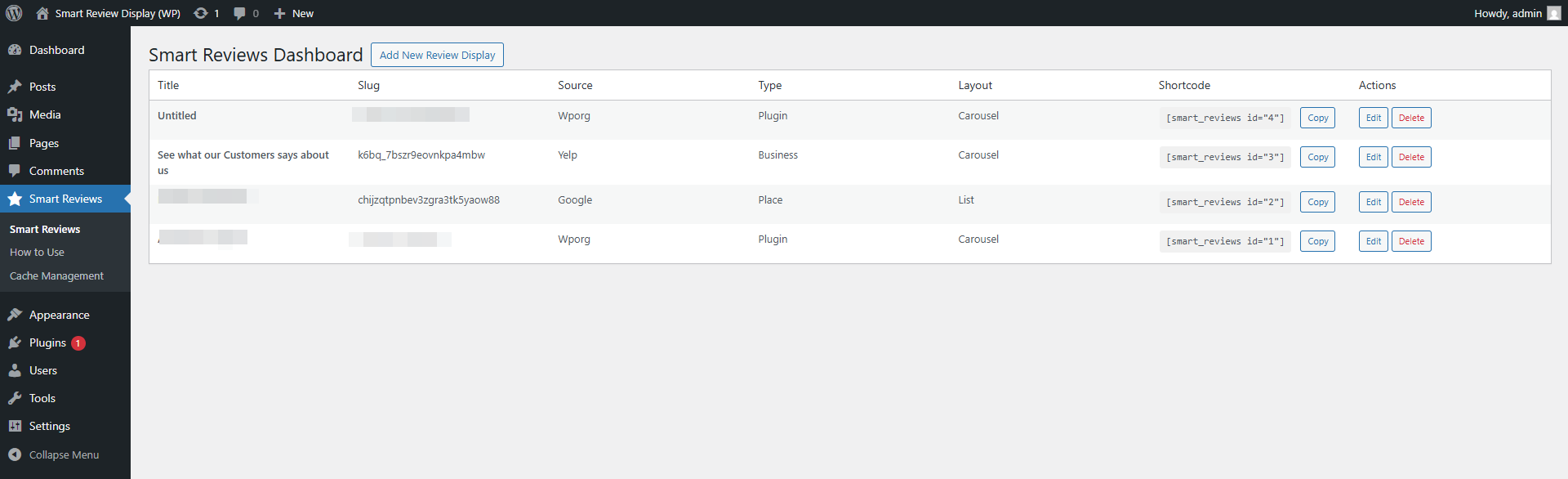


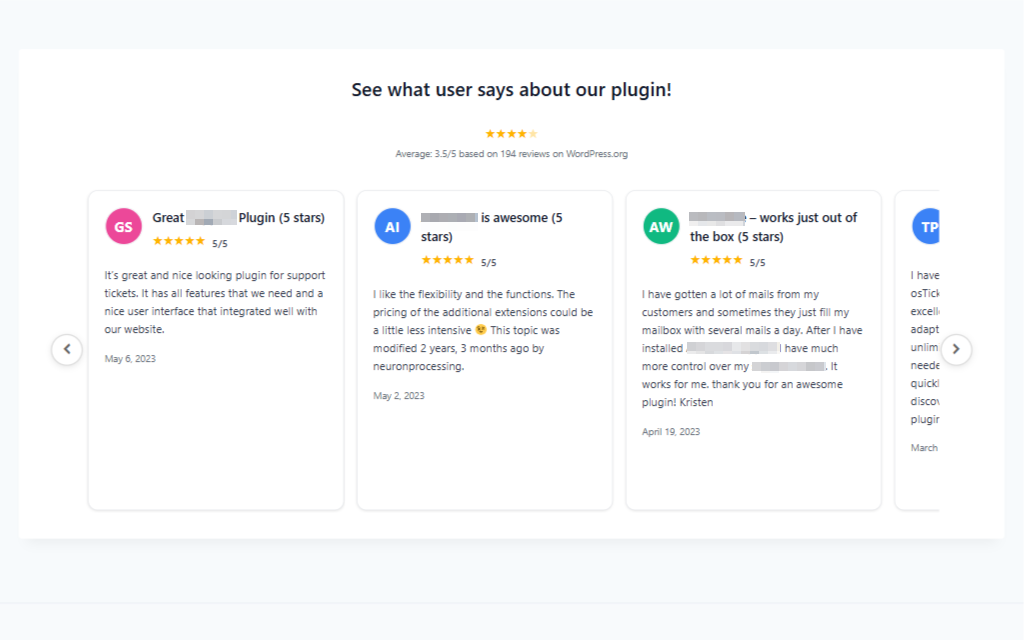
Smart Reviews Display lets you showcase reviews from multiple sources including WordPress.org, Yelp, and Google Reviews. Choose from responsive grid, list, or carousel displays with reviewer names and ratings and smart caching.
Key Features
- Multiple Review Sources: WordPress.org plugins/themes, Yelp business reviews, Google Places reviews, and custom reviews
- Custom Reviews System: Create up to 10 custom reviews with full control over content, ratings, and clickable links
- Review Grouping: Organize custom reviews into categories (testimonials, product-reviews, etc.)
- Responsive Layouts: Grid, list, and carousel, with card counts adapting to the available container width
- Smart Management: Up to 3 saved displays, review management, collections, publication status, and internal vs display titles
- Rich Content: Initials avatars, star ratings, descriptions, aggregate ratings, contextual fields, and review links
- ID-Based Shortcodes: Simple
[smart_reviews id="123"]format that auto-updates - Gutenberg Blocks: Full block editor support with live preview
- Smart Caching: Configurable cache management and TTL controls
- Private Invitations: Generate individual review links, send emails through WordPress, and choose immediate publication or approval.
- Recipient Privacy: Email opt-out, privacy export/erasure, and invitation-verified badges that do not claim purchase verification.
- Upgrade Integration: Clear upgrade path to Pro version for unlimited custom reviews
- Security First: WordPress coding standards compliance with proper sanitization
- Lightweight Frontend: Optimized CSS/JS with no bundled frontend libraries
Usage
Dashboard Management
- Go to Smart Reviews Displays
- Click “Add New Review Display” to create a new configuration
- Fill in the form:
- Internal Title: For backend management (e.g., “WooCommerce Reviews”)
- Display Title: Shown on frontend (e.g., “What our customers say”)
- Description: Optional description text
- Review Source: WordPress.org, Yelp, Google Reviews, or Custom
- Slug/ID: Plugin slug, Yelp business ID, Google Place ID, or leave empty for Custom
- Review Group: Select specific group for Custom reviews (optional)
- Type: Plugin/Theme (WordPress.org only), Business (Yelp), Place (Google), or Custom
- Layout: Grid, List, or Carousel
- Display Options: Show title, show aggregate rating
- Save and use the generated shortcode or block
Custom Reviews Management
- Go to Smart Reviews Reviews
- Click “Add Review” to create a new custom review
- Fill in the custom review form:
- Source: WordPress, Google, or Yelp (for styling consistency)
- Username: Reviewer’s name
- Profile Photo URL: Optional stored metadata; current review cards use initials avatars
- Review Date: When the review was written
- Review Text: The actual review content
- Review Link: Optional clickable link to original review
- Star Rating: 1-5 star rating
- Review Group: Group name for organization (e.g., “testimonials”, “product-reviews”)
- Business ID/Place ID: Required for Google and Yelp sources
- Save the review and use it in your review displays
- Note: Free version supports up to 10 custom reviews. Upgrade to Pro for unlimited reviews.
Gutenberg Block
Search for “Smart Reviews” in the block editor. You can either:
* Use ID: Select a saved review display by ID
* Configure Manually: Set all options directly in the block
Shortcode Usage
New ID-based format (recommended):
[smart_reviews id=”123″]
Custom reviews examples:
[smart_reviews source=”custom” layout=”grid” title=”Customer Testimonials”]
[smart_reviews source="custom" group="testimonials" layout="grid" title="Customer Testimonials"]
Yelp example:
[smart_reviews source=”yelp” business_id=”your-business-id” type=”business” layout=”grid”]
Google Reviews example:
[smart_reviews source=”google” place_id=”your-place-id” type=”place” layout=”carousel”]
External services
This plugin can connect to external services depending on which review source you choose. No external requests are made for Custom reviews created and stored inside your own WordPress site.
WordPress.org
If you use WordPress.org as the review source, the plugin fetches review feeds/pages and plugin rating data from WordPress.org so it can display reviews and aggregate ratings.
It sends the selected plugin or theme slug in the request URL and includes your site’s home URL in the standard WordPress user-agent header when reviews are fetched, refreshed, or re-cached.
Terms and policies: https://codex.wordpress.org/WordPress_Policies
Privacy policy: https://wordpress.org/about/privacy/
Google Maps Platform (Places API)
If you use Google Reviews as the source and enter a Google API key, the plugin sends the configured Google Place ID to the Google Places API so it can fetch reviews, rating totals, place name, and related place URLs.
Requests are made when the reviews are first fetched and again whenever the cache expires or you manually clear the plugin cache. Google also receives your site’s home URL in the standard WordPress user-agent header.
Terms of service: https://developers.google.com/maps/terms
Privacy policy: https://policies.google.com/privacy
Yelp Fusion API
If you use Yelp as the review source and enter a Yelp API key, the plugin sends the configured Yelp business ID to the Yelp Fusion API so it can fetch business reviews, rating totals, business name, and related Yelp URLs.
Requests are made when the reviews are first fetched and again whenever the cache expires or you manually clear the plugin cache. Yelp also receives your site’s home URL in the standard WordPress user-agent header.
Terms of service: https://www.yelp.com/developers/api_terms
Privacy policy: https://terms.yelp.com/privacy/en_us/20260101_en_us/
Review Invitations
Go to Smart Reviews > Invitations. Enter the recipient name and private email,
choose a review collection, expiry (1-90 days), and immediate publication or approval.
Choose Generate link to share manually, or Generate and send email. Configure the
email subject, message, Reply-To, and provider keys in Smart Reviews > Settings.
Sending uses WordPress mail; configure your site mail transport for delivery.
Accepted for sending does not confirm inbox delivery. Copy and resend preserve
the current link; Renew link explicitly rotates it and invalidates earlier review
links. Older hash-only invitations need one explicit renewal before resend. Links
accept one submission and require no account.
Create a Custom display for the same collection and embed its existing
[smart_reviews id=”123″] shortcode. To moderate a pending review, edit it in Reviews
and change Publication status to Published. Page/CDN caches may need purging;
integrations can listen to the smart_reviews_changed action with the review ID.
Active invitations reserve one free-version review slot. Submitted, pending, hidden,
and manual reviews count toward the configured review limit. Expiring or revoking
an unused invitation releases its reservation. No customer email appears publicly.
A Verified badge identifies reviews submitted through a completed private invitation.
It does not establish a verified purchase or the reviewer’s legal identity.
Each invitation email includes a stop-emails link. Opening it does not change a
preference; the recipient confirms with a button. Administrators can suppress or
restore an address under Settings > Recipient email preferences. Suppression applies
to both individual and queued emails and is checked again before mail transport.
Private links should only be shared with the intended reviewer; possession of a link
is not proof of purchase. Exclude URLs containing smart_review_invite from page/CDN
caching and URL analytics. The form sends no analytics and sets no-referrer/noindex.
Recipient name, email, optional context, invitation dates, and email attempt status
are stored until removed through WordPress personal-data erasure or site management.
The WordPress privacy exporter/eraser includes linked submitted reviews. Email
providers and server access logs may independently retain message/link information.
Custom profile photo URLs are retained for compatibility; public cards use initials.