
SKT Page Builder
v5.1Sonal S Sinha · 2018年10月26日 上架
SKT Page Builder has been designed and developed to assist anyone in creating pages using a drag and drop page builder interface.
- 正在使用
- 2,000+
- 评分
- 2.7 / 5
- 累计下载
- 8.5 万
- 最近更新
- 2026年10月13日
贡献者
 Sonal S Sinha
截图
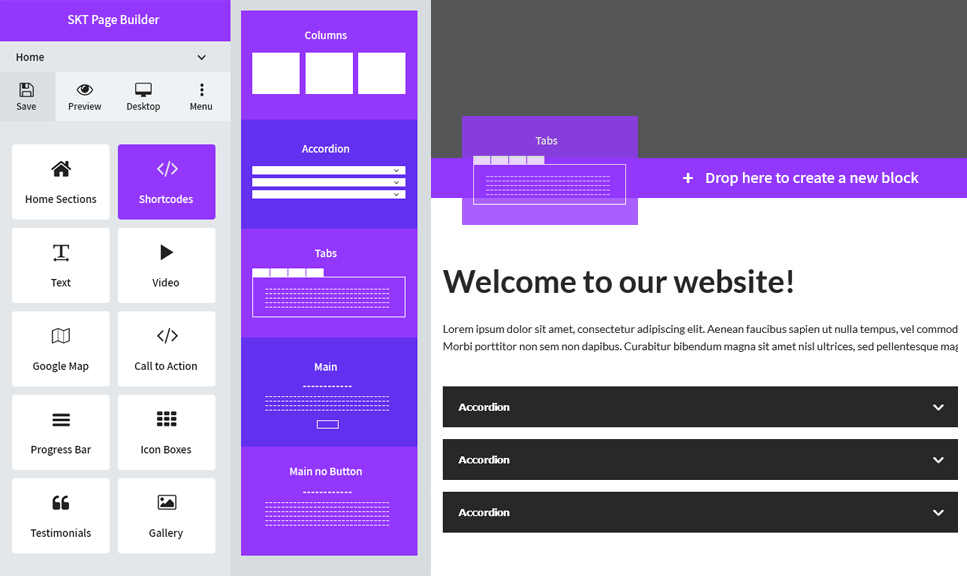


SKT Page Builder has been designed and developed to assist anyone in creating pages using a drag and drop page builder interface. Hence it will help in creating exciting websites easily for FREE without knowing any coding and managing your content easily. Also check our offerings of WordPress themes free at SKT Themes. Download them and make use of these ready to use templates for your next website.
Demo
Documentation
Introduction
SKT Page Builder is an intuitive page builder created in order to save time and efforts of creating landing pages and for adding your content the way you like it or love it.
In case you want sidebar friendly pages and yet want to use page builder the SKT Page Builder is so intuitive that adding blocks into the page can become super easy and idle. One can create pages without any problems.
One can make use of the variety of elements which we have added into this page builder which can be made to use for easier creation of websites.
One can have a look at the elements below which should be sufficient to create one landing page.
Elements
-
Columns — Any type of columns can be added from one column to six columns. Controlling every aspect of the column
-
Accordion — Accordion to help you add any type of FAQs or any type of accordion based content on pages
-
Tabs — Tabs can be helpful to showcase important and several information properly set up in a small area in tabs
-
Text with or without button — Text with button or without button whereby text can be arranged and set up properly
-
Video with or without background — Video section to have nice video playing feature
-
Image Gallery — Gallery with simple images in grid format and on click enlarged view is available
-
Logo/Image Carousel/Slider — Logo or image carousel is provided which can be used for logos or as a image slider too
-
Testimonial Carousel and Grid — Testimonials can be nicely set up in a carousel format with all options as well as grid view
-
Icon Boxes of varied types — Icon boxes of various styles provided for adding any type of service, team or information boxes
-
Shortcode — Adding more shortcodes using plugins or additional theme shortcodes can help developers enhance the plugin more
-
Spacer — Adding space between 2 sections is very cumbersome free
-
Google Map — Adding location map becomes super easy
-
Call to action — Call to action block to add button with text or image
-
Icons — More than 900+ font based icons are available for use
Some common elements are having parallax background for any part of the sections and each section can have different background of its own.
Having background from media library is as easy as possible.