

Site Answers – MCP Server, llms.txt & AI Crawler Log
v1.1.3Tico · 2026年9月30日 上架
A read-only MCP server for AI agents, plus llms.txt, Markdown pages and a log of which AI crawlers read your site. No account needed.
- 正在使用
- 10+
- 评分
- 暂无
- 累计下载
- 887
- 最近更新
- 2026年11月22日
贡献者
 Tico
截图

AI assistants are reading your website. Site Answers has one job: make your site
readable to them, show you whether they actually came, let you decide which of them
may, and let the AI agents you choose search and read it directly. These parts make a
WordPress site agent-ready, and together they are the whole plugin.
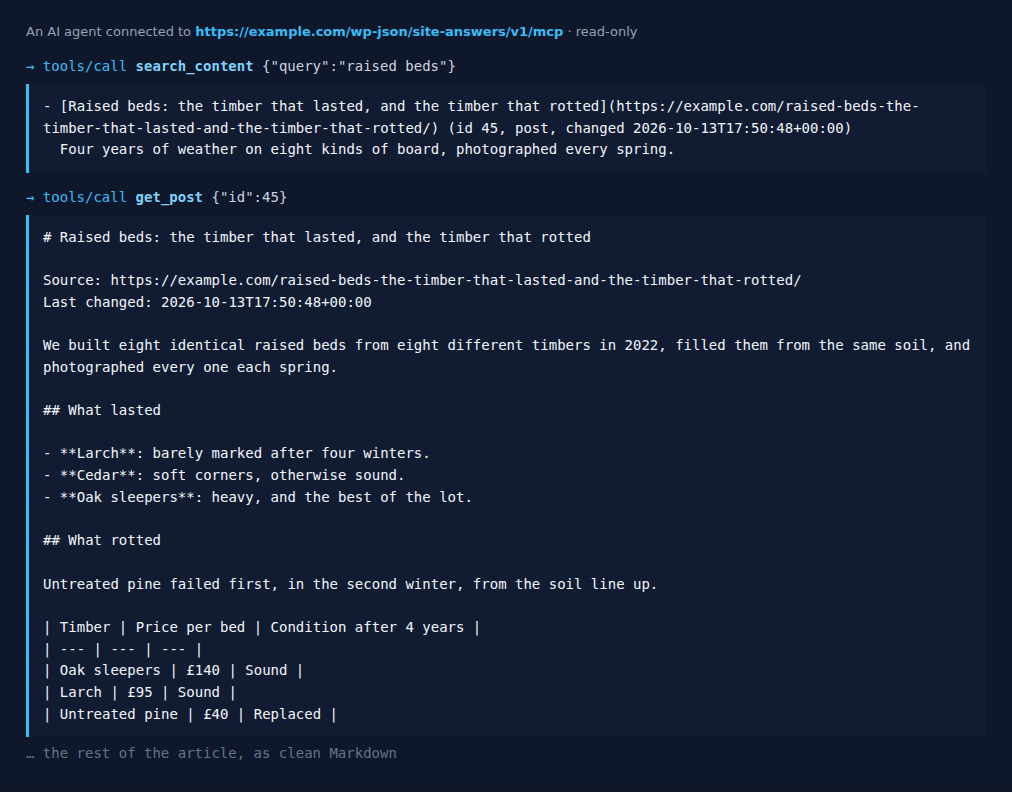
It is a read-only MCP server for AI agents. MCP, the Model Context Protocol, is the
standard way AI assistants such as Claude, ChatGPT and Cursor connect to tools. Make a token
under Site Answers AI Agents (MCP), give your agent the address and the token, and it can
search your published posts and pages and read any of them as clean Markdown. It gets four
tools: search_content, get_post, list_recent and get_site_info. It cannot change
anything: there are no write tools at all, not even switched-off ones. Each token is
revocable and limited to 60 calls a minute, and the access log shows which token used which
tool on which page, and when. If your site runs WordPress’s official MCP Adapter plugin, the
same four tools are registered as WordPress abilities too, so its agents get them with no
token at all.
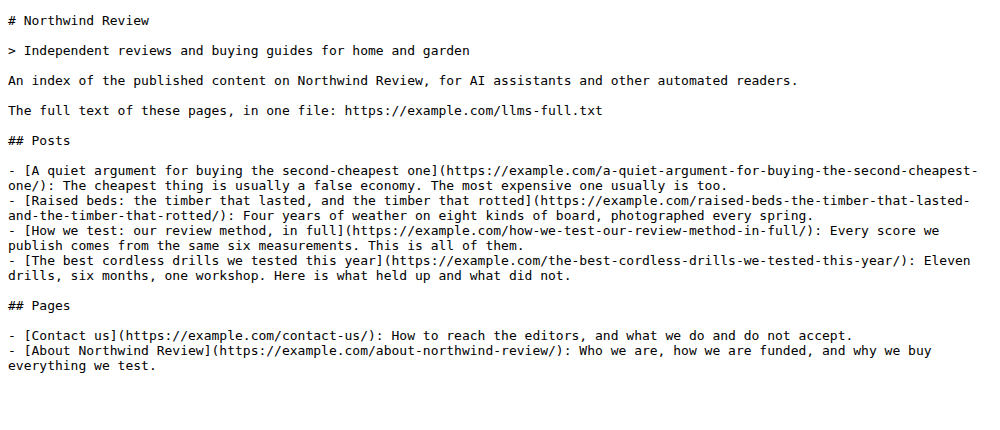
It publishes an llms.txt file. llms.txt is an emerging convention — a plain,
readable Markdown index at the root of your site that tells AI assistants what you
have published and where to find it. Site Answers builds yours from your own posts and
pages: your site name, your tagline, then one line per URL with its title and a short
description. It is rebuilt automatically whenever you publish, edit or delete
something, so it never goes stale.
It publishes llms-full.txt too. Where llms.txt is the map, llms-full.txt is the
whole territory: the full text of every page llms.txt lists, one after another, in one file,
so an AI assistant can read your site in a single visit. Same pages, same exclusions, capped at
5 MB with a note saying where the rest is. You can switch it off in Settings.
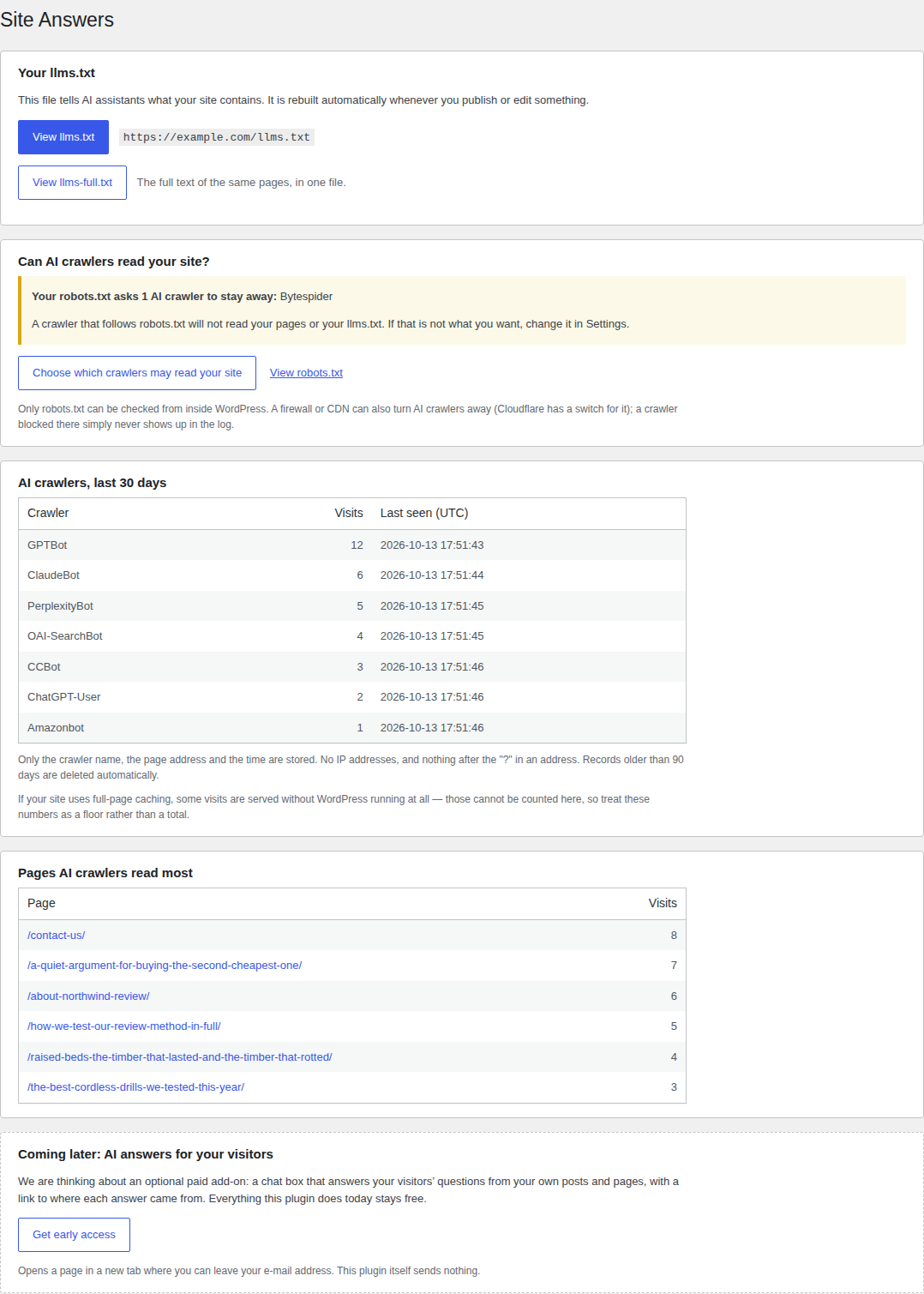
It logs which AI crawlers visit. GPTBot, ClaudeBot, PerplexityBot, OAI-SearchBot,
CCBot and the others are recognised by name. For each visit you see which crawler
came, which page it asked for, and whether it got the page or an error. That answers a
plain question: is AI search actually reading my content, and which pages does it want?
It serves a clean Markdown copy of every page. Add .md to the end of any post or page
address and you get the article as plain Markdown — headings, paragraphs, lists, links and
tables — with the navigation, sidebars, share buttons and scripts left out. That is what an
automated reader wants, and it is far less likely to be misquoted than a page it had to dig out
of a theme. Each HTML page also advertises its Markdown twin in a Link header, so a crawler
can find it without guessing.
It tells you when your robots.txt is turning AI crawlers away. An empty crawler log often
has a simple cause: a line in robots.txt — added by another plugin, a host, or years ago by
hand — asking GPTBot or ClaudeBot to stay away. The Overview reads the robots.txt your site
actually serves, the way the crawlers read it, and names every AI crawler it blocks.
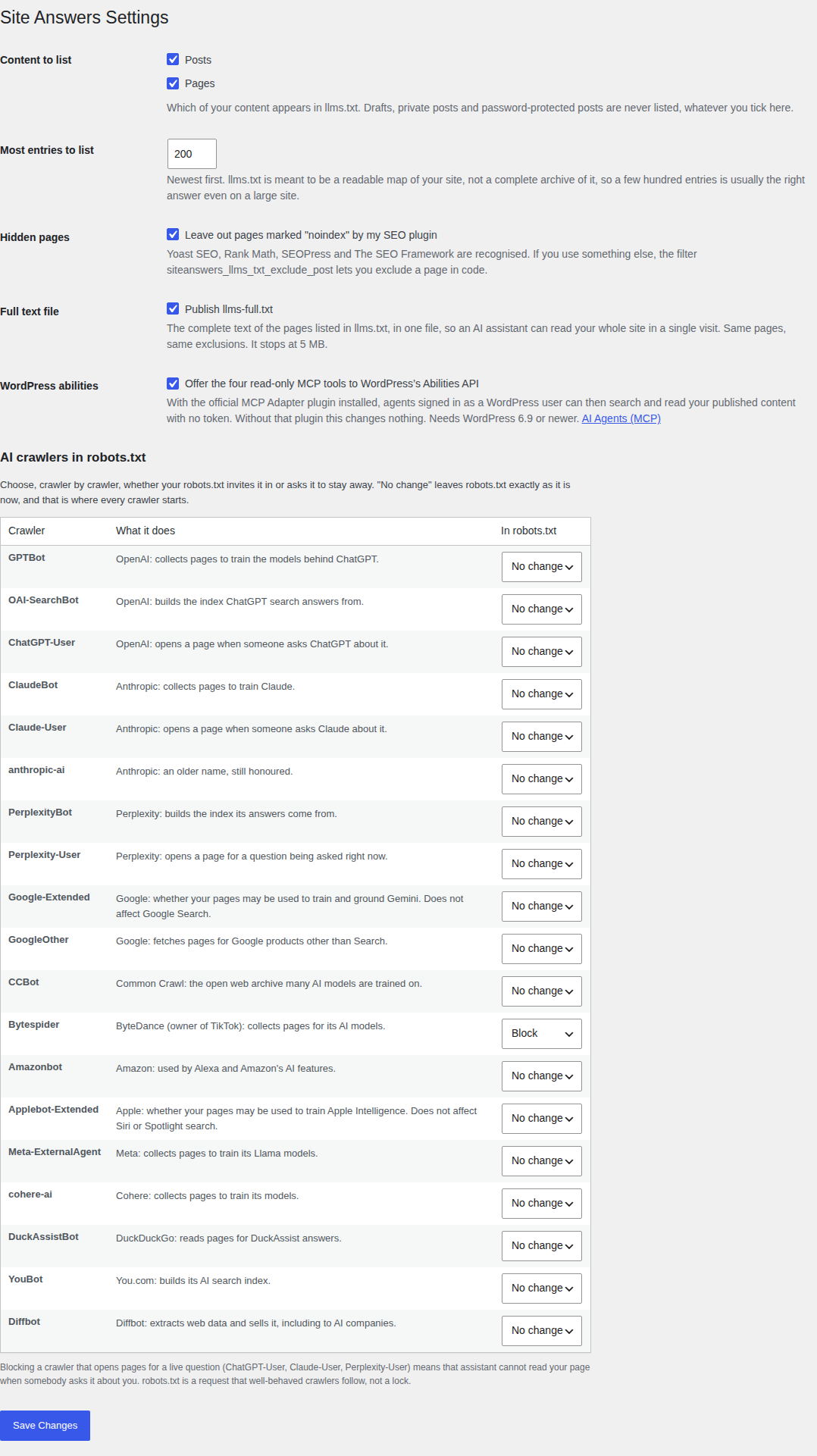
And it lets you choose, crawler by crawler. In Settings, each AI crawler has three
choices: No change, Allow or Block. Block ChatGPT’s training crawler and keep the one that
fetches your page when someone asks ChatGPT about you, or the other way round. Your choices go
into WordPress’s own robots.txt. Until you pick something, robots.txt stays exactly as it was.
How Site Answers is different
Site Answers publishes the file, serves each page as Markdown, and shows you which AI crawlers
came and what they asked for, on your own server. Publishing and measuring sit on one screen,
so you can see whether what you published is being read.
Its MCP tools are read-only: there is no write tool, and each token can be revoked in one
click. A token can read only published content of the types you ticked in Settings, never a
draft, a private or a password-protected post, and every tool returns the same clean Markdown
text the .md addresses serve, not raw page HTML for the agent to dig through.
Three further differences, each of which you can check in the code:
- It stands aside rather than fighting for the address. If another plugin, or a static file
in your web root, already serves/llms.txt, Site Answers never registers its own route for it:
theirs keeps working untouched, and your settings screen tells you which one is answering. Two
plugins answering one address is how sites break, and it is always the newer plugin that gets
blamed for it. - Its logs say what they keep, and keep it on your server. The crawler log keeps the
crawler’s name, the page path, the response status and the time: no IP address and no query
string. The MCP access log keeps which token or which signed-in WordPress user called which
tool, the page read or the words searched, whether the call was answered, and the time, for
90 days. Nothing leaves your server. - It asks for nothing. No account, no API key and nothing to upgrade to. Apart from the
More plugins screen described under External services below, it makes no outbound request:
everything happens on your own server, and nothing about your visitors ever leaves it.
What it does not do
Apart from the More plugins screen described under External services below, this plugin
connects to no external service. It makes no other outbound HTTP request — no API, no
phone-home, no telemetry, no analytics, no third-party libraries. Apart from the More plugins list, everything it shows you was produced by your own site, on your own server.
AI agents you connect over MCP send requests to your site; your site never contacts them.
It stores no IP addresses. The crawler log keeps the crawler’s name, the page path, the
response status and the time: no IP address and no query string. The MCP access log keeps
which token or which signed-in WordPress user called which tool, the page read or the words
searched, whether the call was answered, and the time, for 90 days. Nothing leaves your server.
Anything after the ? in an address is discarded before the record is written, because query
strings on real sites carry e-mail addresses, order references and reset tokens. Records
older than 90 days are deleted automatically, in both logs.
It changes nothing on its own. Your robots.txt is left exactly as it is until you choose
Allow or Block for a crawler, and no file is ever written to your server: if you have a
robots.txt file of your own, the plugin tells you so and leaves it alone.
Why this matters
AI assistants increasingly answer questions using content they read from websites, and being
readable to them is becoming its own discipline — answer engine optimization, or AEO, alongside
the generative engine optimization people now talk about next to ordinary SEO. Both come down
to the same two practical questions: can a large language model find and parse what you
published, and is it actually doing so? Site Answers gives you a straight answer to the second
one, and does the groundwork for the first.
Who it is for
Anyone who publishes writing and wants to know whether AI search engines are reading it.
Bloggers, documentation sites, shops with real content, agencies who need to show a
client what is happening.
Privacy
The crawler log keeps the crawler’s name, the page path, the response status and the time:
no IP address and no query string.
The MCP access log keeps which token or which signed-in WordPress user called which tool,
the page read or the words searched, whether the call was answered, and the time, for 90
days. Nothing leaves your server.
On WordPress 6.9 and newer, any signed-in account that can read your site can call the
tools through WordPress’s abilities, so on a site where visitors register, the MCP access log
can hold what a visitor’s account read or searched. You can switch the abilities off in
Settings. Both logs live in your own WordPress database and are removed with the plugin
when you delete it.
Whether your site needs a consent notice is your decision; this plugin does not decide it for
you.
External services
More plugins (only when you open it). The Site Answers More plugins screen lists our
other free plugins. Only when you open it, WordPress asks the WordPress.org plugin directory
(https://api.wordpress.org/plugins/info/) for the list of free plugins by our author, through
its own plugins_api(): the same request WordPress makes on Plugins Add New. WordPress
adds your admin language and your WordPress version to it, and sends it with your site’s
address and WordPress version in its User-Agent. Nothing else is sent. The answer is
kept for twelve hours, or fifteen minutes if WordPress.org could not be reached. The screen
loads no image from WordPress.org: each plugin is drawn with a local icon. Installing,
activating or updating one uses WordPress’s own installer, downloads it from WordPress.org,
and happens only when you press its button. More Details opens WordPress’s own plugin
details window, which asks WordPress.org for that plugin’s details and shows its banner and
screenshots from WordPress.org, only when you click it. Nothing is sent to us. WordPress.org’s
privacy policy: https://wordpress.org/about/privacy/
That screen is the only place the plugin contacts anything outside your site: nothing is sent
on activation, on the plugin’s other screens or on your Dashboard.