
Short URL Generator
v1.1.1jhm · 2009年6月29日 上架
This plugin automatically generates a Short URL for your article. You can choose your favorite provider and get multiple options.
- 正在使用
- 10+
- 评分
- 暂无
- 累计下载
- 5,615
- 最近更新
- 2009年7月20日
贡献者
 jhm
截图
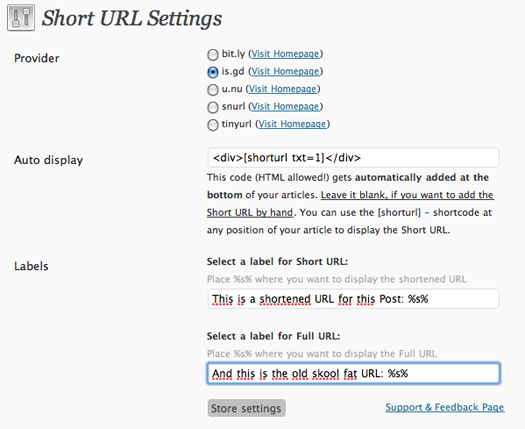

With this Plugin you optimize your workflow as it enables you to auto-generate a shortened URL to your blog posts. So neither you nor your readers have to do it. These Short URLs are particular useful for twitter and alike as these services limit the messages of their users to a certain amount of characters – which leads to the situation that their users are forced to have an eye on what exactly they want to write. And by providing a very short URL it’s easier for them to spread the word on your blog article as they have more characters left for personal remarks.
Compared to other solutions this plugin caches the generated shortened URL – this makes it faster. If the permalink of the article changes, a new Short URL will be automatically generated. It also allows you to choose your favorite from a couple of Short URL Providers and lets you insert the shortened URL via a handy shortcode.
Usage:
- Place
[shorturl]in your article where you want to display the shortened url. - Add optional info with parameters (see below)
- If you don’t like shortcodes you can use the complete auto mode – that way the shortened URL gets always auto-added at the end of your articles.
Features:
- Automatic generation of a Short URL to the blog post.
- Caches the Short URL – So it’s only generated once.
- Offers 6 different URL Shorteners to choose from (bit.ly, tr.im, is.gd, u.nu, snurl.com, tinyurl.com).
- Provides optional parameters to further increase workflow.
- Can add self-defined labels in front (or around) the URL(s).
Options:
Possible values are “1” for active and “0” for disabled
- txt => Will add a label in front of the URL(s) (default: 0).
- full => The permalink will also be displayed (default: 0).
- link => Displays the URL(s) as HTML link (default: 0).
- short => Displays the Short URL (default: 1).
Additional info
For more information, examples, questions and previews – please have a look on the plugins website.
There is also a german version of the plugins page.