
ShipEdit
v0.2.0cnrcodetech · 2026年10月26日 上架
Let WooCommerce customers change shipping address or cancel before you ship, and report damage after fulfillment from My Account.
- 正在使用
- 10 以下
- 评分
- 暂无
- 累计下载
- 324
- 最近更新
- 2026年11月13日
贡献者
 cnrcodetech
截图
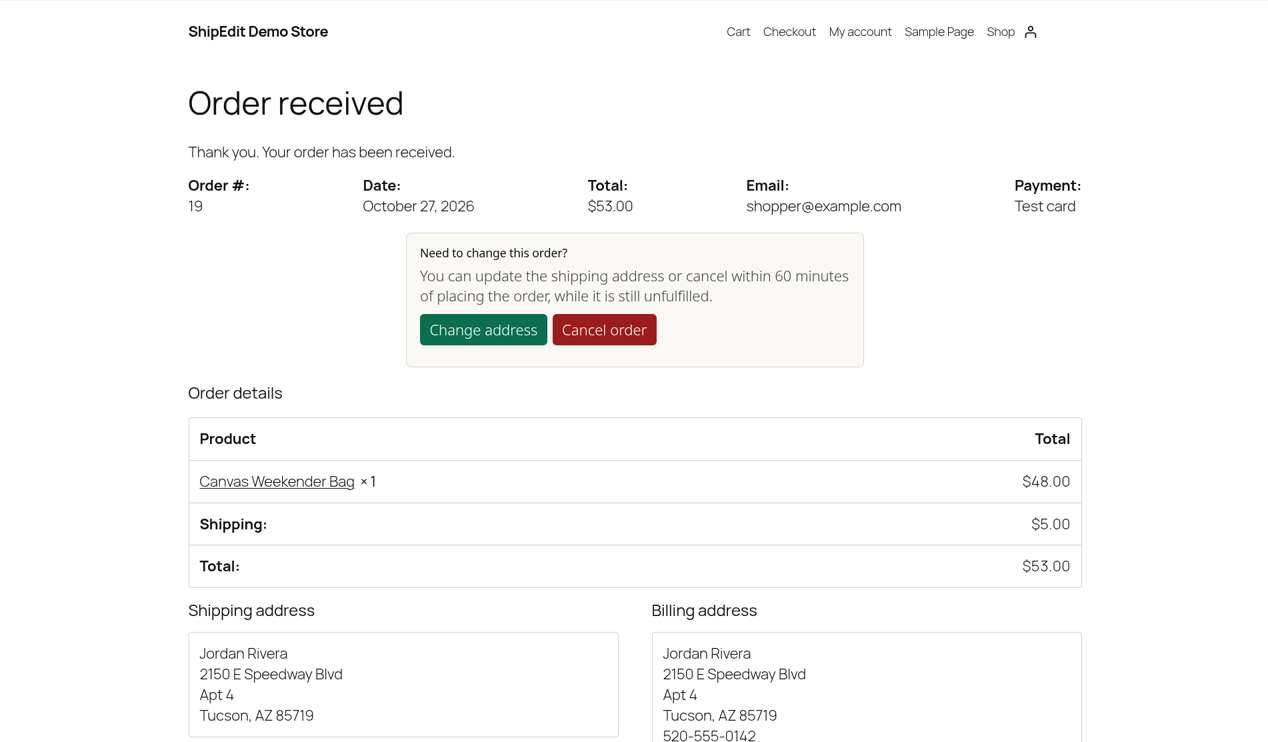



A customer types the wrong street, picks an old address, or changes their mind a minute after checkout. Then they email you, and you have to catch the order before it goes out the door. After delivery, a damaged box brings another inbox thread.
ShipEdit lets WooCommerce customers fix shipping mistakes themselves and file a damage claim after the order is fulfilled. After checkout they can edit the order’s shipping address or cancel the order, from the order received (thank-you) page or from My Account > View order. You decide how long that window stays open. Once the order is fulfilled, logged-in customers can use Report damage on My Account (and on order-received when they are signed in).
It covers address changes and cancellations before shipping, plus damage claims after fulfillment. No upsells, no product swaps.
What customers can do
- Change the shipping address on an order that hasn’t shipped yet
- Cancel an unfulfilled order, and see whether a refund was issued or the store will handle it
- Do it from the thank-you page right after checkout, or later from My Account > View order
- See a plain message when a change isn’t allowed, such as a PO Box, a country you don’t ship to, or a closed edit window
- After fulfillment, report damage from My Account > View order (logged-in customers only). If an open claim already exists for that order, they reopen the same buyer portal link instead of starting a duplicate
What you control
- How long after checkout changes are allowed (the edit window)
- Whether address changes, cancellations, or both are turned on
- Optional destination checks: block PO Boxes and APO/FPO/DPO addresses, or only allow countries in your WooCommerce shipping zones
- An email to you when a customer changes an address or cancels, so the packing team knows before the order ships
- An activity log of every change in ShipEdit
- Damage claims under WooCommerce > ShipEdit Claims: list and open claims, change status, start an invite from an order, copy or resend the buyer portal link
- A ShipEdit Claims box on the order edit screen (HPOS and classic) to list that order’s claims and start a claim
Changes are written to the WooCommerce order itself, so your shipping plugin, 3PL, or anything else that reads the order sees the new address. Claim photos and status live in ShipEdit; WooCommerce keeps a private order note when a claim is filed.
Who it’s for
Stores that pack and ship their own orders or use a 3PL, and get “can I change my address?”, “please cancel my order”, or “it arrived damaged” emails. ShipEdit is also available for Shopify stores.
How it works
This plugin is free. It adds the change-address and cancel panel, the Report damage button, and the claims admin screens to your store, and connects them to the ShipEdit service where you set your edit window, rules, and claims plan. Billing happens on shipeditapp.com, not inside WordPress. Setup and pricing for WooCommerce: https://shipeditapp.com/woocommerce-change-shipping-address
Works with block themes and the Order Confirmation block, classic themes, High-Performance Order Storage (HPOS), and the Cart and Checkout blocks.
Damage claims require a ShipEdit plan that includes damage claims. If the store is not entitled, WooCommerce > ShipEdit Claims shows a clear upgrade message and invite actions stay unavailable.
Guest orders
Report damage is shown only to logged-in customers who own the order, so WordPress can verify ownership before asking ShipEdit for a portal link. Guest checkout orders do not get the button in this release; merchants can still start a claim invite from WooCommerce > ShipEdit Claims or the order screen.
External services
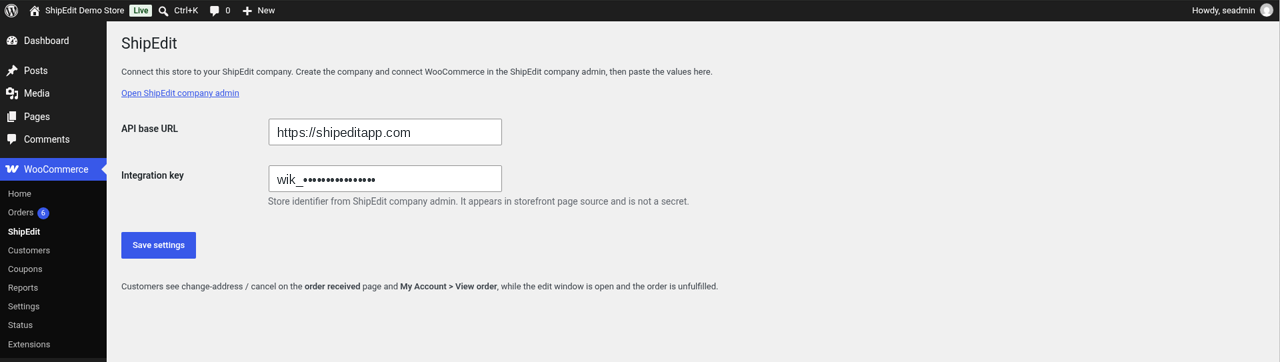
This plugin connects to ShipEdit, a hosted service run by CNR Consulting Services, Inc. Nothing is sent until you enter an API base URL and integration key on the WooCommerce > ShipEdit settings screen.
What is sent and when:
- Order received and My Account view-order pages (only when API settings are saved): the customer’s browser loads ShipEdit assets from this plugin and calls your configured API base URL (
/api/woo/order,/api/woo/order/address,/api/woo/order/cancel) with the order id, order key, and integration key to check eligibility and submit address changes or cancellations. - Report damage (logged-in My Account / order-received): the browser calls WordPress admin-ajax only. WordPress verifies the customer owns the order, then ShipEdit’s server calls your configured API base URL (
/api/woo/claims/customer-claim-link) with the store integration key. The integration key is not printed into the claims button markup. - WooCommerce > ShipEdit Claims and the order Claims box: WordPress calls your configured API base URL (
/api/woo/claimsand related paths) server-to-server with the store integration key to list claims, load detail and signed photo URLs, change status, start invites, and mint or resend buyer portal links. Those calls require the manage_woocommerce capability and WordPress nonces. - Tools > Export Personal Data / Erase Personal Data: when a request includes an email, WordPress asks ShipEdit (
/api/woo/claims/export-buyer,/api/woo/claims/erase-buyer) for claim records tied to that email on this connected store. - Admin settings screen: settings stay in WordPress options until you save them. No outbound call is made from the settings page itself.
- Order sync / updates: ShipEdit reads and updates order data through the WooCommerce REST API key and webhooks you authorize from ShipEdit company admin.
ShipEdit privacy policy: https://shipeditapp.com/privacy
The plugin itself is free and GPL-licensed and does not license-gate features inside WordPress. Paid ShipEdit plans (including damage claims) are billed by the service. Support: support@shipeditapp.com.
Guides and setup help: Change a WooCommerce shipping address before you ship
Privacy
ShipEdit may store claim codes, order ids, buyer name and email, claim descriptions, photos, status history, and related messages for damage claims filed through this store. Retention follows the retention setting on your ShipEdit company plan.
This plugin registers WordPress personal data exporters and erasers for ShipEdit claim data tied to a customer email. Export and erase call the ShipEdit API for the connected store only. Address-change and cancel activity that already lives on the WooCommerce order is handled by WooCommerce’s own tools.
See https://shipeditapp.com/privacy for the full ShipEdit privacy policy.