
Shashura Mobile Money for CampTix
v1.0.5Ciphewave Software Limited · 2026年10月29日 上架
Accept MTN and Airtel Mobile Money for CampTix ticket sales in Uganda through the Shashura gateway. Not affiliated with or endorsed by CampTix.
- 正在使用
- 10 以下
- 评分
- 暂无
- 累计下载
- 422
- 最近更新
- 2026年11月20日
 Ciphewave Software Limited
 Ssebuwufu Moses
 Moses Cursor Ssebunya
截图
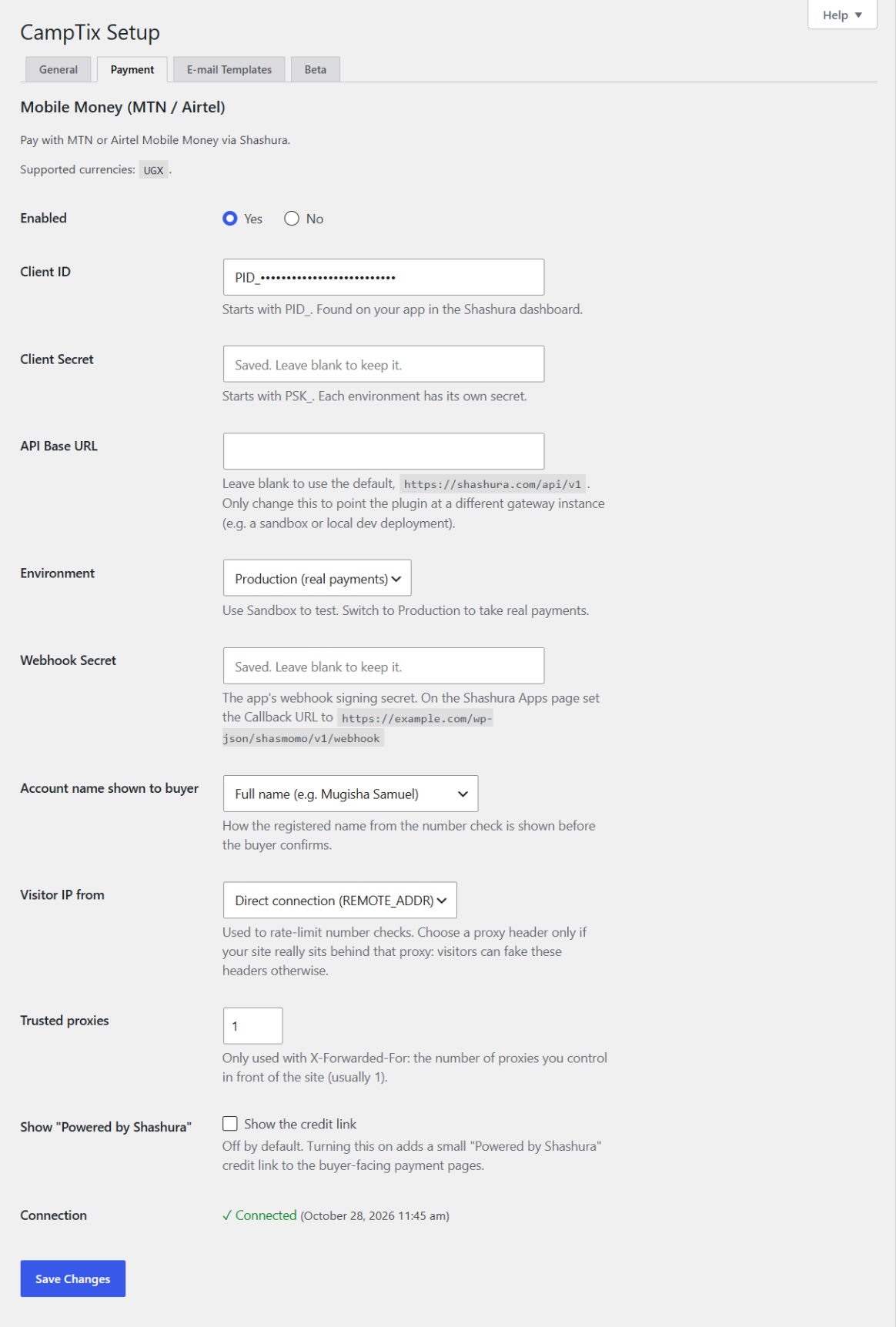
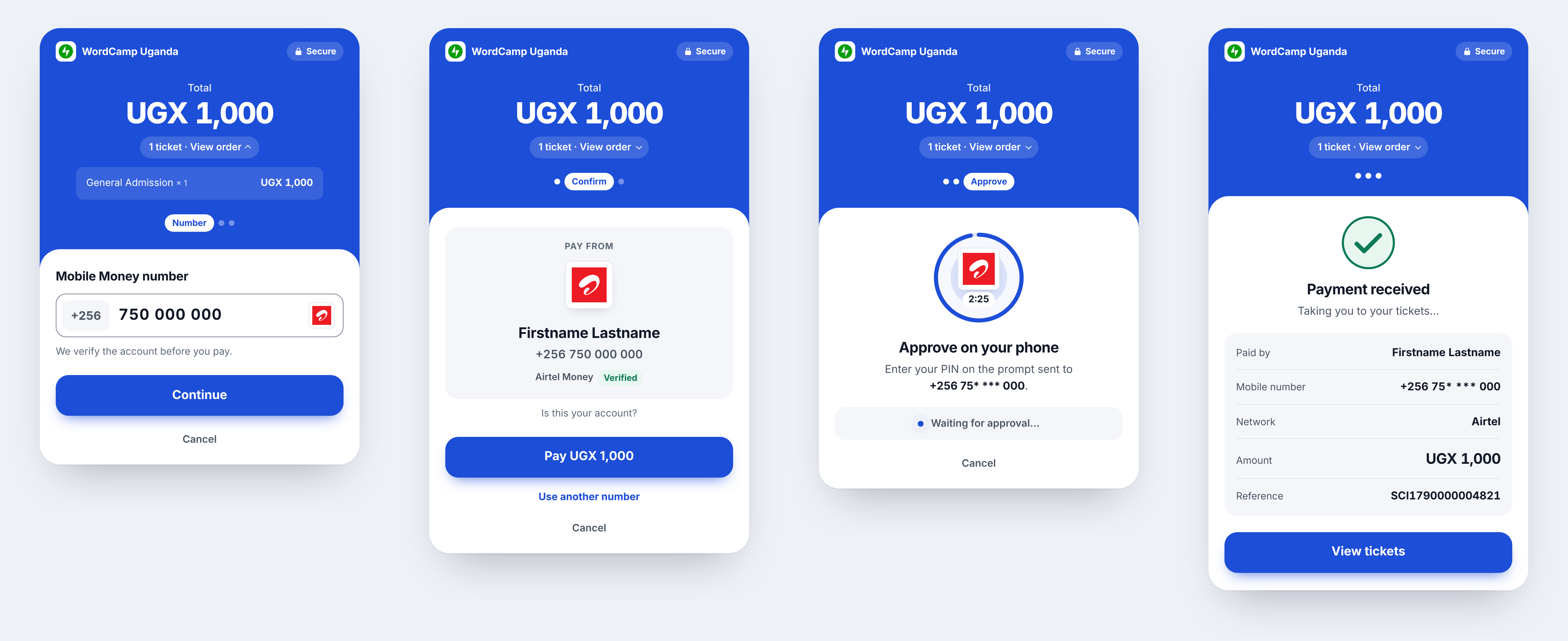
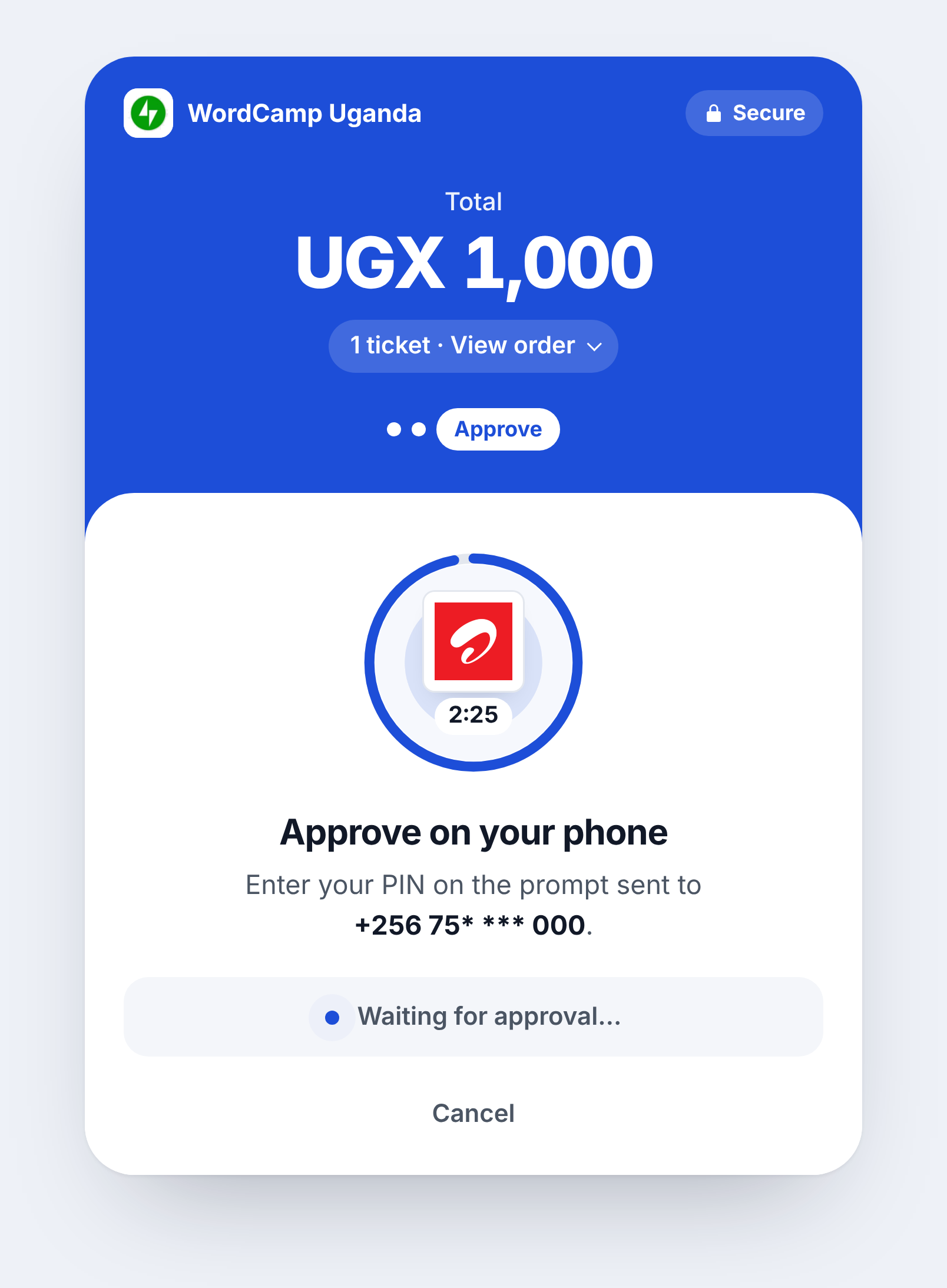
Shashura Mobile Money for CampTix adds MTN and Airtel Mobile Money as a payment option for CampTix, the WordPress event ticketing plugin used by WordCamp and community events. It is built for organisers selling tickets in Uganda who need a payment method their attendees already use day to day. This plugin is developed and maintained by Techdom Digital Solutions and is not affiliated with, or endorsed by, the CampTix project.
A Shashura merchant account is required to use this plugin. Sign up or log in at https://shashura.com.
The plugin connects CampTix to the Shashura Mobile Money API and handles the full collection lifecycle: number verification, the PIN push to the buyer’s phone, settlement confirmation, and reconciliation. It runs against either Shashura’s Sandbox or Production environment, and endpoint overrides are controlled by trusted deployment code, never per-site settings. See ENDPOINT-POLICY.md for migration and development testing.
How a payment works
- The buyer selects Mobile Money at checkout and enters their MTN or Airtel number.
- The number is verified against the network before anything is charged. The registered name is hidden by default; site administrators may choose partial or full display.
- A PIN prompt is pushed to the buyer’s phone for the exact order total.
- The plugin confirms the payment with Shashura directly rather than trusting the browser or an incoming webhook on their own. Both only trigger a check; only a successful status enquiry for the stored payment attempt, with the expected amount and (where already known) matching Shashura transaction ID, can mark it paid. The gateway may replace external_ref after settlement, so it is not used as a post-settlement equality check.
- Once confirmed, the buyer is taken to their CampTix ticket page and receives CampTix’s standard confirmation email.
Reliability and safety
- Every payment prompt on an order is tracked and reconciled, including ones approved after a buyer tried more than once.
- A duplicate payment on the same order is detected and flagged to the site administrator for a manual refund, rather than accepted or dropped silently.
- Incoming webhooks are verified against an HMAC-SHA256 signature. Unsigned, forged, oversized or mismatched-environment events are rejected.
- A per-order lock stops the webhook, the buyer’s browser, an order cancellation and CampTix’s own timeout sweep from recording conflicting outcomes for the same order at the same time.
- Requires CampTix with non-interactive payment results (the four-argument API in current CampTix 2.x). CampTix 1.x is unsupported: it can terminate webhook requests before a response is sent. On an incompatible version, this payment method is not registered and administrators see an upgrade notice. Upgrade CampTix before accepting new Mobile Money payments.
Requirements
- CampTix, with the ticket currency set to UGX.
- A Shashura merchant account with an app configured for Mobile Money collections, and its Client ID, Client Secret and Webhook Secret.
- A publicly reachable site, with the server’s outbound IP whitelisted on the Shashura app, so callbacks and settlement can reach the plugin.
Getting Your Shashura API Credentials
This plugin needs three values from your Shashura merchant account: a Client ID, a Client Secret, and a Webhook Secret. All three are issued from the Apps page of your Shashura merchant dashboard.
- Log in to your Shashura merchant dashboard at https://shashura.com and open the Apps page. If you don’t have an account yet, sign up there first.
- Click Create App and give it a name, such as your event site’s name. Shashura generates a Sandbox credential pair and a Production credential pair for the app at the same time, along with a Webhook Signing Secret, so there is no separate step to request production access later.
- The Apps page lists each Client ID against its environment:
- Client ID: SANDBOX begins with
TID_. Use this, with its matching Client Secret, while Environment is set to Sandbox in this plugin. - Client ID: PRODUCTION begins with
PID_. Use this, with its matching Client Secret, once Environment is switched to Production. - Client Secret is hidden by default. Use the reveal icon to display it on screen, or the regenerate icon to issue a new one. Regenerating immediately invalidates the previous secret, so update this plugin’s settings straight after.
- Client ID: SANDBOX begins with
- Copy the Client ID and Client Secret for the environment you are configuring into this plugin’s Payment settings.
- Reveal the Webhook Signing Secret (begins with
whsec_) on the same Apps page and copy it into this plugin’s Webhook Secret field. - Copy the webhook URL this plugin displays under its Webhook Secret field and paste it into the Callback URL field for the same app on the Apps page.
- Ask Shashura to whitelist your server’s outbound IP address for this app, so callbacks and settlement checks are accepted.
Because each app holds both a Sandbox and a Production credential pair, going live does not require creating a new app; only switching this plugin’s Environment setting to Production and swapping in the Production Client ID and Secret from the same Apps page.
External services
This plugin connects to the Shashura Mobile Money API to collect ticket payments. This is required functionality: without it, the plugin cannot verify mobile numbers, push PIN prompts, or confirm payment, since Mobile Money collection can only happen through a licensed Mobile Money aggregator.
What is sent, and when:
- Number verification: when a buyer enters a mobile number at checkout, that number is sent to Shashura to look up the registered account name on the MTN/Airtel network, shown to the buyer for confirmation before anything is charged.
- Payment request: once the buyer confirms, the mobile number, the order total, and an order reference are sent to Shashura to push a PIN prompt to the buyer’s phone.
- Status confirmation: after a prompt is sent, this plugin asks Shashura directly whether the referenced payment succeeded (and Shashura also notifies this plugin via a signed webhook). No card numbers, mobile money PINs, or other site data are sent.
- These calls happen only when a buyer actually attempts a Mobile Money payment at checkout, never on a page load with no checkout activity.
This service is provided by Shashura (operated by Techdom Digital Solutions): Terms of Service, Privacy Policy.
A Shashura merchant account, with an app’s Client ID and Client Secret, is required to use this plugin. See “Getting Your Shashura API Credentials” above.
Additional Information
About Shashura
Shashura is a Mobile Money payment gateway for Uganda, settling payments through MTN and Airtel Mobile Money. A Shashura merchant account is required to use this plugin. Sign up or log in at https://shashura.com.
Privacy
A checkout visitor can check a Ugandan Mobile Money number that does not belong to them. The verification service may return the registered subscriber’s name. By default this plugin hides that name from the visitor; site administrators can opt to show the partial or full name under Tickets Setup Payment. This can disclose personal information to a third party. Explain the chosen setting in the site’s privacy policy. Rate limiting is not proof of number ownership. The name may still be received and temporarily stored by the plugin when display is off.
Against each paid order, this plugin stores the payer’s registered name, a masked mobile number, the mobile network, and the Shashura transaction reference, for reconciliation and support. Full, unmasked phone numbers and names are included in WordPress’s own Tools Export Personal Data and Erase Personal Data tools, so data-subject requests are handled through core WordPress, not a separate process. This plugin never handles or stores card numbers, mobile money PINs, or Shashura account credentials.
CampTix writes each payment result to its own order log, which WordPress’s Erase Personal Data tool does not reach. The payer’s name and masked number are therefore not included in the payment data this plugin passes to CampTix. Log entries written by earlier versions may still contain them; if a person asks for erasure, those entries have to be cleaned up in the database. The name and number kept on the payment attempt itself are still covered by the export and erase tools.
Support
For help with a Shashura account, API credentials, or a specific payment, contact Shashura support through the merchant dashboard at https://shashura.com. For issues with this plugin itself, use this plugin’s support forum on WordPress.org.
Testing
The public repository contains standalone regression tests with in-memory WordPress/CampTix doubles and mocked gateway responses. Run php bin/test.php or composer test; GitHub Actions runs the suite on PHP 7.4, 8.2 and 8.4. Coverage and remaining integration gaps are documented in tests/README.md. The historical 92-check end-to-end suite and independent security-review report are not published here; the public regressions do not substantiate those claims.
Credits
- Developed and maintained by: Techdom Digital Solutions (https://techdom.io)
- Contributors: Cipherwave Software Limited (https://cipherwavesolutions.com), Moses Ssebuwufu (ssebuwufumoses on WordPress.org, @ssebuwufumoses on GitHub), Moses Cursor Ssebunya (mosescursor on WordPress.org, @Successfulsebunya on GitHub)
- Trademarks: The MTN MoMo and Airtel Money logos in
assets/imagesare trademarks of MTN and Airtel.
Developer Filters
The following filters are available to adjust plugin behaviour from a theme or another plugin:
shasmomo_lookups_per_ip(default 20): number verification checks allowed per visitor IP per hour.shasmomo_lookups_per_number(default 3): number verification checks allowed per phone number per hour, across all orders.shasmomo_lookups_alert(default 300): site-wide number verification checks per hour that trigger an admin email.shasmomo_client_ip: overrides the IP address used for rate limiting.shasmomo_accent_color(default #1d4ed8): accent colour used on the payment pages.shasmomo_merchant_logo(default: Site Icon, then Custom Logo): image shown in the payment page header.shasmomo_network_logo(default: bundled MTN MoMo or Airtel Money logo): image URL for a network logo (mtnorairtel). Return an empty string to show the coloured badge with the network name instead.shasmomo_template(default: the plugin’stemplates/folder): path of a payment page template. Themes can also override one by copying it toyour-theme/shashura-mobile-money-for-camptix/.shasmomo_http_timeout(default 25): timeout, in seconds, for calls to the Shashura API.shasmomo_base_url(default https://shashura.com/api/v1): trusted deployment override requiring HTTPS and WordPress safe HTTP validation. Per-site endpoint settings are ignored.