
Disable REST API for Real
v2.1.1Samuel Aguilera · 2015年12月17日 上架
Really prevents the REST API from handling requests (default) or require user to be logged in.
- 正在使用
- 200+
- 评分
- 5.0 / 5
- 累计下载
- 6,507
- 最近更新
- 2019年11月15日
贡献者
 Samuel Aguilera
截图

The WordPress REST API is a great resource, but if you don’t want to use it probably you will want to close this door to your WordPress.
Unlike other popular plugins that aims to disable the REST API but only return an error, processed by the REST API, when a request is received, by default, this plugin removes all filters and actions related to WordPress REST API, and returns a 404 error for requests sent to the REST API URL endpoints, effectively blocking any use of the REST API.
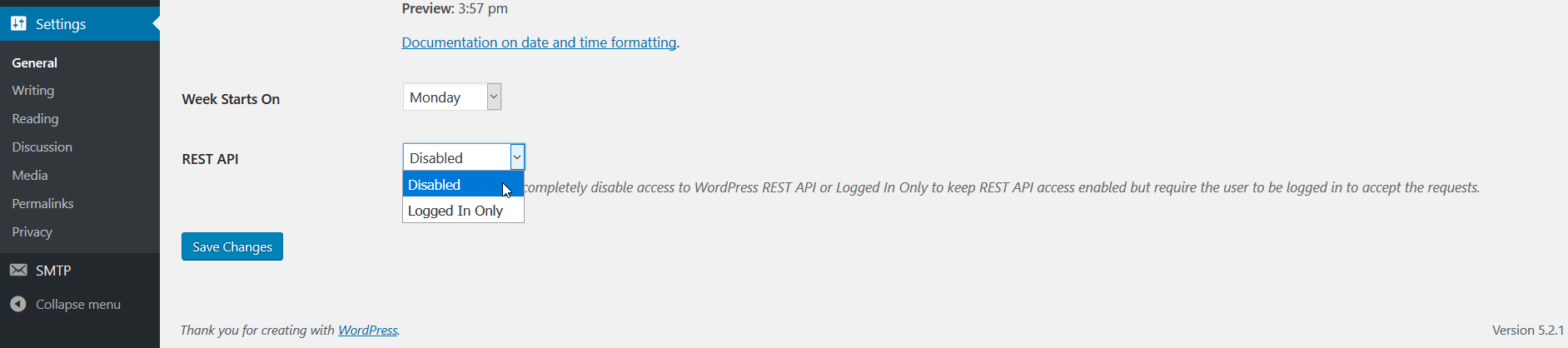
Optionally you can set the REST API setting in Settings -> General page to “Logged In Only” for a less drastical action, to keep REST API access enabled but require the user to be logged in to accept the requests.
If you’re happy with the plugin please don’t forget to give it a good rating, it will motivate me to keep sharing and improving this plugin (and others).
SUPPORT: If you have any support question, please create an issue at the Github repository.
Requirements
- WordPress 4.7 or higher.
Features
- Disable WordPress core REST API for real by removing all filters and actions related to it and returning a 404 error for requests sent to REST API URL endpoints (e.g. https://example.com/wp-json/whatever ).
- Option to require user to be logged in to use the REST API instead of completely disable it.
Usage
To disable the REST API completely simply install the plugin from the Plugins page and enable it.
If you don’t want to disable the REST API but require user to be logged in instead, go to Settings -> General page and set the REST API to option to “Logged In Only”, and click Save Changes.
You can change the option back to “Off” if you want to disable the REST API again.
To return to WordPress default, simply deactivate the plugin.