

SalesDrawer – Sale Products Drawer for WooCommerce
v1.0.0dapperdev · 2026年11月4日 上架
Promote your sale products in a slide-out drawer with a persistent sale tab. No manual syncing — WooCommerce stays the source of truth.
- 正在使用
- 10 以下
- 评分
- 暂无
- 累计下载
- 371
- 最近更新
- 2026年11月4日
贡献者
 dapperdev
截图
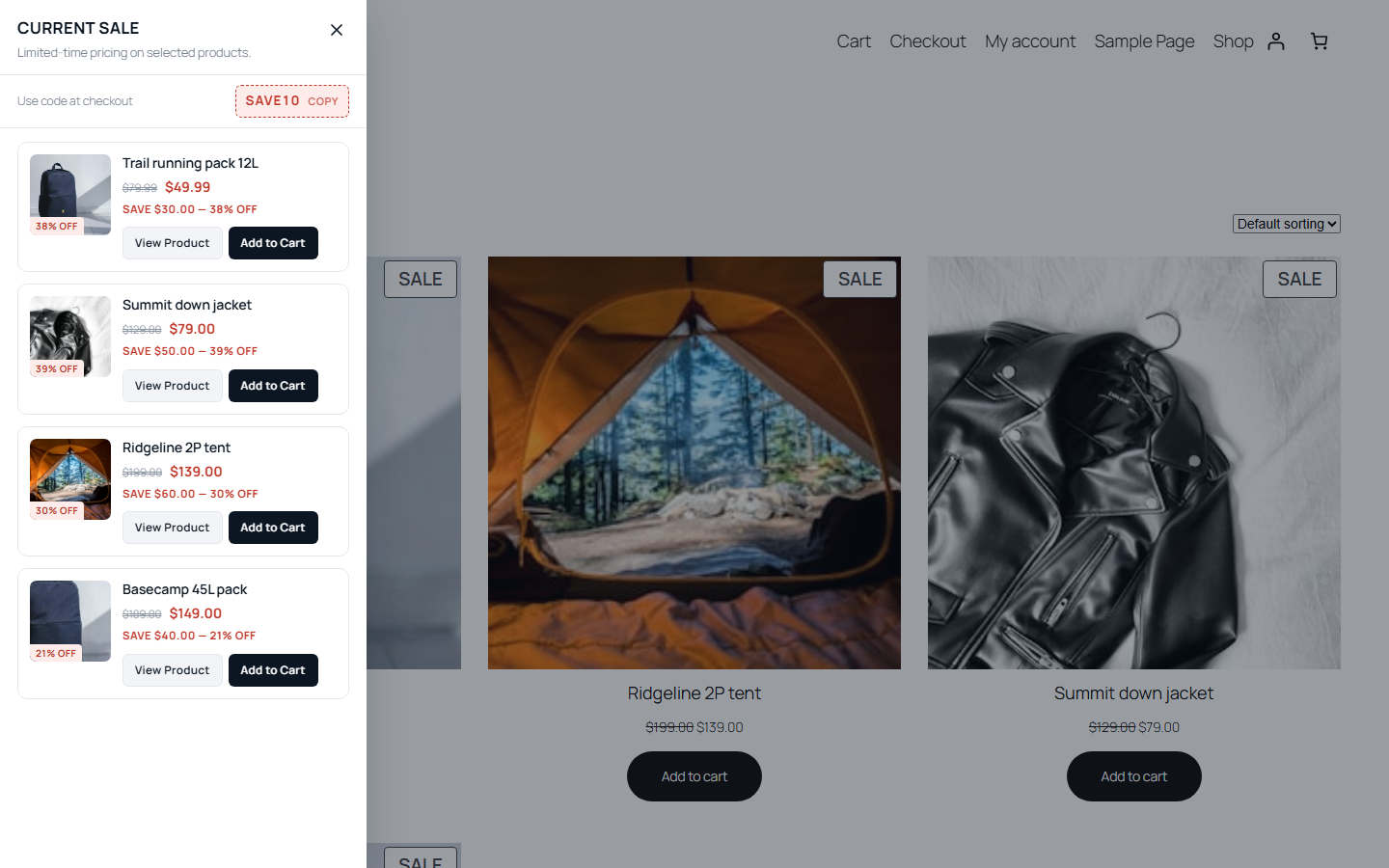


SalesDrawer finds every product your store currently has on sale and promotes it inside a slide-out drawer. The drawer opens on the schedule you choose, closes into a persistent sale tab, and reopens whenever a shopper taps it.
The plugin never stores prices, sale windows or stock levels. It reads them live from WooCommerce behind a short cache, so the drawer can never advertise a price that is no longer available.
Works on activation
- Every eligible sale product is promoted automatically — nothing to sync, nothing to configure
- Simple and variable products, including scheduled WooCommerce sales with start and end dates
- Products leave the drawer on their own when the sale ends, the price is removed, or the product is unpublished, deleted or out of stock
Merchandising
- Promote every eligible sale product, or hand-pick exactly which ones with a per-product switch
- Pin products to the top
- Sort by sale price, dollar savings, percentage discount, name or newest
- Cap how many products appear
- A Drawer Order view showing exactly which products made the cut, in order
The drawer
- Slides from the left, the right, or up from the bottom as a sheet; independent widths for desktop, tablet and mobile
- Three product layouts — list, two-column grid, or compact rows
- Auto-open rules: every page load, once per session, daily, every X days, first visit only, or never
- Launcher as a classic edge tab or a floating bubble, with nine built-in icons, your own icon, and live text tokens like {count} and {max_percent}
- A
[saledrawer_tab]shortcode to place a “see the deals” button anywhere - Add to cart from the drawer for simple products; variable products get Choose Options
- Cart awareness — a product already in the cart shows View Cart instead
- A tap-to-copy coupon code in the drawer header — read live from WooCommerce, so an expired or used-up coupon removes itself
- Keyboard and screen-reader accessible; works with any WooCommerce-compatible theme
- Full appearance control: colours, radius, spacing and shadow
- One-click seasonal presets — Black Friday, Flash Sale, Clearance and Holiday looks, applied before you save
Built for speed
Assets load only when the drawer has something to show. Every derived list is cached and invalidated automatically when product or campaign data changes. A deferred rendering mode keeps the drawer accurate on sites behind a full-page cache.
Extending
Every part of the drawer can be extended through documented action and filter hooks (all prefixed saledrawer_), and the drawer fires DOM events such as saledrawer:open, saledrawer:close and saledrawer:add_to_cart that themes and tag managers can listen for.
SalesDrawer Pro
SalesDrawer Pro is a separate add-on plugin, sold and hosted outside WordPress.org, that adds features of its own: scheduled campaigns, product rules by category/tag/brand, countdown timers, custom ordering, advanced targeting and analytics. This plugin contains none of that code, has no licence checks, and is complete on its own.