

RespSync Visibility Toggle for Elementor
v1.1.0Shabab Ahmed · 2026年8月11日 上架
RespSync responsive visibility toggle icon in the Elementor Structure (Navigator) panel for instant device visibility management.
- 正在使用
- 10 以下
- 评分
- 5.0 / 5
- 累计下载
- 309
- 最近更新
- 2026年8月16日
1 条评价需要 WordPress 5.8+已测试到 7.0.9PHP 7.4+
贡献者
 Shabab Ahmed
截图
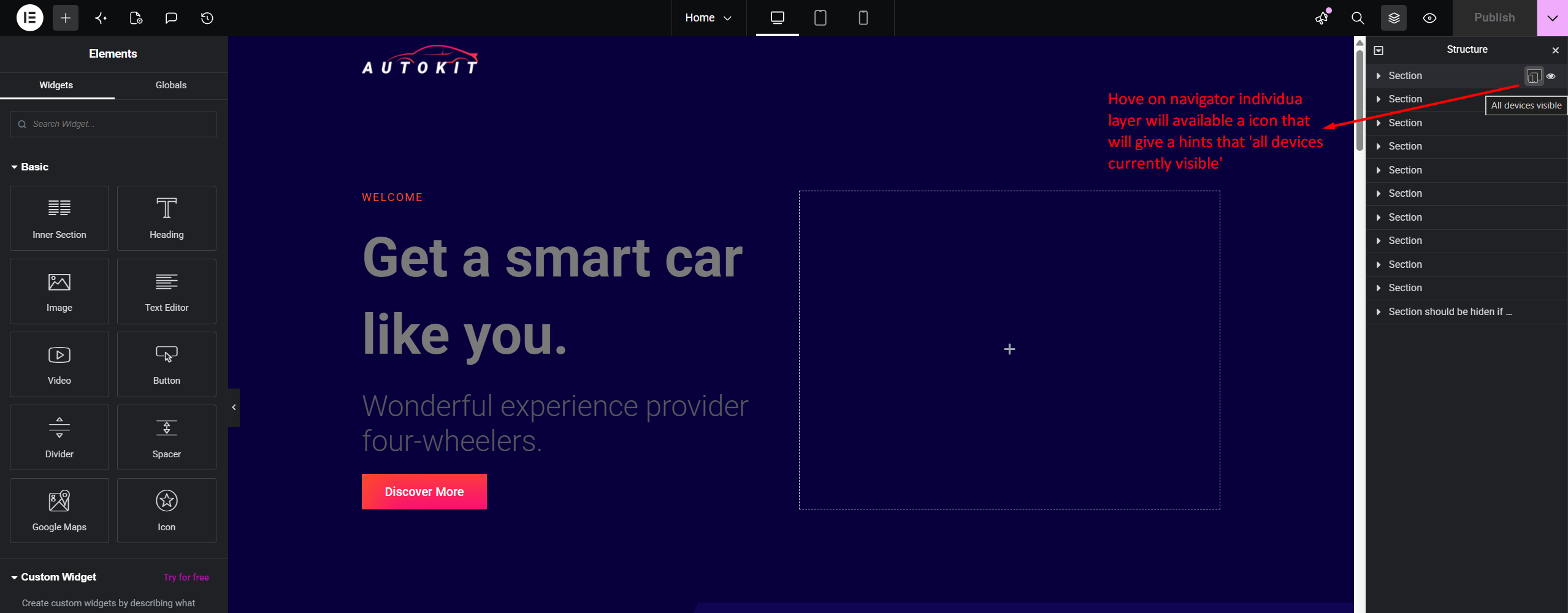


RespSync Visibility Toggle adds a fast, intuitive device visibility toggle button directly inside the Elementor Structure (Navigator) panel item rows.
With a single click, users can check and toggle element visibility across Desktop, Tablet, and Mobile devices without navigating through multiple tab controls in the Elementor settings panel.
Key Features
- Navigator Panel Integration: Instant access directly on Navigator tree items.
- Dynamic Multi-Device Status: Visual device icon indicator showing active and hidden states.
- Floating Tooltip Popup Controls: Compact floating popup with dedicated toggle controls for Mobile, Tablet, Desktop, and All devices.
- Linear Gradient Title Masking: Elegant linear-gradient fade effect on long layer titles when tooltip popup is active.
- Native Synchronization: Seamlessly updates Elementor settings model and marks document as modified for saving.
- Lightweight & Fast: Pure JavaScript integration with zero overhead on front-end performance.