

resmio button & widget
v1.3Philipp-resmio · 2015年1月23日 上架
Resmio provides you with an online reservation system software for your restaurant that allows you to manage all reservations received in your restaur …
- 正在使用
- 300+
- 评分
- 5.0 / 5
- 累计下载
- 8,384
- 最近更新
- 2021年12月15日
贡献者
 Philipp-resmio
截图


Resmio provides you with an online reservation system software for your restaurant that allows you to manage all reservations received in your restaurant quickly and easily. In order to recieve reservations from your website you have to integrate the codesnippet provided by resmio either for the widget itself or for a reservation button (which then loads the widget).
With this plugin you do not have to manually add these codesnippets to your site. Instead you can type shortcodes directly into the wysiwyg-editor and or insert the shortcodes through a menu button in the toolbar of the TinyMCE editor (only in visual mode).
The shortcodes are:
[resmio-button] -> for the resmio button
[resmio-widget] -> for the resmio widget
Why Use It?
Instead of adding whole codesnippets for your resmio button/widget to your website you can use shortcodes.
How To Use (once plugin is installed)
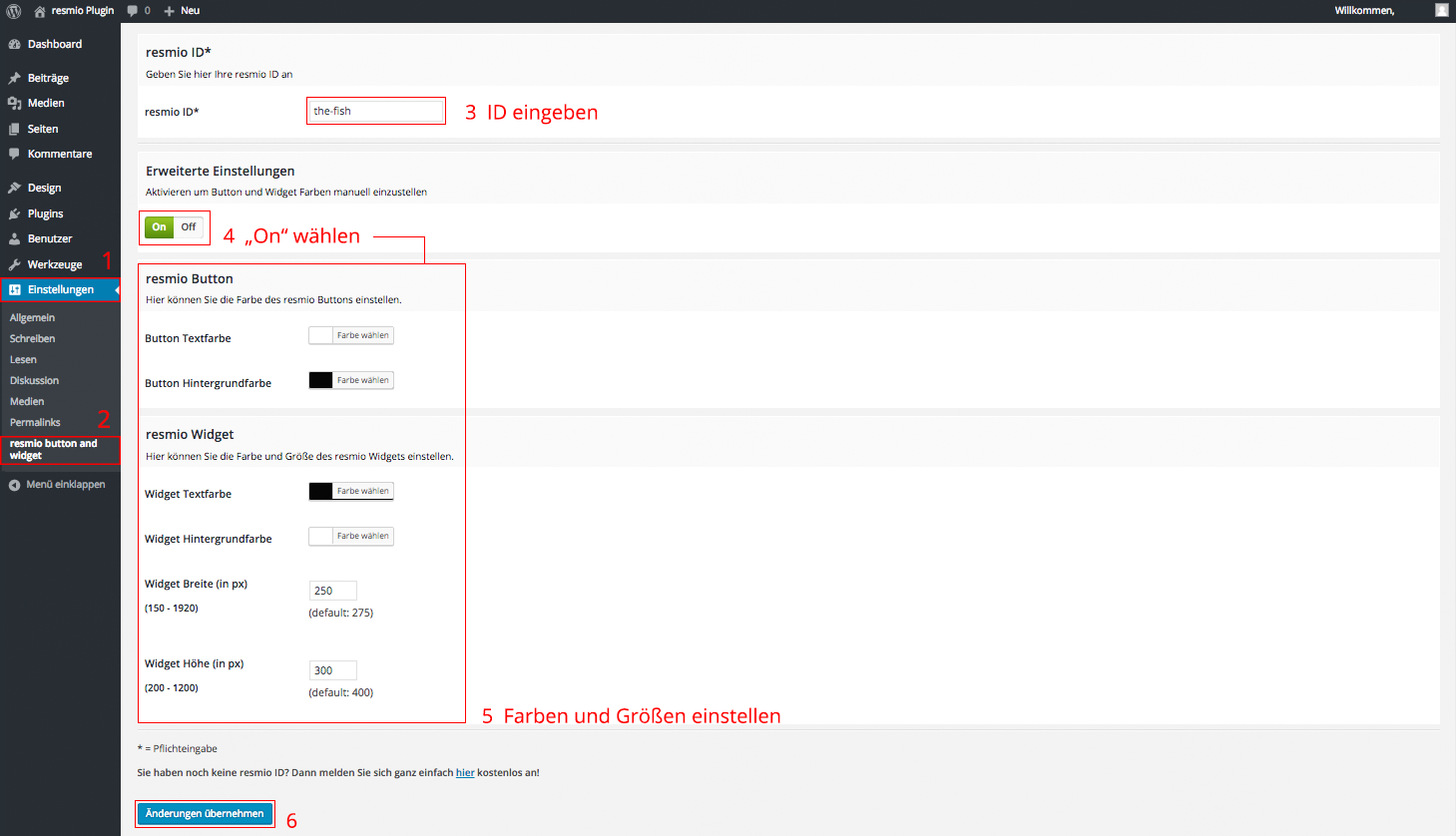
1) Go to settings -> resmio button and widget and insert your resmio ID
1.1) If you want to alter the colors of the button (and so on) activate extended settings
2) Save the settings
3) Go to your page/post and insert the shortcode you want to use.
There are two ways to insert the shortcodes:
3.1) Type the shortcodes ‘[resmio-button]’ and/or ‘[resmio-widget]’ directly into the wysiwyg editor
3.2) Use the menu button ‘resmio’ in the toolbar of your wysiwyg-editor (only in visual mode)
Compatibility
Tested on 4.0, 4.1, 4.4.2, 4.5.4, 4.6, 5.3, 5.4, 5.6.1 and 5.8.2
Support
If you encounter any problem with this plugin please contact resmio GmbH via email -> support@resmio.com
Disclaimer
This plugin is released under the GPL licence. I do not accept any responsibility for any damages or losses, direct or indirect, that may arise from using the plugin or these instructions. This software is provided as is, with absolutely no warranty. Please refer to the full version of the GPL license for more information.
Manual Installation
- Download the plugin file and unzip it.
- Upload the ‘resmio-button-and-widget’ folder to the ‘wp-content/plugins/’ folder.
- Activate the resmio button and widget plugin within WordPress.
Alternatively, you can install the plugin manually through the WordPress Admin interface by going to Plugins -> install -> upload plugin (zip format)