
Replai Favicon – Favicon & App Icons for Every Device
v1.0.12REPLAI · 2026年8月28日 上架
Generate a complete favicon set for every browser and device from one image. Generated on your own site, no external service.
- 正在使用
- 10 以下
- 评分
- 暂无
- 累计下载
- 280
- 最近更新
- 2026年8月29日
需要 WordPress 6.2+已测试到 7.1.5PHP 7.2+
贡献者
 REPLAI
截图
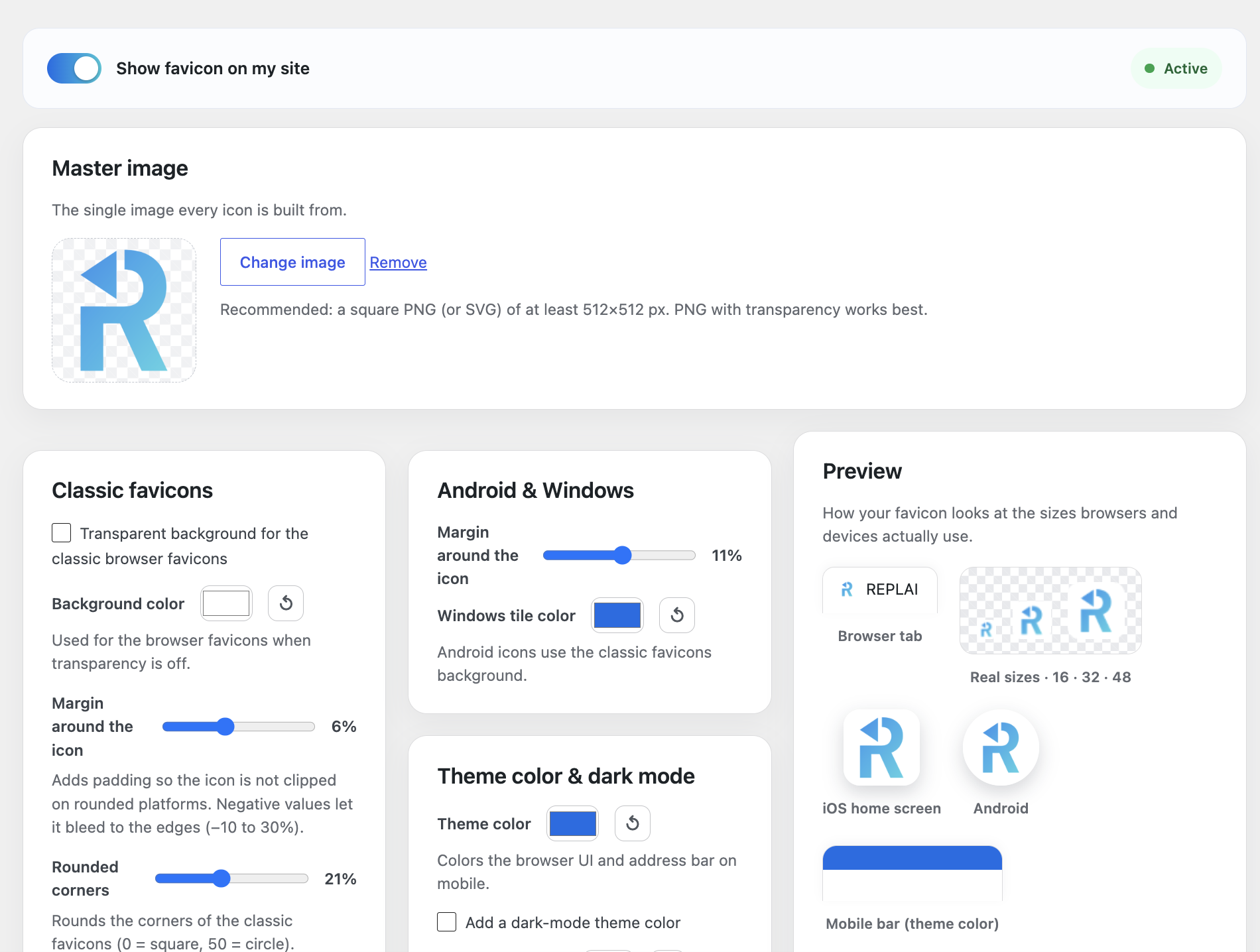

Replai Favicon turns a single master image into every icon your site needs — and adds the right HTML automatically. No copy-paste, no third-party service: everything is generated on your own server.
From one image the plugin creates:
- favicon.ico (16/32/48) — the classic icon, still used by browsers on PDF pages and elsewhere.
- PNG favicons — 16, 32, 48 and 96 px for crisp browser tabs and Google search results.
- Apple Touch icon (180×180) — the iOS home-screen icon, always with a solid background.
- Android icons + web app manifest — 192 and 512 px plus a maskable icon and a
site.webmanifest. - Windows tiles — an
mstile-150x150.pngand abrowserconfig.xml. - SVG favicon — if your master image is an SVG, it is served as a modern vector favicon too.
Many options
- Transparent or solid background for the classic favicons, with a color picker and a one-click reset to white.
- Padding per icon type — set a different margin for browser favicons, Apple Touch and Android, and even go slightly negative so the icon bleeds to the edges.
- Rounded corners for the classic favicons, from square all the way to a circle.
- Apple Touch background (iOS icons are always opaque).
- Theme color for the mobile browser UI, plus a Windows tile color.
- Dark mode — an optional alternative
theme-colorforprefers-color-scheme: dark. - App name for the web app manifest (defaults to your site title).
Smart and safe
- Real-time preview — a sticky preview panel shows your icon in a browser tab, at real sizes, on iOS and on Android, and updates live as you change any option, before you generate.
- Replaces the WordPress Site Icon tags (optional) so you never get duplicate icon markup.
- Serves /favicon.ico from the site root (optional) for browsers and crawlers that request it directly.
- Turn it on or off without regenerating — the files are kept.
The whole admin is available in 7 languages (English, Spanish, Catalan, French, Italian, Portuguese and German) based on your site language.
Everything runs on your own site. Icons are generated locally with GD or Imagick — your image is never uploaded to an external service.