

Raya AI – Persian Support Chatbot
v1.10.0rayachat · 2026年10月26日 上架
Puts your Rayachat AI chatbot on your site — it answers visitors from your knowledge and products — and its inbox in wp-admin.
- 正在使用
- 10 以下
- 评分
- 暂无
- 累计下载
- 474
- 最近更新
- 2026年11月22日
贡献者
 rayachat
截图
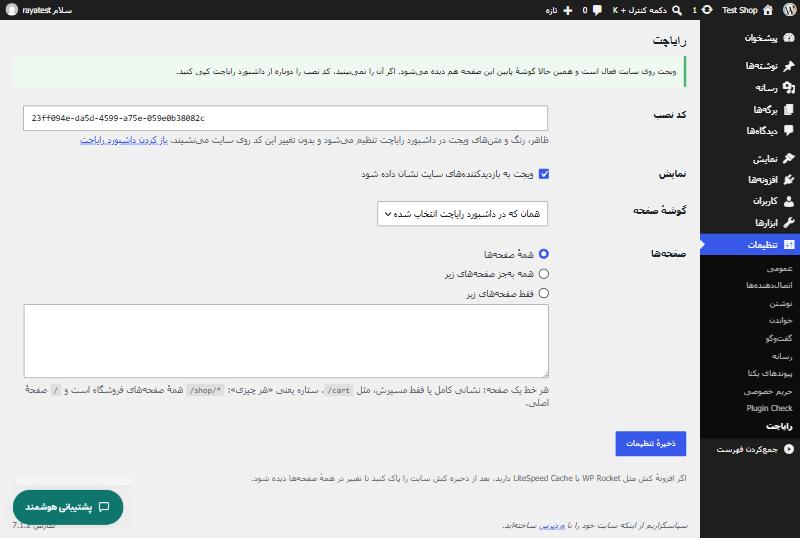
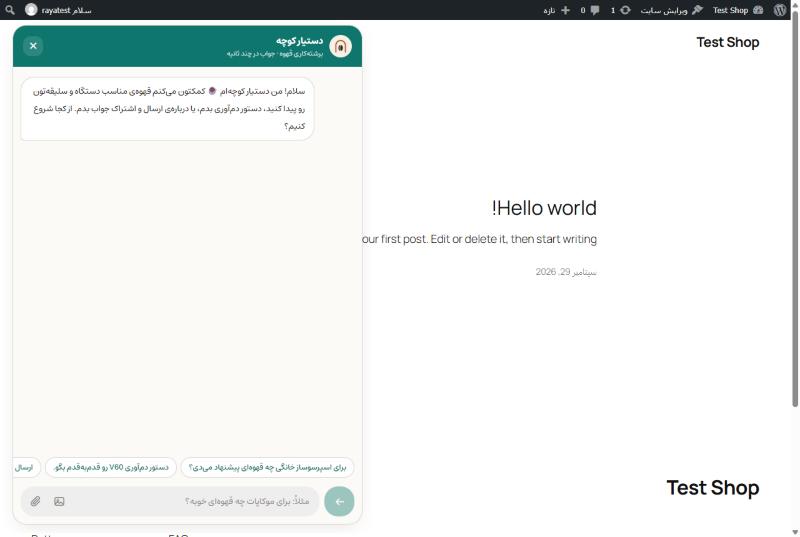
Rayachat is an AI customer-support chatbot for Persian-speaking businesses. You build the chatbot in the Rayachat dashboard — its knowledge, products, tone and look — and this plugin puts its chat widget on your WordPress site without touching theme code.
- Connect with one click: approve the site in your Rayachat account and come back connected — no codes or keys to copy. Pasting the install code by hand still works.
- Switch the widget off and on without losing its settings.
- Show it on every page, on every page except a few, or only on a few. Persian (non-Latin) addresses work as typed or as copied from the browser.
- The settings page shows the widget itself, so you see at once whether the code is right.
- Read and answer the chatbot’s conversations without leaving WordPress, and see on the Dashboard who is waiting for a person and how the chatbot is doing.
The widget’s corner, colours, texts, greeting and everything the chatbot says are managed in the Rayachat dashboard, so a change there reaches your site without updating the plugin.
The inbox in WordPress
Tick “Inbox and figures in WordPress” when you connect, and Rayachat Inbox shows every conversation of the chatbot, from the site and from Telegram or Bale, laid out like Rayachat’s own inbox: the conversations, the open one, and its details beside it. The customers waiting for a person are a tab of their own; each row shows who wrote, on which channel, the conversation’s tags and its state. The thread has the photos and the product cards the bot sent, and the details hold the contact details from the lead form, the page the visitor wrote from and the conversation’s history. Answer from there — the reply goes out on the customer’s own channel and pauses the bot in that conversation; the bot’s mark beside “Send” turns it back on — or mark a conversation resolved or unread from its row. Saved replies from Rayachat are a “/” away, and the sparkle button drafts a reply for you to read over, one message of your Rayachat plan each. The menu shows how many customers are waiting.
The Dashboard gets one Rayachat card, laid out like the overview in the Rayachat dashboard: whether the bot has stopped answering and why, the customers waiting for you (only when someone is), then today’s conversations, the share of replies the bot wrote alone, new leads and customer satisfaction (or the bot’s reply time) with 14-day bars, the sales that came after a chat on a WooCommerce store, the questions the bot couldn’t answer, and the plan’s messages in a quiet line at the foot. Its figures are the dashboard’s own, so the two always agree, and each links to its page in Rayachat. Move, fold or hide it under Screen Options like any other card. On a store, shop managers see the inbox and the card too; elsewhere, administrators.
WooCommerce
Tick “Sync WooCommerce products” when you connect, and the plugin sends your products to your chatbot — name, description, categories, attributes, every variation with its price and stock, and the main picture — and keeps them up to date. A change waits 10 minutes before it is sent (you can choose 5, 10 or 30), and each new edit to the same product starts the wait again, up to twice the wait in all, so a wrong price or a product trashed by mistake that you put right in time never reaches your customers. Once a day the plugin checks every product again; only the products that changed are sent. Prices are converted to toman from rial, toman, thousand rial or thousand toman.
Developers can hide the widget on any page with the rayachat_show_widget filter:
add_filter( 'rayachat_show_widget', function ( $show ) { return $show && ! ( function_exists( 'is_checkout' ) && is_checkout() ); } );
External services
This plugin connects your site to Rayachat (https://rayachat.net), the service that runs your chatbot. The plugin needs a Rayachat account and chatbot; until you connect it loads nothing and sends nothing.
-
Connecting (when you click “Connect to Rayachat”): your browser opens
https://rayachat.net/connect/wordpresswith your site’s address and name, whether WooCommerce is active, and two random one-time values. After you approve, your site sendshttps://rayachat.net/api/integrations/wordpress/exchangethe one-time code it got back, and receives the chatbot’s install code, a sync key if you chose product sync, and a key for the inbox if you allowed it. Disconnecting tells Rayachat to stop accepting those keys. -
The chat widget: on every page where the widget is shown, and on the plugin’s own settings page as a preview, the visitor’s browser loads
https://rayachat.net/widget.js, which opens the chat window in an iframe served fromhttps://rayachat.net/embed/. Loading those files sends the chatbot’s install code and, as with any web request, the visitor’s IP address and browser details. When a visitor chats, their messages, any photo or file they attach and any details they enter in the chatbot’s contact form are sent to Rayachat, to be answered and shown to your team. The chat window keeps a random visitor token in the browser’s storage for rayachat.net, so a conversation carries on across pages. Ifhttps://rayachat.net/widget.jsfails to load or hasn’t loaded within six seconds — for a visitor in Iran while the country is cut off from the international internet — the browser loads the same widget fromhttps://raya41.ir, Rayachat’s own server inside Iran, and the same applies to it. When that copy was loaded only because rayachat.net was slow, it first askshttps://rayachat.net/api/healthonce, and opens the chat on rayachat.net if it answers. - WooCommerce product sync (only when you turned it on): your site sends
https://rayachat.net/api/integrations/woocommerce/your store’s address and currency, and for each published product its name, SKU, link, descriptions, categories, visible attributes, variations with their prices and stock, and its main picture. It does so when you connect, after a product changes (after the wait you chose), and once a day — then a short fingerprint of each product, and in full only the products that changed. - Sales after a chat (with WooCommerce product sync on): when a visitor writes to the chatbot, the widget keeps a random reference in a cookie on your site,
rayachat_ref, for 7 days. An order placed with it keeps the reference, and when the order is paid, cancelled, refunded or fails your site sendshttps://rayachat.net/api/integrations/woocommerce/salesits order ID, total, currency, status, date and that reference — never the buyer’s name, phone, email, address or the products bought. Once a night it also sends the number and total of the paid orders of the last two days, as two figures per day. Rayachat uses them to show the chatbot’s owner the sales that came after a chat. - The inbox and the Dashboard cards (only when you allowed them): while an admin has the inbox or the Dashboard open, your site asks
https://rayachat.net/api/integrations/wordpress/inbox/for the chatbot’s conversations, its figures and the customers waiting for a person, and passes them on to that admin’s browser — every few seconds for an open conversation, and at most once a minute for the menu’s count and the Dashboard’s figures. A reply, a pause or a status change made there is sent with the display name of the WordPress user who made it; asking for a suggested reply sends only which conversation it is for, and Rayachat writes the draft with its AI model. Product pictures in conversations load fromhttps://rayachat.net/api/product-images/. The plugin’s own admin pages load Rayachat’s typeface fromhttps://rayachat.net/api/integrations/wordpress/font, which serves it to connected sites only; the request carries the site’s address, as any font request does. Disconnecting or deleting the plugin tells Rayachat to stop accepting the key, and the chatbot’s owner can withdraw it from the Rayachat dashboard at any time. - What is never sent: anything about your customers, anything about your orders beyond the figures above, and anything about your site’s posts, pages or users — except, from the inbox, the display name of the user who answered or changed a conversation.
Rayachat terms of use: https://rayachat.net/terms
Rayachat privacy policy: https://rayachat.net/terms#privacy