

Quantities and Units for WooCommerce
v1.0.13Nick Verwymeren · 2015年10月30日 上架
Easily require your customers to buy a minimum / maximum / incremental amount of products. Supports decimal quantities.
- 正在使用
- 1,000+
- 评分
- 4.4 / 5
- 累计下载
- 2.5 万
- 最近更新
- 2016年11月29日
贡献者
 Nick Verwymeren
截图


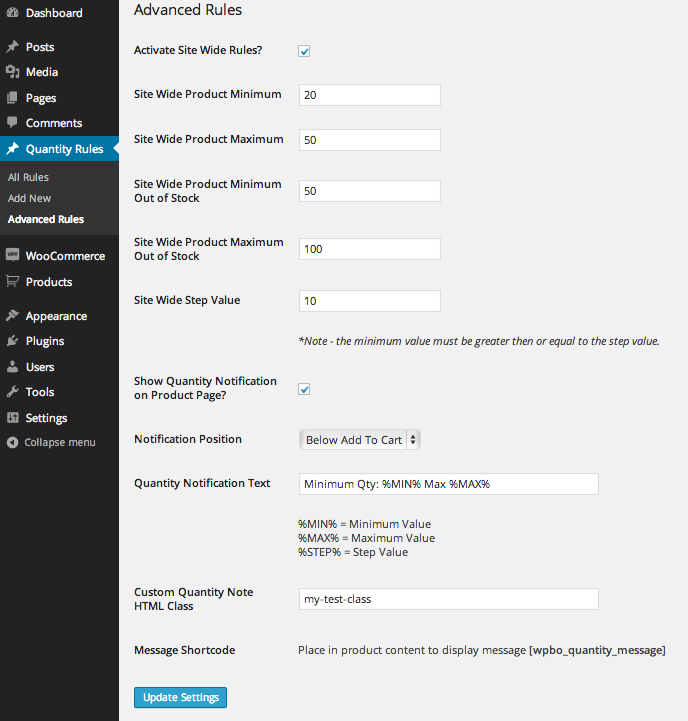

NOTE: This plugin has been forked from the “Advanced Product Quantities” plugin. It adds decimal quantities support and
units to products. Please don’t attempt to run both plugins simultaneously. It not needed and the universe will
probably implode.
With Quantities and Units for WooCommerce you can easily create rules that restrict the amount of products a user can
buy at once. Set Minimum, Maximum and Step values for any product type and must be valid before a customer can proceed
to checkout. Quantities and Units also bring decimal quantity support to WooCommerce.
This plugin works great with Rapid Order, a fast ordering system for WooCommerce.
New Features
- Allow decimal quantities (configure this in Quantity Rule -> Advanced Rule -> Site Wide Step Value)
- Specify a unit of measurement for the quantity (ie lbs, kg, bag etc)
Features:
- Added Custom Quantity Message Option
- Added Out of Stock Min/Max
- Added Role Support, create rules based on user roles.
- Improved performance / caching
- Improved admin interface
- Allows rules to have a minimum of 0
- Set a Minimum product quantity requirement
- Set a Maximum product quantity requirement
- Sell products by a desired increment ie. by two’s or the dozen
- Create product category based rules
- WooCommerce Validation rules tells users what rules they’ve broken directly on the cart or product page
- Set rule priority to layer multiple rules on top of each other
- Add your rule based input boxes to products thumbnails using WooCommerce Thumbnail Input Quantities
- Easily override rules on a per-product basis
- Integrates with WooCommerce’s Product CSV Import Suite
- See which rule is being applied to an individual product on your edit product page
- Now fully supports ALL PRODUCT TYPES, simple, variable, grouped and affiliate
- Create Site Wide rules that apply to every product unless overwritten on a per-product basis
- Create rules by Product Tags (opposed to just categories)
- Woocommerce +2.0 compatible