

ProRank SEO
v1.7.3prorankseo · 2026年3月9日 上架
For site owners who want SEO and speed in one plugin: replaces Yoast or Rank Math plus a cache plugin, and imports your settings.
- 正在使用
- 10+
- 评分
- 5.0 / 5
- 累计下载
- 4,428
- 最近更新
- 2026年11月25日
贡献者
 prorankseo
截图


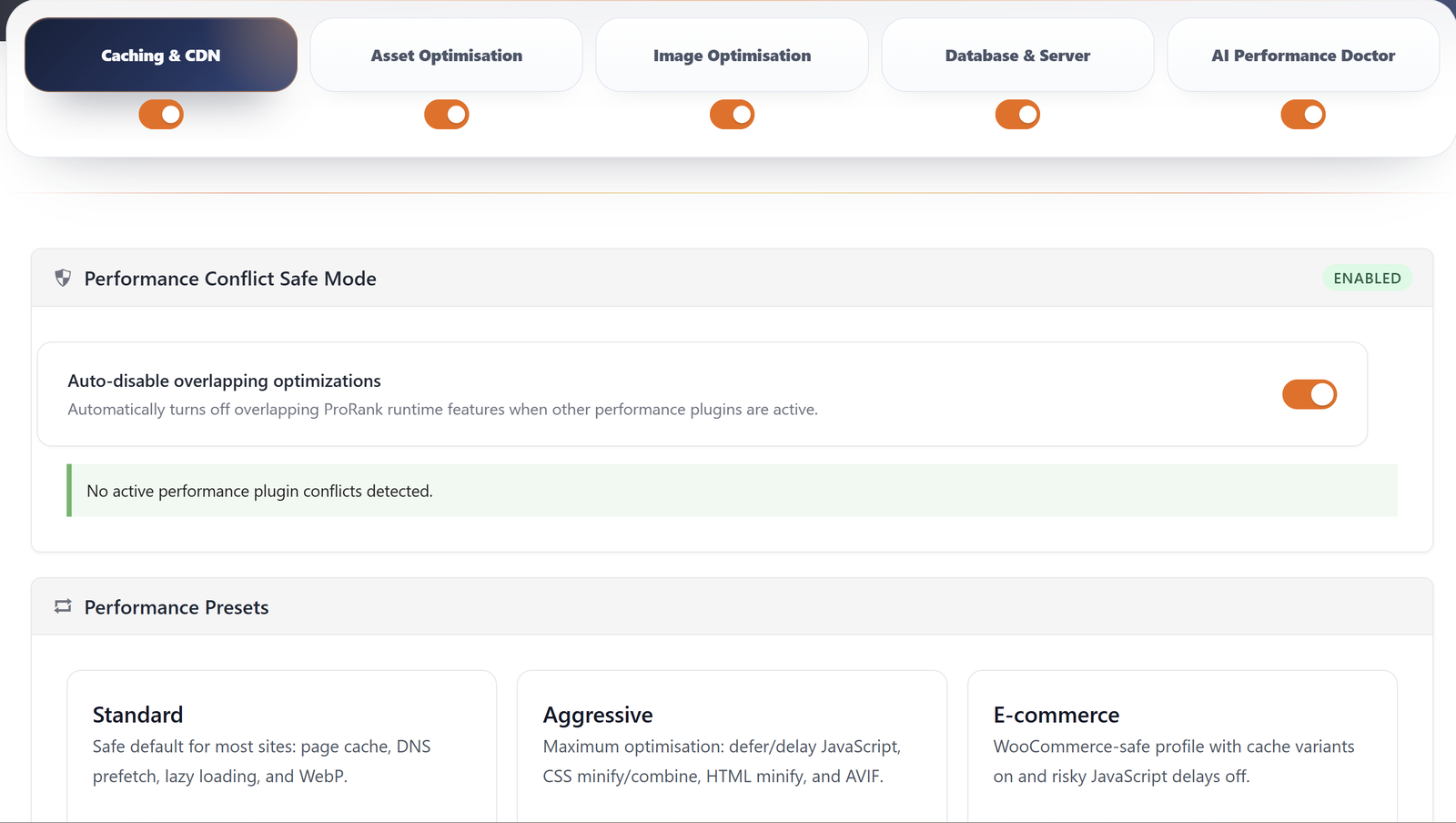


ProRank SEO is for WordPress site owners who are tired of running an SEO plugin, a cache plugin and an image plugin side by side, each with its own settings. It handles titles and meta descriptions, schema, XML sitemaps, redirects and site audits, and it also caches pages, optimizes images and trims CSS and JavaScript. One plugin can replace Yoast SEO or Rank Math plus a separate cache plugin.
Switching is safe. Preview your Yoast SEO, Rank Math, AIOSEO or SEOPress data before you import it, and roll the import back if you change your mind. Speed features stay off until you turn them on, and everything in this plugin works without an account or an API key.
What you can do with the free plugin
- Control how pages appear in search — titles, meta descriptions, canonical URLs, robots meta, Open Graph and X cards, with search and social previews in the editor.
- Find problems before your visitors do — run a site audit on your own server and get a score, an issue list and guided fixes for broken links, missing titles, duplicate H1s and more.
- Decide what gets crawled and indexed — XML, video and HTML sitemaps, a robots.txt editor, AI crawler blocking by vendor, IndexNow, and global or rule-based noindex.
- Keep visitors on the right page — 301 and 302 redirects with groups, schedules and hit counts, plus 404 monitoring with redirect suggestions.
- Earn rich results — WebSite, Organization, Article and breadcrumb schema, plus FAQ, HowTo, Recipe, JobPosting and Dataset blocks.
- Make pages load faster — page and browser caching, CSS and JavaScript optimization, local image optimization with WebP, lazy loading and database cleanup.
- Strengthen internal links — link opportunities, broken-link checks, orphan detection, a link map and auto-linking rules.
- Get ready for AI search — llms.txt, a site-wide schema map and public discovery endpoints for AI assistants.
On-page SEO
- SEO titles and meta descriptions with dynamic variables
- Canonical URL and robots meta controls
- Open Graph and X (Twitter) cards
- Search result and social previews in the editor
- Content analysis with readability, headline, inclusive-language and keyword checks
- Numeric SEO score badges in the post list
- Site basics, social profiles, site verification and site representation settings
- Breadcrumbs with breadcrumb schema
- Google Preferred Sources link, button, block and shortcode
- Search result priority by post type for on-site search
- Bulk editing for SEO metadata
- H1 and title-length audits with guided repair
- SEO revision history for ProRank metadata changes
Schema and rich results
- WebSite, Organization, Person, Article and breadcrumb schema
- Local business details: business type, opening hours, map coordinates and price range
- FAQ, HowTo, Recipe, JobPosting and Dataset blocks with automatic JSON-LD
- Podcast episode and series schema
Sitemaps, indexing and technical SEO
- XML sitemaps with content-type controls, including custom post types
- Video sitemap with automatic YouTube and Vimeo detection
- HTML sitemap
- Virtual robots.txt editor that steps aside when a physical robots.txt exists
- AI crawler blocking by vendor (OpenAI, Google AI, Anthropic, Apple, Meta, AI search crawlers and more)
- IndexNow submissions when you publish or update content
- Global noindex options and rule-based noindex for thin or stale content
- Redirect manager with 301 and 302 redirects, groups, schedules and hit counts
- 404 monitoring and redirect suggestions
- URL cleanup and head cleanup tools
- RSS feed content and attribution settings
- Detection and cleanup of AI metadata left in generated content
Internal linking
- Internal-link scan with saved suggestions and change previews
- Review and edit individual links in supported content
- Target phrases and CSV link plans
- Inbound and outbound link opportunities
- Broken-link checks and orphan detection
- Link map, link reports and auto-linking rules
- Connected-site catalogs for linking between your own websites
- Optional internal-link click tracking
Site audit and monitoring
- Site audit that runs on your own server, with issue history
- Core Web Vitals dashboard
- H1, title-length, AI metadata, font delivery and bloat checks
- Accessibility checks
- Notifications and workflow guidance inside the plugin
Speed and image optimization
- Page caching with URL, category, tag and post-type exclusions, and stale-while-revalidate refresh
- WooCommerce cart, session, checkout, account and Store API cache bypasses
- Browser caching and a REST GET cache for safe public API routes
- CSS, JavaScript and HTML optimization
- Local image optimization with WebP, lazy loading and image dimension controls
- Image SEO patterns for bulk alt text, attachment titles and captions
- Performance presets: Standard, Aggressive and E-commerce
- Performance Conflict Safe Mode, which turns off overlapping features when another caching or optimization plugin is active
- Resource hints and local Google Fonts hosting
- Heartbeat controls for the front end, dashboard and post editor
- Cloudflare zone detection, development mode and purge controls
- Object cache health checks and an opt-in drop-in for Redis or Memcached (server backend required; not bundled; never enabled automatically)
- Database cleanup with savings previews
Import, export and setup
- Setup wizard
- Import from Yoast SEO, Rank Math, AIOSEO, SEOPress, Redirection, Schema Pro and All in One Schema Rich Snippets, with preview, post counts and one-click rollback
- Builder support for Gutenberg, Elementor, Divi Builder, Beaver Builder, SeedProd and WPBakery
- Settings export and import, snapshots and backups
- Module manager
ProRank SEO Pro
Everything above keeps working without Pro. ProRank SEO Pro is a separate plugin for larger sites, teams and agencies. It adds:
- Google Search Console and Google Analytics 4 reports, and Microsoft Clarity integration
- Rank tracking and content-decay reports
- Cloud site audits with PDF and CSV reports
- AI writing, AI image attributes and AI fix suggestions, using your own AI provider key
- Keyword research (Business and Agency plans)
- Regex redirects, author and news sitemaps, and hreflang
- Local SEO with locations, a store finder and KML sitemaps
- WooCommerce product, cart and shop SEO
- Critical CSS and unused CSS removal
- Agency tools: client reports, white label, user roles, audit log and SEO roadmaps
Learn more
Development & Build
The human-readable source for JS/CSS lives in src/ and assets/. Production bundles are generated into build/.
Build steps:
1. npm install
2. npm run build
External Services
- Google Preferred Sources (optional) — Disabled by default. Simple link mode connects a reader to
www.google.com/preferences/sourceonly when they follow the link, sending the public site domain as the search query. Interactive mode, selected by an administrator, loadshttps://news.google.com/swg/js/v1/publisher.jsin the visitor’s browser only on pages rendering the button. Google receives the visitor’s IP address, browser request details, and may receive Google cookies/account information through its own interaction flow. ProRank does not collect Google account credentials, add preferences automatically, or claim to count completed preference changes. A plain link remains available if the script is blocked. Google determines eligibility; the plugin makes no eligibility-check requests. Service documentation | Terms | Privacy
ProRank SEO connects to external services only for features that need them, and only after an administrator enables or runs the relevant feature. The Free plugin package is updated only through WordPress.org; it does not contain ProRank’s private Premium updater.
- ProRank API (prorank.io) — Used only by these features: the news and tips feed on the Notifications tab, which is off until an administrator turns it on and then requests announcements every few hours, sending the site address (in the WordPress user agent), the ProRank SEO version and the plan; and the in-plugin changelog, which requests the public changelog when you open it. The ProRank API is not used to deliver Free plugin package updates. Terms | Privacy
- Google PageSpeed Insights API — Core Web Vitals and performance audits. Sends the analyzed URL and optional API key. Terms | Privacy
- YouTube Data API — Optional video-sitemap metadata enrichment when you provide a YouTube API key. Sends the detected YouTube video IDs and your configured API key. Terms | Privacy
- Hosted video metadata — Video sitemaps can request public titles, descriptions, thumbnails, dates, and durations for detected Vimeo, Dailymotion, VideoPress, and TED videos. Sends only the detected public video URL; VideoPress also receives the requesting site host required by its oEmbed API. Requests use fixed provider endpoints, are cached, and run only while generating a sitemap containing those videos. Vimeo | Dailymotion | WordPress.com | TED
- Schema.org Validator — Schema validation. Sends the validated page URL. Terms
- IndexNow — Instant indexing notifications, only after you turn IndexNow on. Sends the host, your IndexNow key and the changed URLs to the participating search engines (Bing, Yandex, Seznam and Naver). Protocol
- Google Fonts — Downloads fonts locally when local hosting is enabled. Sends the font request URL.
- Website Carbon API and Green Web Foundation API — Sustainability reports send page byte counts and the site’s hostname to estimate emissions and check green-hosting status. Requests run only when an administrator runs sustainability analysis and successful results are cached. Website Carbon Terms | Website Carbon Privacy | Green Web Foundation Privacy
- CDN provider APIs (optional) — After an administrator selects a provider and supplies credentials, ProRank can test the connection, detect a Cloudflare zone, manage supported Cloudflare settings, and purge cached URLs. Requests go directly from the WordPress server to the selected provider. They can include the configured zone, service, pull-zone or distribution ID; authentication token, key ID or signed authorization header; the site hostname; and URLs or paths selected for invalidation. An AWS secret key is used locally to sign CloudFront requests and is not transmitted verbatim. Requests occur only on an explicit connection/settings action or a cache purge while that provider is configured. ProRank does not upload or proxy site assets through prorank.io as part of these controls. Cloudflare Terms | Cloudflare Privacy | bunny.net Terms | bunny.net Privacy | Fastly Terms | Fastly Privacy | AWS Service Terms | AWS Privacy | KeyCDN Terms | KeyCDN Privacy
- Administrator-configured webhooks (optional) — A CDN purge webhook receives a connection-test request or a JSON purge action with the affected public URLs. Audit-alert webhooks receive the event and report fields selected by the administrator. Requests are sent only after an administrator saves and uses that endpoint. The endpoint is controlled by the site owner, so its terms and privacy policy are those of the chosen webhook operator.
- User-configured CDN URL rewriting (not a ProRank proxy) — When an administrator enters a CDN base URL, ProRank rewrites eligible URLs for static files already hosted by the site. This feature makes no server-side upload or proxy request. A visitor’s browser requests the rewritten asset directly from the administrator’s chosen CDN, which receives the visitor IP address, standard request headers, and requested asset path under that provider’s terms. Nothing is routed through prorank.io by this rewrite feature.
- Trustindex loader localization (optional) — When the matching performance governance feature is enabled and the site already includes a Trustindex widget loader, the WordPress server can retrieve that public loader URL, adapt it for deferred local delivery, and cache the resulting file under WordPress uploads. Trustindex receives the requested loader URL, the server IP address, and standard HTTP request data; ProRank does not send visitor form data or WordPress database content. Trustindex Terms | Trustindex Privacy
Static hostnames for Google Maps, CAPTCHA providers, payment gateways, booking tools, WordPress emoji resources, and public CDNs also appear in ProRank’s compatibility, privacy, and sustainability catalogs. Those entries identify or protect resources already added by WordPress, the theme, or another plugin; the lists themselves do not load those services or send them data.
Optional compatibility updates
When you enable Download JavaScript compatibility updates in Support > Advanced Settings, ProRank contacts https://prorank.io/api/v1/performance/exclusions every 12 hours. The request includes the plugin and WordPress versions; the server receives the requesting server’s IP address. Downloaded script exclusions supplement the bundled compatibility rules. This feature is off by default. Terms: https://prorank.io/terms. Privacy: https://prorank.io/privacy-policy.
Third Party Libraries
- axe-core (https://github.com/dequelabs/axe-core), licensed under MPL-2.0 and bundled locally in
assets/js/axe-core/axe.min.js.
Privacy
ProRank SEO does not collect personal data by default. All SEO data is stored locally in your WordPress database. Optional features like click tracking and RUM monitoring are disabled by default and only activate when you enable them.