跳到内容

Proofreading

v1.2.2

Scribit · 2018年2月23日 上架

Proofreading checks texts on every content of your WordPress site. You can proofread in 30 different languages and get tips to improve your writings.

正在使用
5,000+
评分
4.0 / 5
累计下载
1.4 万
最近更新
2025年1月16日
8 条评价需要 WordPress 4.0+已测试到 6.7.12PHP 5.6+

贡献者

截图

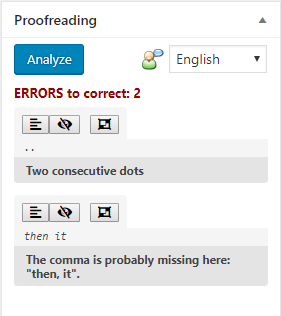
This screen shot the Proofreading box inside a post edit page. Pressing the Analyze button you provide a text errors check for the enabled error categories of the selected language. Three buttons for every found error allows you to: Show the paragraph of the error, Hide the error or Hide all errors of this type.
When at least one error has been hidden, you can show again every hidden error.
How to access to settings page
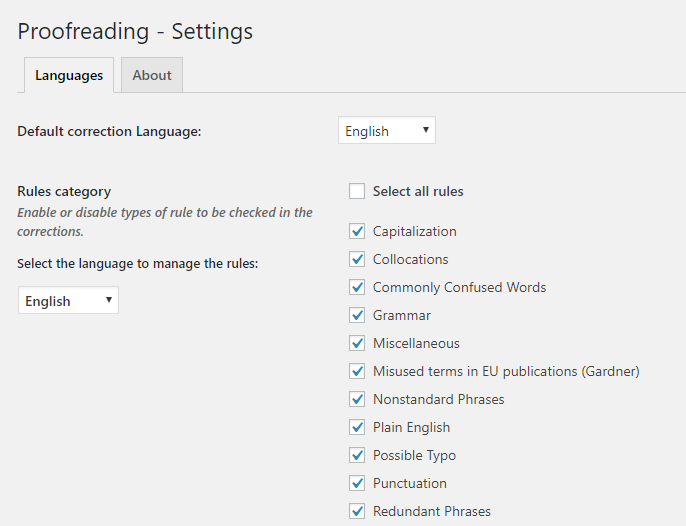
Settings page. Here you can: Select your default language, Enable/Disable error categories to check for every language

Proofreading plugin allows you to improve the quality of your posts, pages and all your WordPress website.
It gives you the possibility to check the correction of the texts inserted into posts, pages and drafts in less than a second!

Press the “Analyze” button and you will have a list of all found errors.
The plugin allows to recognize different types of text errors (thanks to Languagetool.org). Here some examples of error types:
* Typos
* Punctuation
* Typography
* Commonly Confused Words
* Nonstandard phrases
* Semantic
* Grammar
* Redundant Phrases

Proofreading plugin supports a lot of languages. For example:
* English
* Spanish
* German
* Italian
* Japanese
* French
* Portuguese
* Russian
* and so on…

For every language, in the settings page, you can customize which are the error categories you are interesting, hiding the others.

Plums

按场景查找 WordPress 插件。安装量、评分和兼容版本来自官方目录。

导航

说明

WordPress 是 WordPress Foundation 的商标。本站与 WordPress Foundation、Automattic 没有隶属关系。这里不托管插件文件,下载和安装以 WordPress.org 上的页面为准。

© 2026 Plums