

Product Dropdown Selector for Contact Form 7
v2.2Pluginorbit · 2025年1月24日 上架
Add a WooCommerce product selectors for Contact Form 7 with AJAX search, multi-select, and advanced filters. Pro support for WPForms & Gravity Forms.
- 正在使用
- 20+
- 评分
- 暂无
- 累计下载
- 1,451
- 最近更新
- 2026年10月20日
贡献者
 Pluginorbit
截图
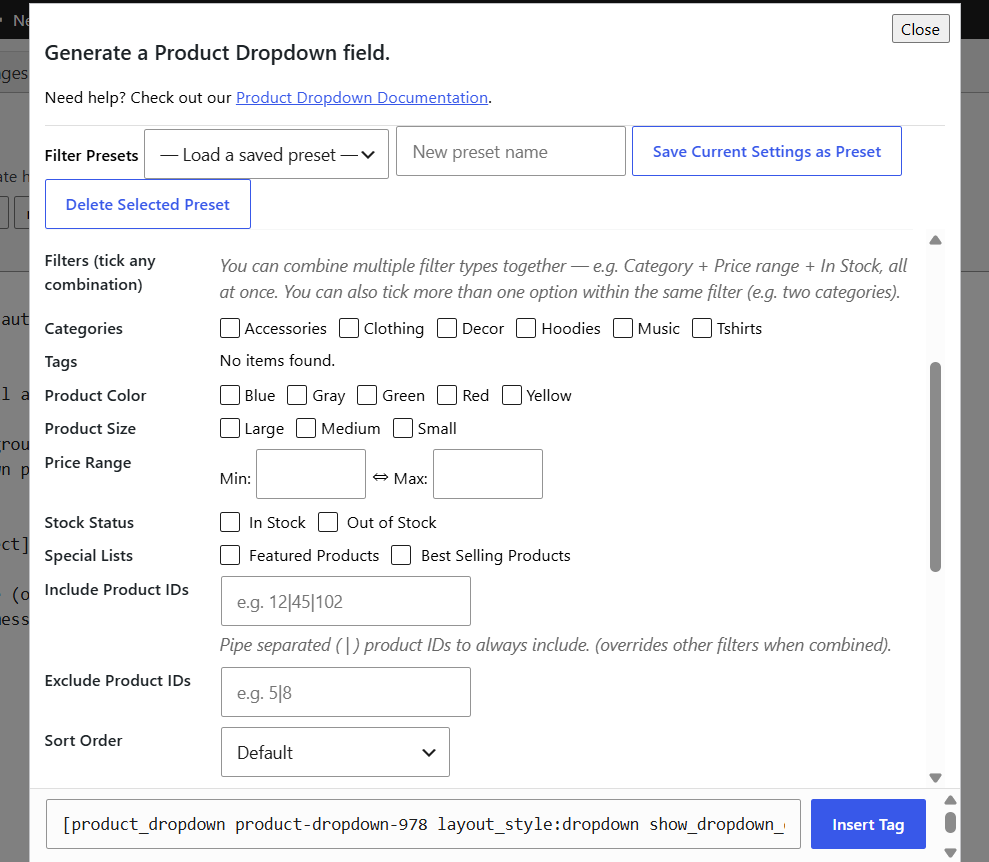
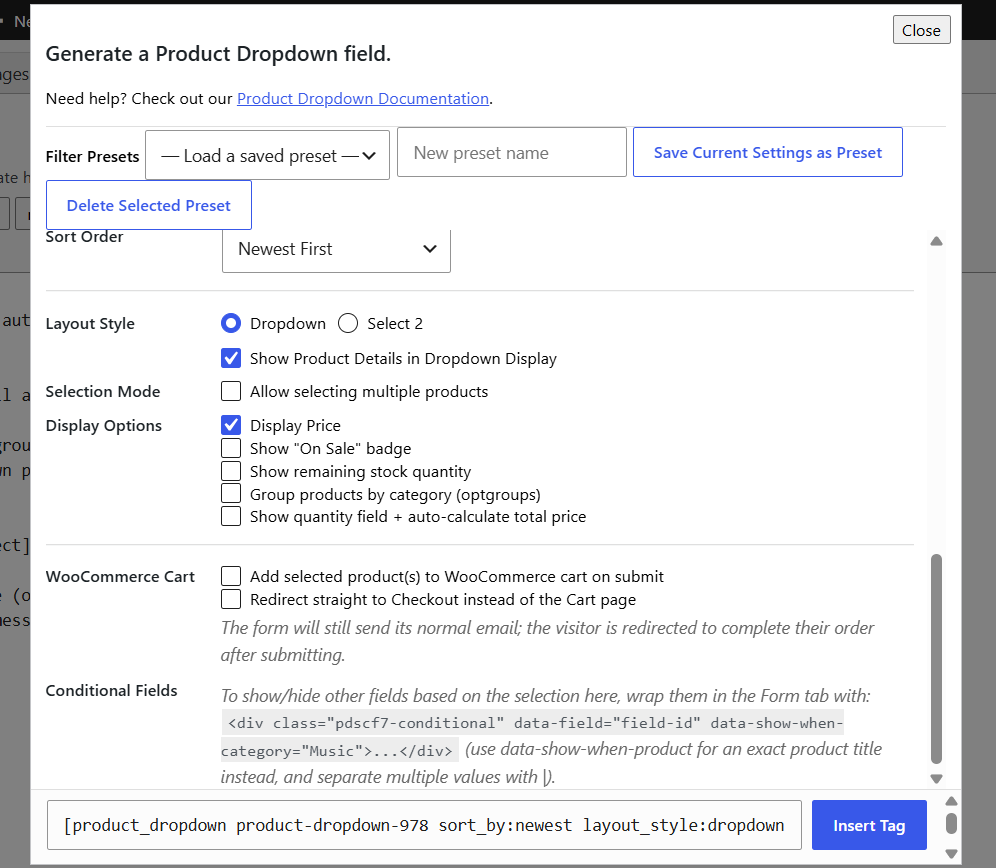


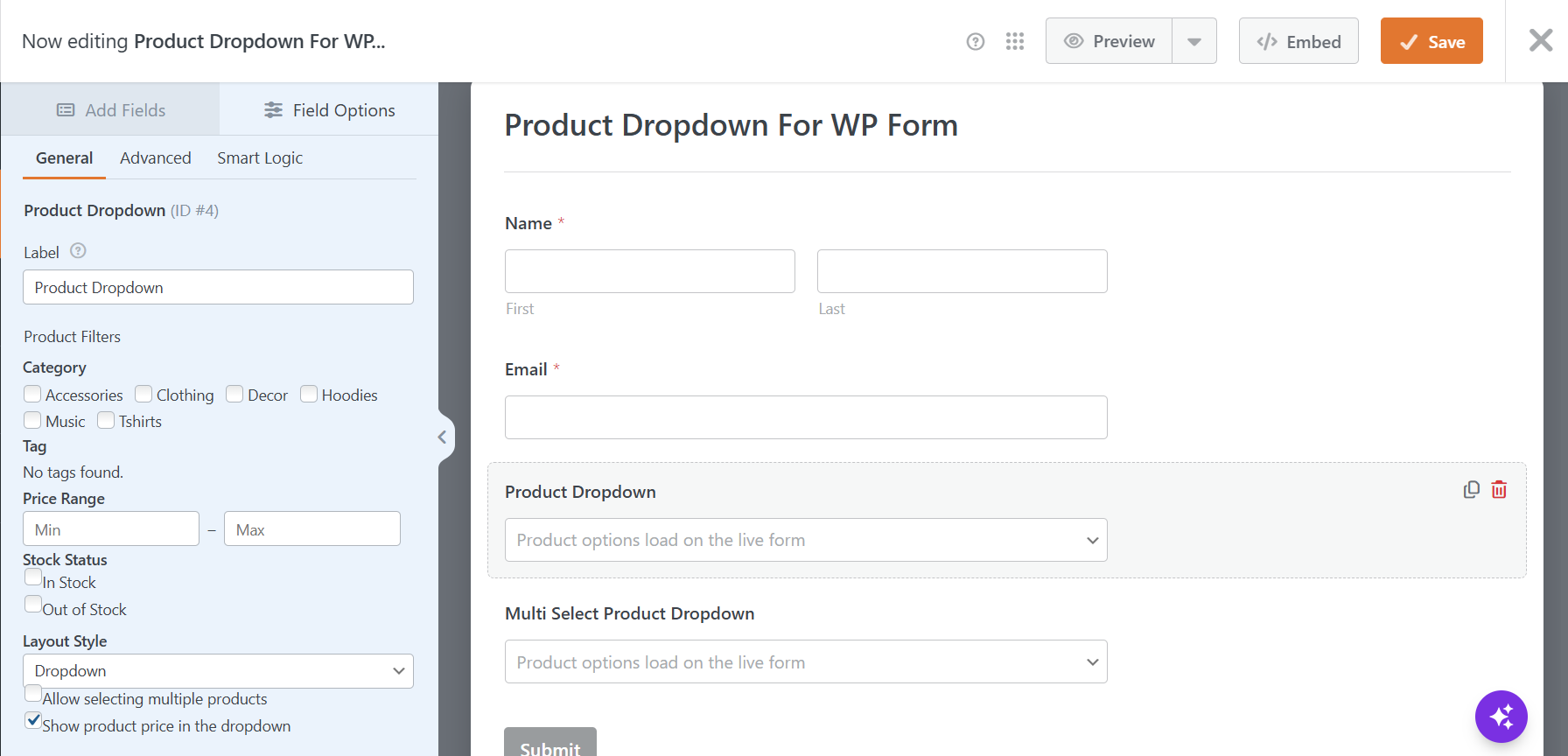
Product Dropdown Selector for Contact Form 7 is the easiest way to turn any Contact Form 7 form into a WooCommerce product inquiry form, order form, or quote request form without writing a single line of code. It connects directly to your WooCommerce store and lets visitors pick one or more real products from a live, filterable dropdown, right inside your Contact Form 7 form. With the Pro version, the same product dropdown is available as a native field for WPForms and Gravity Forms too.
Whether you need a simple product selector field for Contact Form 7, a product inquiry form for WooCommerce, a product dropdown for Gravity Forms, a custom order form plugin, or a full product enquiry form with quantity and price calculation, this plugin gives you a no-code way to build it in minutes using the built-in Contact Form 7 tag generator.
📚 Learn More
✨ Documentation
✨ Live Demo
👉 See Pro Features & Upgrade
👉 WPForms Demo
👉 Gravity Forms Demo
🔥 Why store owners choose this plugin
- No shortcodes to memorize a visual tag generator popup builds the field for you.
- Works with any WooCommerce catalog size, from 10 products to 10,000+ (thanks to AJAX live search).
- Supports simple and variable products (size/color variations).
- Fully responsive and compatible with both the classic Dropdown layout and the searchable Select2 dropdown layout.
- Combine unlimited filters together category, tag, price, stock, and any custom product attribute in a single field.
- Build a complete product inquiry form or quote request form without touching a line of code.
✨ Complete Feature List
Product Selection
- Multi-select products: let a customer choose more than one product in the same order/enquiry form field.
- Variable product (size/color) support: each product variation is automatically listed as its own selectable option (e.g. “T-Shirt – Red, Medium”).
- AJAX-powered live product search: instead of preloading your entire catalog, products load as the visitor types. Essential for large WooCommerce stores where a normal dropdown would be too slow.
- Include or Exclude specific Product IDs: force particular products to always appear, or hide specific ones, regardless of other filters.
- Grouped products are automatically excluded from the dropdown, since they’re not directly orderable on their own.
Powerful, Combinable Filters
- Filter by Product Category
- Filter by Product Tag
- Filter by Price Range (min/max)
- Filter by Stock Status (In Stock / Out of Stock)
- Filter by Featured Products
- Filter by Best-Selling Products
- Filter by ANY WooCommerce product attribute you’ve created Color, Size, Brand, Material, or fully custom attributes detected automatically, no configuration required.
- Combine as many filters as you like in one dropdown for example: Category “Shoes” + Price ₹500–₹2000 + In Stock, all at once.
Sorting & Organization
- Sort products by Name (A-Z / Z-A), Price (Low to High / High to Low), Popularity (Best Selling), or Newest First.
- Group products into optgroups by category so long product lists are easy to scan.
Display & Pricing
- Show product price directly in the dropdown.
- Show an automatic “On Sale” badge on discounted products.
- Show live remaining stock quantity next to each product.
- Clearly labeled “Out of Stock” products in every view dropdown options, the quantity/total table, and the product details card — so customers never accidentally request something unavailable.
- Show product image, title, and price in a rich Select2-style dropdown, or as a details card below a classic dropdown.
- Custom, fully editable placeholder text instead of the default “Select a Product”.
Quantity & Order Total
- Built-in Quantity field for each selected product.
- Automatic, real-time Grand Total price calculation as the customer changes quantities or selections perfect for turning Contact Form 7 into a lightweight WooCommerce order form or product quote request form.
Developer & SEO Friendly
- Clean, translation-ready code (Text Domain included) for full multilingual compatibility.
- Lightweight assets are only enqueued on pages where they’re needed.
- Works alongside other Contact Form 7 add-ons and WooCommerce extensions.
💡 Common Use Cases
- WooCommerce product inquiry form or product enquiry form
- Product order form without a full checkout flow
- “Request a Quote” / quote request form
- Wholesale or B2B product request form
- Event, catering, or rental product booking form
- Custom product configurator with variations, quantity, and live pricing
🚀 Want More? (Pro Features)
Need to go further than a filtered product dropdown? The Pro version adds:
- Add to Cart — send the visitor’s selected product(s) straight into the WooCommerce cart (or checkout) on submit, turning your form into a real, working order form. Available for Contact Form 7 and Gravity Forms.
- WPForms Integration — Adds a native WPForms product dropdown with live product filtering, Select2 search, and multi-select support. Includes a product details card, a quantity table with live total price calculation, and options to add products to the cart or redirect users to checkout.
- Gravity Forms Integration — the same product dropdown as a native Gravity Forms field, complete with the product details display card, the quantity + live total price table, and Add to Cart / Redirect to Checkout support.
-
Conditional Field Display — show or hide other form fields automatically based on which product or category was selected. In the CF7 Form tab, wrap any field(s) in a marked
<div>:[text your-custom-question]
data-field must match the product dropdown’s Field ID. Use
data-show-when-product="Exact Product Title"instead (or alongside) for a product-based condition rather than a category. Separate multiple values with|, e.g.data-show-when-category="Music|Instruments". -
Filter Presets — save a fully configured set of filters once, and reuse it across any form in one click.
Usage
- Go to Contact > Contact Forms in the WordPress dashboard.
- Edit or create a form, click Product Dropdown in the tag generator toolbar.
- Configure your field combine as many filters as you like, pick a layout (Dropdown or Select2), and enable any of the new display/behaviour options.
- Click Insert Tag and save the form.
Example generated shortcode with several options combined (multiple ticked values within one filter are joined with |, and spaces in term names are automatically converted to underscores):
[product_dropdown product-dropdown-62 id:product-dropdown category:Music|Clothing min_price:10 max_price:200 stock_status:instock|outofstock layout_style:select2 ajax_search multiple show_price show_sale_badge show_stock_qty show_quantity placeholder_text:Choose_your_products]<h3>Privacy</h3>
This plugin does not collect or store any personal data. It operates solely by pulling product data from your WooCommerce store and displaying it in the Contact Form 7 dropdown field.