
Prettify Code Syntax
v1.2.1jesucarr · 2013年2月15日 上架
Code syntax highlighter using Google Prettify, supporting the HTML5 recommendation, and caching plugins.
- 正在使用
- 70+
- 评分
- 4.2 / 5
- 累计下载
- 1.7 万
- 最近更新
- 2013年3月21日
贡献者
 jesucarr
截图

The main reason for the development of this plugin was the lack of options supporting the HTML5 recommendation, where the code snippets should be tagged with pre followed by code, and optionally a class starting with language- and then our language.
You can use the plugin like this:
<pre class="prettyprint"><code class="language-php">
// my code
</code></pre>
Also very important is that although this plugin loads different files depending on your configuration, it fully supports caching scripts (W3 Total Cache) to concatenate and compress all the css and js, so the impact in performance will be minimum.
Languages
This syntax highlighter is based on Google Code Prettify and should work on a number of languages including C and friends, Java, Python, Bash, SQL, HTML, XML, Javascript, Makefiles, and Rust. It works passably on Ruby, PHP, VB, and Awk and a decent subset of Perl and Ruby, but, because of commenting conventions, doesn’t work on Smalltalk.
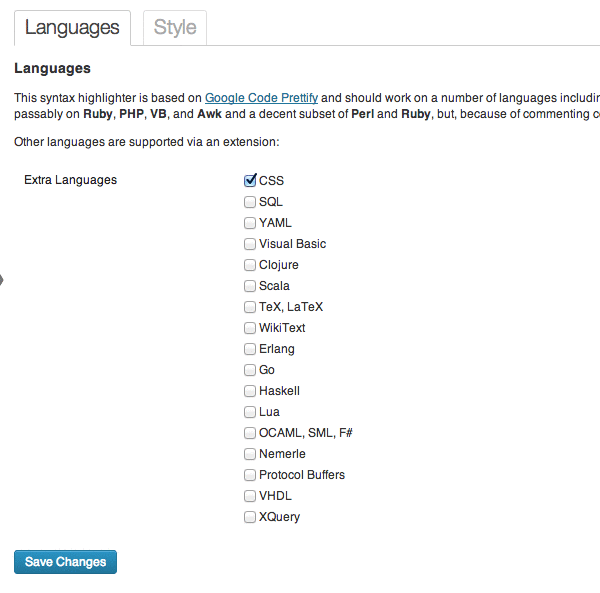
Other languages are supported via an extension (plugin options): CSS, SQL, YAML, Visual Basic, Clojure, Scala, Latek (TeX, LaTeX), WikiText, Erlang, Go, Haskell, Lua, OCAML, SML, F#, Nemerle, Protocol Buffers, CHDL (VHDL), XQ (XQuery), Lisp, Scheme, Dart, Llvm, Mumps, Pascal, R, S, RD, TCL
Styles
Four different styles are provided, and they can be previewed in the plugin options. They are modified to make sure they don’t clash with any other styles in your theme.
You have also the option to include your custom style.
If you have a style that would like to see included in the option list, just contact me, or fork me.
Notes
-
Plugin options are at Settings > Prettify Code Syntax. Have a look at the Screenshots tab to see how it looks like.
-
If you don’t care too much about the HTML5 recommendation, you can skip the
language-class. The code always gets detected automatically. -
It will also work if you only use a
pretag without thecodetag (but long lines will be wrapped instead of get horizontal scroll), or if you only use acodetag with theprettyprintclass (but if you don’t usepreyour spaces/returns won’t be maintained.) -
Be careful using the Visual Editor tab when inserting code, as some HTML tags will be modified or removed.
-
Using a chaching plugin like W3 Total Cache is highly recommended.
Demo
You can find a front end demo here a the bottom.