

Presswell Alt Text Generator
v1.3.1Presswell · 2026年4月29日 上架
Generate accessible image alt text in WordPress with OpenAI, Anthropic, and Google Gemini.
- 正在使用
- 10+
- 评分
- 暂无
- 累计下载
- 998
- 最近更新
- 2026年11月4日
 Presswell
 benplum
截图
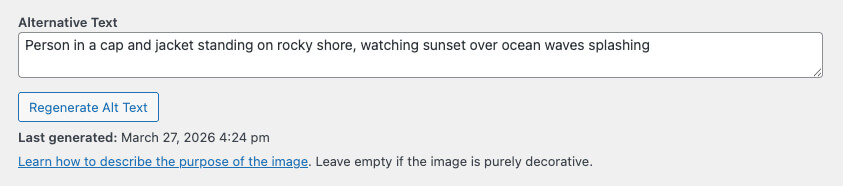
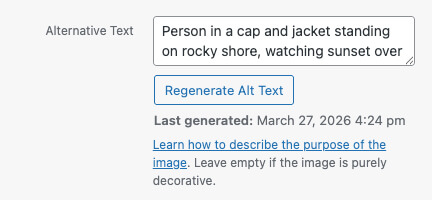
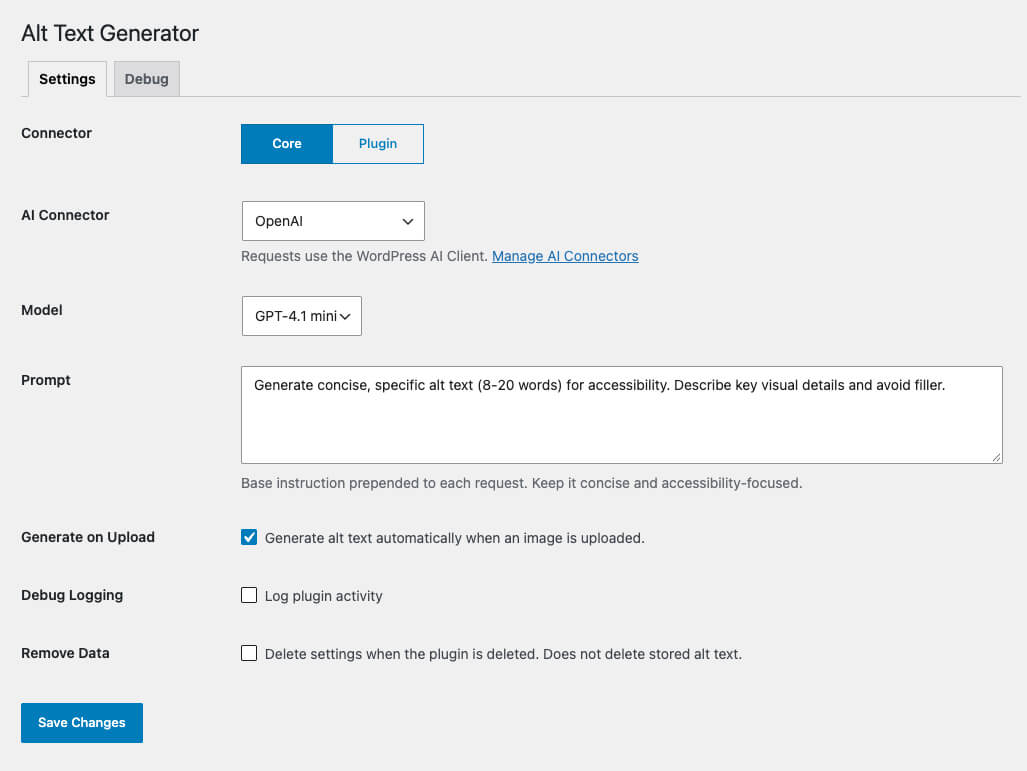
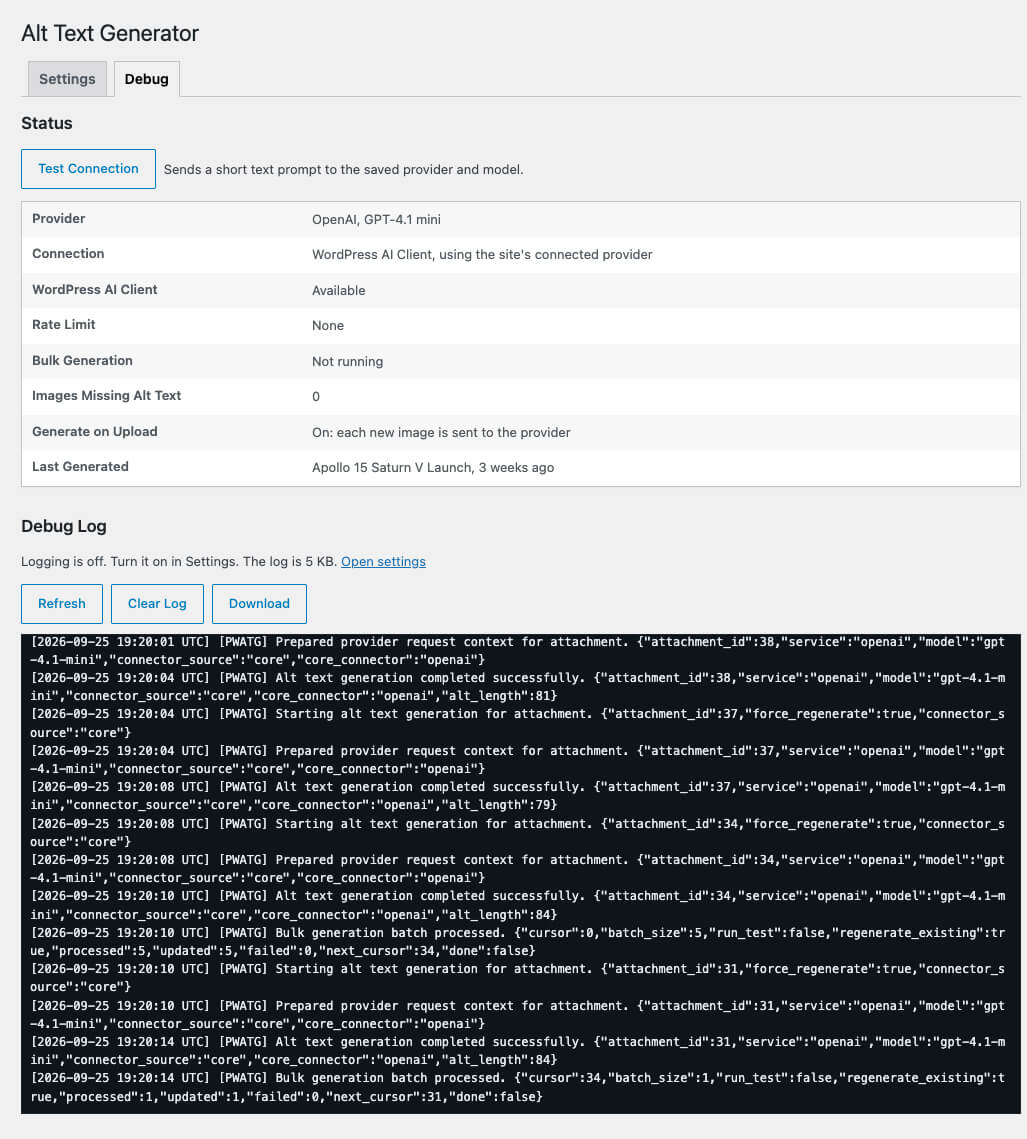
Presswell Alt Text Generator helps teams reduce accessibility backlog by generating descriptive alt text for new and existing images. Connect a provider, choose a model, and run generation workflows directly inside wp-admin.
Features
- Supports OpenAI, Anthropic Claude, and Google Gemini through WordPress AI Connectors (recommended, WordPress 7.0+) or, deprecated, with API keys stored by the plugin
- On WordPress 7.0+, can send requests through the WordPress AI Client, so the plugin stores no key
- Generates alt text for individual images in the Media Library, the media modal, and the Image block
- Generates alt text for new uploads automatically (optional)
- Processes missing-alt backlogs in batches with a dedicated bulk queue
- Writes alt text in your site’s language
- Keeps the previous alt text when regenerating, so you can restore it with one click if you prefer it
- Handles provider rate limits and quota errors with automatic pauses
- Provides a customizable prompt seed for output consistency
Media Library Tools
An Alt Text column shows each image’s alt text, and a “Generate Alt Text” or “Regenerate Alt Text” row action updates it in place. The same button appears in the media modal and on the attachment edit screen, along with “Restore previous alt text” after a regeneration.
Block Editor
Select an Image block to find an Alt Text Generator panel in its sidebar. It fills in the block’s alt text and updates the image in the Media Library.
Bulk Generator
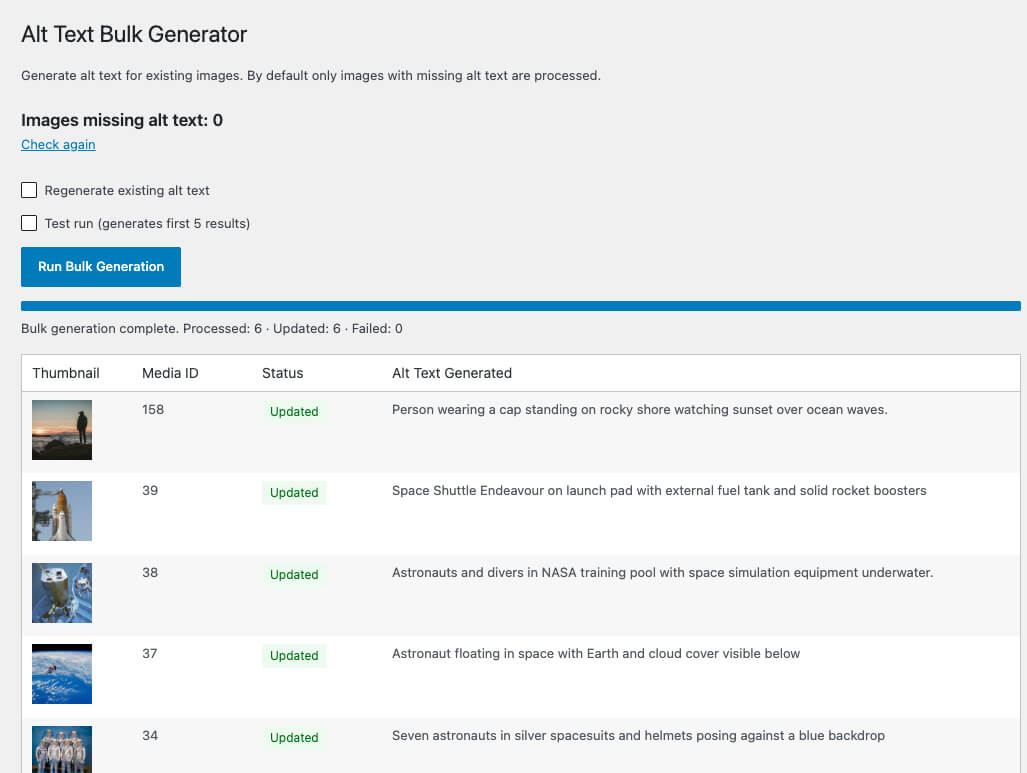
The Bulk page counts images missing alt text, can regenerate existing alt text or do a test run on the first five images missing it, and runs batches while surfacing progress, failures, and rate-limit pauses.
Debug Tab
Settings -> Alt Text Generator -> Debug shows how requests are sent and what can stop them (API key, rate limits, bulk runs, images missing alt text), a Test Connection button, and the private debug log.
Connector Source
WordPress AI Connectors (Settings -> Connectors, WordPress 7.0+) are the recommended setup and the default for new installs. The Plugin connector source, which stores API keys in this plugin’s settings, is deprecated and will be removed in a future release; the settings screen shows a warning while it is selected. On WordPress versions without AI Connectors, the plugin keeps using its own keys.
Documentation
Filters
pwatg_available_services— Modify the available AI providerspwatg_available_models— Modify the available models for a provider (receives the models and the provider slug; the first model is the default; providers added withpwatg_provider_registryhave no models until you list them here)pwatg_provider_registry— Map provider slugs to custom service classes (each slug is listed in the settings, with its own API key field)pwatg_generate_on_upload— Return false to skip generating alt text for a new upload (receives the attachment ID)pwatg_debug_log_max_bytes— Size at which the debug log rotates (default 5 MB)pwatg_image_max_dimension— Long edge, in pixels, of the image copy sent to the provider (default 1024, minimum 256)pwatg_alt_text_language— Language the alt text is written in (defaults to the site language; return an empty string to leave it to the model)pwatg_include_filename_in_prompt— Return false to leave the image’s filename out of the prompt (receives the attachment ID)pwatg_use_wp_ai_client— Return false to call the provider directly instead of through the WordPress AI Client in Core mode (receives the provider ID)pwatg_core_connector_service_map— Map WordPress AI Connector IDs to this plugin’s provider slugspwatg_service_connector_candidates— Connector IDs checked for each provider’s API keypwatg_debug_log_filename— Filename of the private debug logpwatg_status_rows— Rows of the Debug tab’s status table (each an array with stringlabelandvalue, andstatusofok,warning, or an empty string; rows without a string label and value are dropped)pwatg_should_generate— Return false to skip an image on every path: uploads, the Media Library and Image block, bulk runs, WP-CLI, andpwatg_generate_alt_text()(receives the attachment ID and the context:upload,single,bulk,cli, orapi)pwatg_prompt— The full prompt sent to the provider (receives the attachment ID, the provider slug, and the context; an empty or non-string value keeps the original)pwatg_alt_text— Generated alt text before it’s saved (receives the attachment ID, the current alt text, and the context; returning an empty string fails the generation and saves nothing)
Actions
pwatg_alt_text_generated— After generated alt text is saved (receives the attachment ID, the new alt text, the alt text it replaced, and the context)pwatg_generation_failed— When generation fails, not when it’s skipped (receives the attachment ID, theWP_Error, and the context)
Functions
pwatg_generate_alt_text( $attachment_id, $args = [] )— Generate and save alt text for an image with the saved settings. Pass[ 'force' => true ]to replace existing alt text. Returns true when saved, false when skipped, or aWP_Error. It doesn’t check the current user’s capabilities.
WP-CLI
If WP-CLI is available, you can run single-image generation, bulk generation, and missing-alt counts from the command line:
wp pwatg generate <attachment-id>wp pwatg bulk-generatewp pwatg count-missingwp pwatg network-bulk-generate
Optional CLI flags:
wp pwatg generate <attachment-id> --forcewp pwatg bulk-generate --force— reports how many images would be overwritten; add--dry-run=falseto generatewp pwatg bulk-generate --dry-runwp pwatg bulk-generate --limit=<int>wp pwatg bulk-generate --missing-onlywp pwatg network-bulk-generate --force— a dry run unless--dry-run=falseis givenwp pwatg network-bulk-generate --limit=<int>wp pwatg network-bulk-generate --missing-onlywp pwatg network-bulk-generate --sites=<id,id,...>
Privacy
This plugin sends images to the AI provider you choose when generating alt text (OpenAI, Anthropic, or Google Gemini). Generation happens when you ask for it, and for new uploads when Generate on Upload is on. In the deprecated Plugin mode, API keys are stored in WordPress options on your site (or your network, when network-activated on Multisite) and used only for requests your server sends to that provider.
External Services
This plugin connects to an external AI service only when alt text is generated (on request, or for new uploads when Generate on Upload is on) or when you use Test Connection. Only the provider selected in the plugin settings is contacted. In Core mode on WordPress 7.0+, the request is sent through the WordPress AI Client using the connection set up in Settings -> Connectors. This plugin sends the following data:
- The API key, in the provider’s authentication header (in Core mode, the WordPress AI Client sends it)
- The selected model name
- The prompt: your prompt seed, the site language, and a short plain-text version of the image’s filename when it describes something (camera and screenshot names are left out; leave it out entirely with the
pwatg_include_filename_in_promptfilter) - For alt text generation: a copy of the image, resized to about 1024 pixels and converted to JPEG when the provider doesn’t accept its format or the file is over 5 MB, encoded as base64
- For Test Connection: a short text prompt (“Reply with: OK”)
OpenAI API
- Terms: https://openai.com/policies/terms-of-use
- Privacy: https://openai.com/policies/privacy-policy
Anthropic API
- Terms: https://www.anthropic.com/legal/commercial-terms
- Privacy: https://www.anthropic.com/privacy
Google Gemini API
- Terms: https://ai.google.dev/terms
- Privacy: https://policies.google.com/privacy