

Preserve Code Formatting
v5.0Scott Reilly · 2005年4月14日 上架
Preserve formatting of code for display by preventing its modification by WordPress and other plugins while also retaining whitespace.
- 正在使用
- 400+
- 评分
- 4.7 / 5
- 累计下载
- 5 万
- 最近更新
- 2025年8月15日
贡献者
 Scott Reilly
截图
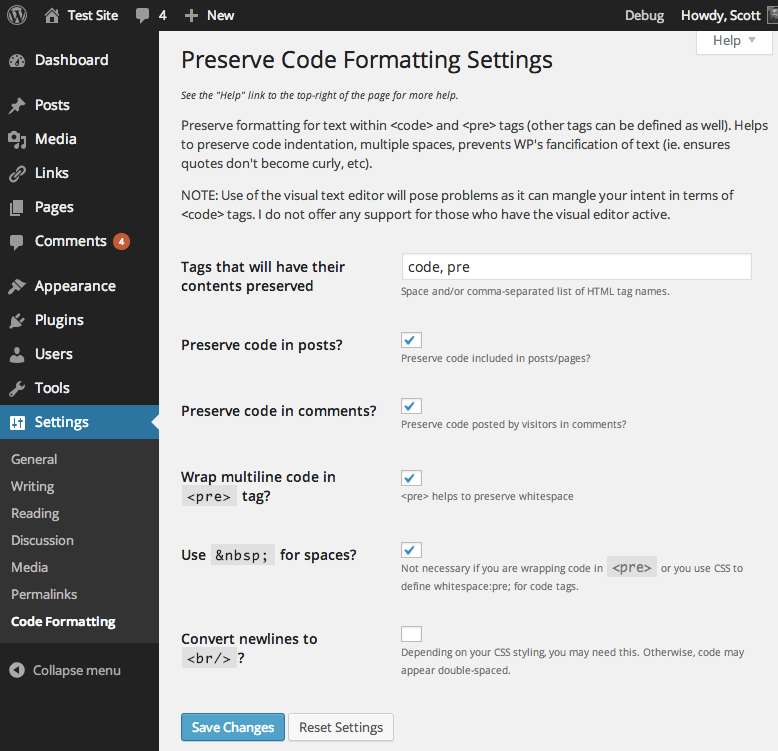
This plugin preserves formatting of code for display by preventing its modification by WordPress and other plugins while also retaining whitespace.
NOTE: This plugin does NOT handle posts containing blocks. For such posts, use the built-in code or preformatted blocks to format your code for display. However, this plugin would still be needed if you have text-based posts from before using the blocks-based editor.
NOTE: Use of the visual text editor will pose problems as it can mangle your intent in terms of code tags. I strongly suggest you not use the visual editor in conjunction with this plugin as I have taken no effort to make the two compatible.
Notes:
Basically, you can just paste code into code, pre, and/or other tags you additionally specify and this plugin will:
- Prevent WordPress from HTML-encoding text (i.e. single- and double-quotes will not become curly; “–” and “—” will not become en dash and em dash, respectively; “…” will not become a horizontal ellipsis, etc)
- Prevent most other plugins from modifying preserved code
- Prevent shortcodes from being processed
- Optionally preserve whitespace (in a variety of methods)
- Optionally preserve code added in comments
Keep these things in mind:
- ALL embedded HTML tags and HTML entities will be rendered as text to browsers, appearing exactly as you wrote them (including any
brtags). - By default this plugin filters ‘the_content’ (post content), ‘the_excerpt’ (post excerpt), and ‘get_comment_text (comment content)’.
Example:
A post containing this within code tags:
$wpdb->query("
        INSERT INTO $tablepostmeta
        (post_id,meta_key,meta_value)
        VALUES ('$post_id','link','$extended')
");
Would, with this plugin enabled, look in a browser pretty much how it does above, instead of like:
$wpdb->query(—
INSERT INTO $tablepostmeta
(post_id,meta_key,meta_value)
VALUES ('$post_id','link','$extended')
―);
Links: Plugin Homepage | Plugin Directory Page | GitHub | Author Homepage